An exclusive gaming industry community targeted
to, and designed for Professionals, Businesses
and Students in the sectors and industries
of Gaming, New Media and the Web, all closely
related with it's Business and Industry.
A Rich content driven service including articles,
contributed discussion, news, reviews, networking, downloads,
and debate.
We strive to cater for cultural influencers,
technology decision makers, early adopters and business leaders in the gaming industry.
A medium to share your or contribute your ideas,
experiences, questions and point of view or network
with other colleagues here at iVirtua Community.
I would not recommend anyone to get a quad core for gaming. I have a socket 939 Operteron 180, a 2.4GHz dual core with 2mb of L2 cache. I got it for $170, which is not bad for a dual core Opteron. You may say "That thing sucks you couldn't do any good gaming on it". Well apparently, with my 7900GT, I played the Crysis demo with medium-high settings (physics were maxed as far as I remember) and with a 25-45 framerate, my cpu usage stayed below 90%. Now, if my video card were not the downfall, it is possible my cpu would reach 100% but if I had a better video card, I probably would be using a better cpu as well. My point is, even a 2.4ghz dual core is good enough to play crysis, so those "know-it-alls" who get their precious 2.8ghz quad core intels have not only wasted a ton of money but have more performance than they'll really need.
We like big explosions, the bigger the better, in fact.
Wealso like smoke effects, water ripples, dappled lighting filteringthrough jungle canopies and creeping up silently behind people, beforemurdering them with our bare hands. But enough about our weekendpastimes…
What we really like are the fantastic visuals that DX10 gaming offers.
If you listen to most people, they will tell you that you need a quad-core, DDR3, triple-SLI setup to play Crysis. The sort of setup that requires you to remortgage your house to own. These people are wrong, and we're going to show you why.
We'vepreviously demonstrated how to build a DX10 setup for just under £300,a not unreasonable amount that should be within the reach of mostpeople. But what if you just blew all your money on a sordid weekend inAmsterdam, and you've resorted to scrambling under the sofa for loosechange? Would you believe us if we told you that it's possible to builda DX10-capable rig for well under £200? Well, it's true.
Ofcourse you can't connect it to a 22-inch wide screen monitor withoutthe frame rates plummetting, but if you're on that tight a budget, abig monitor is probably the least of your concerns.
Wheneveryou work to such a tight budget, something has to give and this projectwill be no exception. We need to prioritise in certain areas, whileothers can be largely ignored.
Yes, a case is important to stopyour gear being an untidy heap of electronics on the floor, but reallyyou just need a metal box to screw things onto. Optical drives are dirtcheap, and with memory stick capacities being what they are, hardlyanyone burns DVDs, so we only need a DVD ROM.
It also means noquad-core and no SLI. But dual-core chips are surprisingly cheap, andwe'll see just how well a budget DX10 card performs. Don't forget thatif you have any parts available from an existing PC, such as cases anddrives, you can reuse them and put the money towards a higher-end CPUor graphics card.
Case and PSU Ifyou want a well-designed case, with plenty of fans, numerous ports andplenty of upgradability, then it's easily possible to spend more thanour entire budget on such a beast.
Likewise, if you want a 1KwPSU that supports the likes of SLI, then it's going to cost a fairamount of cash. At the other end of the spectrum is the all-in-one caseand PSU deal. We found one for just £26, which includes a 400W PSU.
Thismay not sound like a lot of power, but it's more than enough to run oursetup. When spending such a small amount of money on a case, you'dexpect it to be quite horrific, but it's surprisingly well featured. Ithas a matt-black finish, which helps on the looks front, and the frontpanel has USB and audio ports.
Most of the internals can befitted without the need for a screwdriver, and it even has a lockingside panel. Sure, it isn't the best-looking or quietest case we've everseen, but for this sort of money, we're not complaining.
The result? As the most basic DX10 card available from NVIDIA, it comes as no surprise that the performance of the 8400 is not the best.
However,at £20 it still does pretty well, as long as you keep the resolutionrealistic. Okay, not everyone wants to play at 800x600, or even1024x768, but then you shouldn't be so cheap, should you?
Surprisingly, Crysis gave some of the best results, although BioShock achieves the best framerates of all. Using the Optimal settings button, Crysisdid set all the detail level to low, but the results still lookedpretty good. However, if you're going to be realistic about playingDirectX10 games, then you are going to have to find a little more moneyin your budget.
Hooking the 9600GT up to our budget CPU workedabsolute miracles, and at around £70 extra is an absolute steal. Notonly could we turn the detail right up, but we could run a higherresolution and still get twice the frame rates of the 8400GS.
Surprisingly,adding a high-end quadcore CPU doesn't give much of an increase, witheither the 8400 or 9600GT. In conjunction with the 8400Gs, the Phemom9550 does give you some extra fps over the Athlon X2 4400+, but withwhen it comes to the 9600GT, the difference over the 4400+ setup ismarginal.
So, if you want the best performance, and can spend alittle extra, buying the 9600GT is the logical choice. You know itmakes sense.
3D card manufacturers shouldn't take this the wrong way, but ittakes a lot to make us crawl out of the communal Eurogamer bed (yes,all the Eurogamer writers share a single large bed - we do it forfrugality and communality, which remain our watchwords) and go to ahardware presentation. There's a nagging fear someone may talk maths atus and we'd come home clutching the local equivalent of magic beans.And then we'll be laughed at by our fellow writers and made to sleep inthe chilly end where the covers are thin and Tom left dubious stains.That's no fun at all.
Then again, there's some things you can'thelp but go and have a gawk at. So when an invite claims, "All toooften new hardware brings with it a small performance increase - maybea 5-10 percent over the previous fastest thing. Wouldn't it be far moreexciting to see a speed increase of x20 or even x100... well, we'll behappy to show just that on Friday," you have wander along. Even thoughyou suspect it may be a trap and they're going to attack you withill-shaped blades, you have to find out what on earth they're talkingabout.
As we suspected, it wasn't quite what we were hoping for.Sure, there are programs which gain a x100 increase via the methodsNVIDIA talks about on this particular Friday, but unless you're workingin economics or astrophysics modelling, it's not exactly that relevant.However, something more quietly astounding was explained. Mainly, thatdespite the fact that no-one you know bought a PhysX card, if you're aPC gamer with a relatively recent NVIDIA card, you've already got one.Or, at least, you will soon. Spooks.
Get him!
The primary idea NVIDIA was trying to push was Optimised PC - the approach discussed in Rob Fahey's interview with Roy Taylorthe other day. The idea being that the traditional PC approach whereyou buy the fastest PC processor you can doesn't actually lend the bestresults, at least in most situations. If you spent more on -predictably - a GPU-driven 3D card, for an increasing number of areas,you're going to get much higher performance. If the program is usingthe GPU in a meaningful way, anyway. NVIDIA highlights areas likeimage-processing and HD video-encoding, as well as - natch! - games.You lose in single-threaded activities - like, say, just booting up aprogram - but they argue a small loss in opening a Word Document isless noticeable than frames in games or similar.
Where it startsgetting interesting is NVIDIA's development language, CUDA. The problemwith all the threading programming methods is that it's radicallydifferent to single-threading (and, yes, we're getting into, "Why wouldanyone care about this but a programmer?" territory, but its backgroundfor the key point later). It's hard to do, and CUDA is basically a wayto make things more accessible.
NVIDIA claims anyone experiencedin C or C++ will be able to get a grip on it (i.e. not us, but theaforementioned programmers). This means that anyone who codes in CUDAcan program the GPU to do pretty much whatever they like; it's byturning the 3D card into a bank of processors that the financialanalysts and the astrophysics guys are getting such impressive results.And impressive savings, as it's a lot cheaper to do it this way.
Now, NVIDIA claims that the fact GPU solutions are cheaper is goingto push better GPUs into more business machines. This will help pushthe idea that an okay CPU/good GPU machine gives better performancethan a good CPU/okay GPU, leading to more machines with better GPUs...and so, making more PCs abstractly available for gaming. Or, at least,raising the bottom level of hardware that you can expect people to have.
Interms of a more general use, transcoding video can take hours. Later inJuly, all GeForce 8000+ cards will ship with Elemental HD, a programwhich manages to perform the odious task - in the words of NVIDIA - "ina matter of minutes". The software will also be available for people todownload online, probably with a small fee ala Quicksave if theyalready have a GeForce card.
Point being: this CUDA malarkeyisn't something that's just for future NVIDIA technology. It'ssomething that allows the hardware many PC gamers already have to berepurposed.
For example, PhysX. NVIDIA's Physics 3D Card systemwas only supported in a minor fashion, as no-one would buy a card justto make explosions fancier, but with CUDA it can run on one of theother GPUs. A proportion of the 3D card's power can be given over torunning physics, giving those fancy PhysX-style interactions withoutactually having a specific card for it. CUDA's porting to PhysX willbecome available to the public in July, but developers already have thetools.
The Euphoria engine of Natual Motion. It's hard to illustrate this sort of thing.
You'llbe able to - for example - manually, up front, decide to devote aproportion of your 3D card's power to PhysX. Alternatively, developerscan commandeer it and do exactly the same thing. The new generation ofcards which are about to be announced are able to deal with pretty muchanything that exists on the highest setting with power left over, sothat power can be given over to acting like a 3D card would.
Andit goes further. Where previously you'd have just thrown out your old3D card when you upgraded your PC to a new one, if you have a G8000+ 3Dcard already, you can keep it, and just set it to concentrate solely ondoing PhysX tasks. This isn't a SLI situation where you need two of thesame cards working in tandem - any post-8880 card, rather than beingput out to digital pasture, can be given a job of deciding how bits ofglass bounce off a skyscraper, or similar. NVIDIA claims it's talkingto ATI to try and get them to use CUDA too, which.... well, we'll seethere, eh?
The potential is interesting. Demos shown include Natural Motion, whose Euphoria engineis heavily physics-dependent, allowing unique, convincing moments ingames. A straight collision isn't enough, as straight ragdolls areludicrous - the system involving AI (so the hit object will try andmove limbs to protect self and similar) leads to impressivelynaturalistic results. The first sign of this publicly was in GrandTheft Auto IV, but Natural Motion's own American football game, Backbreaker,is a fascinating example of what a physics-heavier approach tocollisions can give games. And, with CUDA-esque use of GPUs to do thisstuff, the PhysX related boon is accessible to even more of us.
So they did talk some maths, then, but we survived.
The birth of AMD’s quad-core Phenom processor was plagued withproblems. After a gestation period more akin to an elephant than a CPU,the new silicon popped out puking and bawling but was clearly a bit ofa runt.
The problem was the now-infamous TLB error that crippled performanceand reduced clock speed with the result that the B2 stepping of Phenomwas only available in two models.
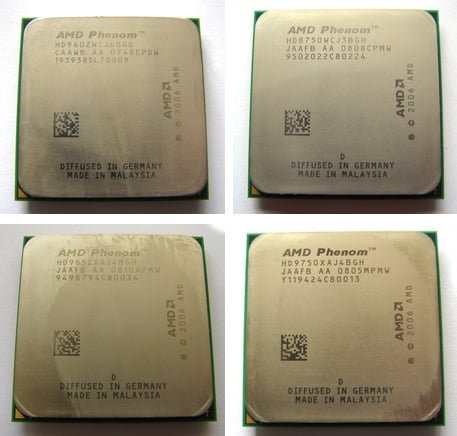
AMD's Phenoms: (clockwise from top left) 9600, X3 8750, X4 9750, X4 9850
Neither the 2.2GHz Phenom 9500 nor the 2.3GHz 9600 delivered enoughperformance to trouble Intel's Core 2 Quad Q6600, which was a directcompetitor at the same price. As an added kick in the teeth, Phenomwould barely overclock while the Intel processor could manage a clockspeed of 3GHz without breaking a sweat.
AMD fixed the TLB problem with its B3 stepping and also got a bitcreative with the model codes that it used. Phenom X4 9x50 denotes aquad-core B3 that effectively replaces the original Phenom. The PhenomX3 8x50 is also a B3 but is unusual in that it's a tri-core processor.Phenom is similar to Core 2 Quad in many respects but there is onesignificant difference as Phenom is a native quad-core design with allfour cores on the same die. By contrast Core 2 Quad is a dual-coredesign, so Intel uses two processor dice to cobble together itsfour-core CPUs.
Naturally, AMD touts this difference as a major advantage for Phenomas it allows HyperTransport to strut its stuff, while Core 2 istheoretically crippled by a lousy communication path through thefrontside bus and then off to the northbridge of the chipset to thememory controller.
It was time for the Phenom X4 9850, and we weren’t surprised to seethat performance was a distinct improvement on the X3 8750 in everyrespect with the exception of pure graphics tests that only stress thegraphics card. The X4 draws 40W more than the X3 which makes it fairlyeasy to deduce how much power each core in a Phenom requires. Thequad-core overclocked slightly better than the tri-core but neither wasimpressive in that department.
The thing that caused us some surprise, however, is the similarityin price. You only pay £10 more for the X4 so why on Earth would youchoose the X3?
Finally, we come to the Phenom X4 9850, which only runs 100MHzfaster than the X4 9750 - 2.5GHz - but there are a couple of otherchanges. The X4 9750 has a TDP of 95W and HyperTransport speed of1.8GHz while the X4 9850 has a TDP of 125W and a HyperTransport speedof 2GHz which rather suggests that the X4 9850 is buzzing along at thelimits of the B3 architecture.
We had heard great things of the X4 9850, with at least one reviewerclaiming a clock speed of more than 3GHz. However, we had nothing likethat degree of success. With the 200MHz clock raised to 225MHz weimmediately suffered a blue screen after Windows had loaded, and thatwas with a clock speed just over 2.8GHz.
The system was pretty much OK with a clock speed of 220MHz (2.75GHzCPU speed) although 3DMark Vantage refused to run however the X4 9850required more cooling than the other Phenoms. Indeed we had to removethe add-in fan controller from the CPU cooler to get the fan speed highenough to cool the CPU properly.
That’s all well and good but just take a look at our test resultsfor Core 2 Quad Q6600. On its stock speed of 2.4GHz it wiped the floorwith Phenom and when we overclocked it to 3.0GHz it made the AMDsilicon look rather limp.
VerdictThe B3 stepping of Phenom is a distinct improvement over theoriginal B2 but that’s not saying much. Intel has cut the price of Core2 to such an extent that there is no compelling reason to buy a Phenombeyond the fact that you might not like Intel very much. Fair enough,we'd say, but for everyone else, Intel has grabbed the initiative. Overto you, AMD.
Motherboards.org is reviewing CoolIT’s Eliminator Liquid CPU cooler and it’sso easy even your granny could hook it up. This piece of kit has everythingbuilt-in and you needn’t stick stuff outside the case. The whole unit justlatches onto your CPU socket (and weighs less than most high-end coolers) andall you need to do is screw it in and connect a power molex. Self-contained andeasy to setup – we weren’t expecting that. Downside? Don’t expect to daisychain stuff into the water cooler - it’s for the CPU and that’s about it.Coolit here.
German website Notebook Journal has managed to capture a Puma in the wild andput it to the test in the lab. It’s a pre-sample sample based on the Pumaplatform, with a ZM-84 (2.3GHz Turion X2 Ultra) and it uses an HD3400 part with256MB of DDR2. While specs aren’t final, the performance numbers do give us anidea of what to expect. In this case, the new Puma does outperform the previousTurions, but it still has a lot of catching up to do with Intel’s Core 2s. PowerXpress seems to be going well, tho’.Here forthe original, orherefor Googlenglish
Benchmark Reviews is poking around inside a Silverstone Kublai KL03B-W midtower case. Silverstone is usually known for its outrageously expensive HTPCcases, but now they seem to have taken the battle to the desktop PC’s arena.It’s spacious enough to handle even the freakiest of cooling setups, and you caneven stick a redundant PSU inside. It’s also very quiet, we hear... or not. Readabout the casehere.
Samsung is moving forward in its HD storage business with a couple of unitsbased on the F1_3D design. The company has sent off a 750GB and 1TB unit toSilent PC Review where Mike the Chin. They are both 32MB cache units and offeridentical read/write speeds – which pretty much sums up the review – identicalperformance through and through. Good performance, that is, and some pretty goodacoustics. The price is right, too...readit here.
OCC is testing the ZEROTherm Zen FZ120 CPU cooler; that’s a really tallheatpipe+cooler, but with a smaller fin surface to which they hook up a 120mmfan. It’s got a 4pin header, meaning you get PWM (a bit more control over thefan) and copper base and heatpipes. For $39.99 this seems pretty affordabletoo. The temps are pretty hot if you don’t plug in the fan, though. Catch thecoolerhere.
After Gigabyte’s slight mishap with Asus, the Gigaboys gave TweakTown a tourof the Nan Ping factory while they were attending Computex 2008. Now, it isn’tusual for manufacturers to let hacks like us take photos and vids of theirfactory’s entrails, but that was the case. So now you too can get an inkling onhow a P45 mobo comes into existence. It seems Gigabyte has put the Asus incidentbehind it.Catchthe tour here.
If you’re relatively new to the rat race and are trying to set up your owngaming rig on a budget, you might want to take a look at this articlehere.Bit-Tech, together with Scan, compiled an article on the subject. The secret isto find the right components, put them all together and then tweak them abit... that’s value for money. Cheap CPU... check. Cheap mobo... check. Cheapgraphics card... check. OC all round... check. Yes, that’s an E2160 running at2.9GHz with a 9600GT running at 775MHz (75MHz above spec) – the whole systemracked up a sub £400 bill at Scan. Not bad.
What do you get when your marketing department gets behind productdevelopment and forgets to talk to the engineers? An Intel DX48BT2. Why? Becauseit is the upper high-end of single-CPU desktop mobos, warranting the “Extreme”branding and it won’t let you overclock decently. That’s what XBit found out, atleast, and we can’t say it’s surprising. Despite Intel’s claims of being thegreatest chip show on Earth, they haven’t (or won’t) had the will the let youtake their CPUs to outrageously high OC values. Xbit considered it might be thecrappy BIOS (1521) but after a quickie update (1523) the OC problems were stillthere. No fun.Readabout the hole.
Intel’s Core 2 Quad Q8000 CPU series will go head to head with AMD's triple-core CPUs, by offering entry-level price, according to trusty source Dodgytimes.
Chipzilla’s Core 2 Quad Q8200, which supports FSB up to 1333MHz, has a core frequency of 2.33GHz and L2 cache of 4MB, should be unveiled by Q3 2008, and will set buyers back by about $203 each for thousand unit bulk buys.
AMD is partnering with Intel to improve the way its graphics chips can handle physics and other scientific calculations.
Well, sort of. AMD's actually working with Intel subsidiary Havok,which the chip giant acquired last year. Havok operates separately fromIntel to develop its Havok FX physics processing API, which allowsdevelopers to code up such algorithms to run on GPUs rather than CPUs.
It's main rival was Ageia, developer of a similar API and adedicated chip, PhysX, to run the calculations. Ageia, however, is nowpart of Nvidia, which is understandably playing down PhysX whilepromoting Ageia's software technology as a way of running physicscalculations on its own GPUs.
All this stuff is going to run on discrete graphics chips, so itmakes more sense for AMD to partner with an Intel company, which isn'tcompeting with it - yet - in the discrete GPU market.
The partnership will ensure that Havok FX can take full advantage ofthe idiosyncracies of AMD's Radeon GPU architecture and of its x86processors.
Games, in particular, are increasingly incorporating algorithms thatcan model complex interactions between players and the worlds theyinhabit. Traditionally, these calculations have been handled by theCPU, but they're better suited to the GPU's parallel-processing design,which whizzes through them while the general-purpose CPU wouldstruggle.
11:02 a.m.: Forstall's back. He thanks all the developers whodemonstrated their applications. He mentions one feature request fromdevelopers: instant-messaging developers want to deliver notificationseven when the application isn't running. This is the background-runningissue that arrived after the March event. Forstall says backgroundprocesses are bad for a number of reasons, such as battery life andperformance. He uses the opportunity to ding Windows Mobile's taskmanager for handling background processes the way desktop Windows does,to widespread laughter and applause.
11:00 a.m.: Forstall promises that Digital LegendsEntertainment is the last demo for this morning. These guys built agame in two weeks, and Xavier Carrillo Costa shows off his game. Theirgame is called Krull, and it's another caveman adventure gamewhere you battle enemies, swing across rope bridges, and solveproblems. They expect to have the game ready by September.
10:57 a.m.: Mimvista has another medical application thatbuilds on their niche, medical imaging software. Mark Cain isrepresenting Mimvista, and he says developing one of their types ofapplications before the iPhone wasn't going to work. The idea is toconnect doctors with their workstations, so they can evaluate medicalimaging from the golf course. The application, like Modality's, canshow extremely detailed pictures of the human system, as well as movingimages. "The iPhone has created a new direction for our company."
MLB on the iPhone
(Credit: James Martin/CNET News.com)
10:53 a.m.: Modality is the next company that Apple isshowing off. These folks, represented by Dr. S Mark Williams, havedeveloped an application that helps medical students ditch their flashcards and use an iPhone to view anatomical images of the body that arevery detailed, down to the arteries and veins, and can quiz students onthe various parts of the heart, for example. Within weeks of the AppStore launching, they will have about a dozen applications availablefor various health-care needs.
10:50 a.m.: MLB.com is getting in on the action, so we canwatch the tortured season of the New York Mets on our iPhones. JeremySchoenherr shows off At-Bat, as we check out the Royals-Yankees game.You can see who's at bat, who's pitching, the count, and the score: Mussina'soff to a decent start this morning. You can get real-time videohighlights of the Yankees turning a double play. They aren't really"real-time" since the highlights arrive after the fact, but still.
10:48 a.m.: It's a parade of developers. An app called Bandwas made by a solo developer named Mark Terry, whereas all the otherapps so far have been corporate-developed. Band lets you create musicon the iPhone, with a touch-screen piano, and the demo guy cranks out apassable version of John Lennon's "Imagine." There are also drums and a12-bar blues creation app, which lays down a bass line while you playguitar over the track, and a bass guitar, which is used to play theslinky bass line from Pink Floyd's "Money." There's other stuff, buttime is limited. Terry says Band will appear on the App Store in a fewweeks' time.
Developer shows off music application on the iPhone.
(Credit: James Martin/CNET News.com)
10:45 a.m.: More applications! Brian Greenstone of Pangea Software comes up to show off two games they ported from Mac OS X to the iPhone, Enigmo, a 3D puzzle game, is very CPU intensive, says Greenstone, and it doesn't miss a beat in the demo. Cromag Rally,which is apparently a caveman racing game, is the other game shown off.Driving looks hard, but he is racing on snow, and people fromCalifornia don't know how to drive in the snow. Both games will cost$9.99.
10:41 a.m.: Our good friends at the Associated Press alsohave an application to show off. Benjamin Mosse of the AP is showingoff their application, which is essentially a reader-style applicationthat focuses on local news. This is another location-aware applicationthat sends you local news based on where you are. You can customize thefeeds for your favorite sports teams, and browse AP photos and video.Those stores can be shared via text or e-mail, and civilians can uploadtheir own stories and pictures to the AP from the iPhone, andcontinuing with the trend, it will be free.
10:39 a.m.: TypePad is next up, for the mobile bloggers inthe audience. Michael Sippey of TypePad shows off what they've puttogether, with a simple interface that lets you create a post, take aphoto, or add a photo. You can take photos with the iPhone's camera andadd them to a post, as well as add photos from your library on youriPhone. This will be yet another free application.
eBay application on iPhone.
(Credit: James Martin/CNET News.com)
10:36 a.m.:Looptis the third company to demo, and they're talking about alocation-based application. Again, no distinction is made whether thisis an application using GPS or the current location-based service onthe iPhone. Loopt blends your social networks with the Mapsapplication, so you can see where your friends are. You can also go totheir journal to see what they've been doing today, what picturesthey've added, and so on. This app will also be free.
10:33 a.m.: eBay is the next developer to show off anapplication, and Ken Sun of eBay comes onstage to show off Auctions onthe iPhone. The iPhone is already the primary mobile device used oneBay's Web site, he says. The app has a basic front door with optionsto track auctions you've bid on, see whether you've been outbid, and toplace new bids. You can also pick up the photos from the auctionlistings, and blow them up to full screen. eBay is making this appavailable for free.
10:30 a.m.: This demo is showing off the capabilities of theaccelerometer, where the iPhone can be tilted back and forth toaccelerate or brake. The tester gets a nice hand from the audience forhurling Baby Monkey through the goal. Super Monkey Ball will be available at the launch of the App Store for $9.99.
10:29 a.m.: Forstall is bringing third-party developersonstage to talk about their application, and Sega revisits the stage.They demoed a game called Super Monkey Ball in March, andthey've refined it. Ethan Einhorn of Sega comes up onstage to talkabout the app. The initial game had four stages developed in two weeks,now they've got 110 stages, with all four classic monkeys.
Showing tilt control on Sega games.
(Credit: James Martin/CNET News.com)
10:26 a.m.: The application finds your friends within acertain radius, but Forstall says nothing about whether the applicationwas designed for the current iPhone, which uses a Wi-Fi/cell tower typeof location-aware application, or the new iPhone, which is expected tohave GPS. Forstall reads off a few quotes from corporate developerpartners like Disney--once again--and Fox Interactive.
10:23 a.m.: His mock application is going to merge thecontacts databases and location-aware services. He's taking us throughthe actual development experience, dragging and dropping icons thatrepresent things like the iPhone's search bar around the developmentenvironment. Once the application is done, the developer can test itright on a Mac for bugs or to make different aesthetic choices, such aswhether to put things in the toolbar or within the regular fields.
HOTHARDWARE HAS A MASSIVE gaming machine that’ll make mostgamers drool over - the Dell XPS 730 H2C. It’s an oh-so-powerful machine withdual-dual graphics cards under its bonnet and an extremely expensive CPU topower it all. Sure, you might be disappointed with “just” 2GB of DDR3 RAM, butthat’s about the weakest link in the whole setup. Lest we forget, the XPS 730ships with an integrated watercooling system. Its godlike features did leave animpression on the review crew (and wallet). Catch ithere.
The Lenovo M57p Eco ultra small computer has some nifty entrails, but islacking in the “looks” department. The Eco in the name purports to its EPEATGold and GreenGuard Air Emissions Quality certifications. The fact that itsrunning an E8400 and drawing just 74W at load is simply jawdropping. AlthoughLenovo has cut the umbilical cord with the original IBM designs,here’san article to prove that they Big Red has something up its sleeve.
Sparkle is very much alive and kicking – and they’ve just launched a new9600GT that InsideHW was nice enough to review for everyone to read. The SparkleCalibre 9600GT comes factory OC’d at 700MHz (a popular choice with this GeForcechip), and performs as you’d expect. The price doesn’t seem too steep for anOC’d 9600GT, although Nebojsa does think so. Read about ithere.
OCC is testing ThermalTake’s new VH6000BWS Armor+ case. This big box istargeting quad-core graphics and extreme cooling requirements, although the latter is mostly a DIY job - you can pull out the HDD cages to install additionalcooling, for example, but you'll have to setup your own coolers. Apart from thebiggie 230mm fan, Thermaltake has left a lot of fan mounting points free for youto do as you will –keep the price lower in the process. Solid stuff, it seems.Read ithere.
Hilbert is laying his hands on BFG’s latest PSU, the ES Series 800watter.It’s a sensible PSU if there is such a thing – throwing LEDs and modularity outthe window – and sticking to the basics: power and performance. By the end ofthe review, Hilbert is really raving about how good a thing BFG has. It takesquite a bit to achieve this...clickethhere, my son.
If you’re into heavy Torrenting this review is for you. Custom PC is testingthe Emprex NSD-100 P2P Download Engine. At a paltry £45.81, this little enginecan manage up to 20 torrents while you get your beauty sleep. It’s downside isreally not having an integrated HD or NAS feature, but you can plug an externalHD to it. Simple enough, it seems, but there’s better out there, thinks Kevin.
Nvidia's CPU mouthed off about Intel, the firmfollowed it up with the stunning NV5800 'Dustbuster'. This time, he mouthed off,and the successor to the GT200 had already taped out. NV is in deep trouble onceagain.
You heard that right, the successor for the GT200 chip has already taped out,and it too will be nothing special. GT200b, it is nothing more than a 55nm shrink ofthe GT200. Don't expect miracles, but do expect the name to change.
There are several problems with the GT200, most of which are near fatal. Thefirst is thediesize, 576mm^2, bigger than most Itanics. One might trust Intel to make achip that big with decent yields, especially if it is basically an island oflogic in the middle of a sea of cache. Nvidia using a foundry process doesn'thave a chance of pulling this off.
Word has come out of Satan Clara that the yields are laughable. No, make thatabysmal, they are 40 per cent. To add insult to injury, that 40 per centincludes both the 280 and the 260 yield salvage parts. With about 100 diecandidates per wafer, that means 40 good dice per wafer. Doing the maths, a TSMC300mm 65nm wafer runs about $5000, so that means each good die costs $125 beforepackaging, testing and the like. If they can get away with sub-$150 costs perGPU, we will be impressed.
So, these parts cost about $150, and the boards will sell for $449 and $649for the 260 and 280 respectively, so there is enough play room there to makemoney, right? Actually, most likely yes. There are costs though, but not enoughto kill profit for any one touching these.
The biggest cost is memory. The 512b memory width means that they will haveto use at least 16 chips. This ends up making the board very complex when youhave to route all those high speed signals, and that means more layers, morecost, and more defect fallout with the added steps. You also have to solder oneight more memory chips which costs yet more.
To add insult to injury, the TDPs of the 260 and 280 are 182W and 236Wrespectively. This means big copper heatsinks, possibly heatpipes, and high-endfans. Those parts cost a lot of money to buy, assemble and ship. Not fatal, butnot a good situation either. It also precludes a dual GPU board without losing alot of speed.
Basically, these boards are going to cost a lot of money to make, not just tobuy. The $449 price is justified by the cost. The last round of GX2 boardscostOEMs about $425, meaning that NV charges OEMs about 70 per cent of retailfor high-end parts. After packaging, shipping and add-ins, there is almostnothing left for the OEMs, quite possible explaining why one of their biggestone is teetering on the verge of bankruptcy, kept alive because NV won't calltheir debt while still shiping to them. Watch for this to melt down once NVloses the high end.
So, you end up with an expensive chip on an expensive board that makes few ifany people money. Fair enough, bleeding-edge parts mean bleeding-edge prices.The problem is that ATI is going to make a chip that competes with GT200, andlines up with it point for point. NV wins big Z Fill, ATI crushes them onShader Flops. What this translates to in the real world is still up in the air,but it looks like the 770 and the 260 will be about equal for most things.
The GT200 is about six months late, blew out their die size estimates andmissed clock targets by a lot. ATI didn't. This means that buying a GT260 boardwill cost about 50 per cent more than an R770 for equivalent performance. TheGT280 will be about 25 per cent faster but cost more than twice as much. A monthor so after the 770 comes the 700, basically two 770s on a slab. This will crushthe GT280 in just about every conceivable benchmark and likely cost less. Why?Because.
So, what is a company to do when it promised the financial world that ATIwas lost, and GT200 would raise their margins by 100 basis points or so? Surelythey knew what was coming a few weeks ago during their financial call, right? Imean, if word was leaking days later, the hierarchy surely was aware at thetime, right?
The answer to that is to tape out the GT200b yesterday. It has taped out, andit is a little more than 400mm^2 on a TSMC 55nm process. Given that TSMC tendsto price things so that on an equivalent area basis, the new process ismarginally cheaper than the old, don't look for much cost saving there. Anydecrease in defectivity due to smaller area is almost assuredly going to bebalanced out by the learning curve on the new process. Being overly generous, itis still hard to see how the GT200b will cost less than $100 per chip. Don'tlook for much cost savings there.
The new shrink will be a much better chip though, mainly because they mightfix the crippling clock rate problems of the older part. This is most likely nota speed path problem but a heat/power issue. If you get a better perf/wattnumber through better process tech, you can either keep performance the sameand lower net power use, or keep power use the same and raise performance.
Given NV's woeful 933GFLOPS number, you can guess which way they are going togo. This means no saving on heatsinks, no savings on components, and a slightlycheaper die. For consumers, it will likely mean a $50 cheaper board, but nofinal prices have come my way yet. It will also mean a cheaper and faster boardin a few months.
The GT200b will be out in late summer or early fall, instantly obsoleting theGT200. Anyone buying the 65nm version will end up with a lemon, a slow, hot andexpensive lemon. Kind of like the 5800. It would suck for NV if word of this gotout. Ooops, sorry.
What are they going to do? Emails seen by the INQ indicate they are going toplay the usual PR games to take advantage of sites that don't bother checking upon the 'facts' fed to them. They plan to release the GT200 in absurdly limitedquantities, and only four AIBs are going to initially get parts.
There is also serious talk of announcing a price drop to put them head tohead with the R770 and giving that number to reviewers. When the boards comeout, the reviews are already posted with the lower numbers, and no reviewerever updates their pricing or points out that the price performance ratio wasjust blown out of the water. There is also internal debate about giving a fewetailers a real price cut for a short time to 'back up' the 'MSRP'.
We would hope the reviewers are able to look at the numbers they were givenon editors' day, $449 and $649, and take any $100+ last minute price drop withthe appropriate chunk of NaCl. Just given the component cost, there is no way NVcan hit the same price point as the 770 boards. "We lose money on each one, butwe make it up in volume" is not a good long term strategy, nor is it a way toimprove margins by 100 basis points.
In the end, NV is facing atoughsummer in the GPU business. They are effectively out of the Montevinamarket, and they are going to lose the high end in a spectacular way. Nvidia hasno effective countermeasure to the R770, the GT200 was quite simply botched, andnow they are going to pay for it. When all you have is a hammer,everythinglooks like a 5800.
Nvidia is on thewarpath, telling anyone that will listen that: a) Intel is really big, andreally mean, and, b) the CPU is dead, the GPU is taking over, death to the CPU.Except our new ones, obviously.
With all the animosity in the air, it's all to easy to forget a better time,a nicer time
Details are firming up about Intel’srumoured Atom dual-core processor – which is increasingly looking setfor arrival towards the end of this year.
Fudzillamanaged to unearth a fresh batch of details on what they suggest willbe branded the Atom 330, following on from the single core Atom 230.
The Atom 330 is expected to bring the processor up to 1.6GHz, willhave 1MB cache memory and supports 64-bit processing although the FrontSide Bus remain at 533MHz.
Of course, one of the major considerations in a mobile CPU is theThermal Design Power (TDP), and the Atom 330 apparently stops at just8W.
The PC is no longer a viable platform. The PC is all about casual gaming. The PC market is dying.
We've heard it all before, and so has Valve's Doug Lombardi. Irecently caught up with the marketing VP during an Electronic Artspress event. At the end of the night, the house music dying down, wehad a long chat on a number of topics--many of which pertained to hiscompany's primary platform.
What does Valve think of the PC Gaming Alliance? Are they as tired ofthe PC gaming "problem" as we are? What is at the root of the issue,anyway?
Shack:
Do you guys ever get tired of the same old "PC Gaming Is Dying" stories?
Doug Lombardi:
I mean, I think,we sort of laugh at it. Because we've been wildly successful--we'revery fortunate, you know. Our games have all done really, really well,Steam has taken off and become this whole other business for us, Valvehas never been in better shape--and yet everybody is talking about howin the PC world, the sky is falling. And we're like, we've been doingthis for 10 years now--actually 12 years since the company started, 10years since the first game came out--and we've never been in bettershape, financially or otherwise. The company is over 160 people now--itwas 20 people when we shipped Half-Life. We've got multiple projectsgoing--we were always a one-project-at-a-time group.
We don't understand why that story gets traction over time. I thinkpeople have finally started to clue in to the fact--there was a storylast week where people finally looked at the online subscriptionrevenues for WoW and all the things that look like WoW, and realized,wow, there was a butt-load of cash being made here that wasn't beingcounted at the register, at retail, in North America, which is whereall these stories come out of.
NPD, god love 'em, they release a US retail sales report, and peopletake that and say that's the world picture. And it's just not true.It's not like NPD is trying to be evil. Their job is to report NorthAmerican sales data. They're doing their jobs. But people are takingthat and discounting.. in Germany for example, retail sales of PCproducts crush all other games, with the possible exception of the DS.It certainly kills all of the next-generation consoles. So if peoplewere looking at that and factoring it in, if people were looking atWoW's subscriptions alone and factoring it in, looking at Steam salesand factoring it in.. Just look at what Popcap's doing--Bejeweled andPeggle and all this stuff--they're not in that NPD data.
If you go around and you look at all these different things that arehappening on the PC, and you add them together, my hunch is that [thesales numbers] would actually be much larger than all of the consolesput together. Again, minus the DS, because the DS is this crazy thingby itself. But talking purely in terms of the Wii, the PS3, and the360, if you added those together and looked at the whole picture, I'dbet you PC would be even, if not bigger than those three systems interms of the money that's changing hands and the opportunity for doingbusiness.
So we always look at those things, and we always kind of laugh. We'redoing just fine, Popcap's doing just fine, Blizzard'scertainly--they're printing money down there. We always sort of shakeour heads, and go, okay, sooner or later someone's going to write thebigger picture story and perceptions will change.
Shack:
Interesting that you use the word "perception." Is this a perception problem?
Doug Lombardi:
It is absolutelya perception problem. I mean one of the things that happensis--Microsoft has an army of PR people that work for Microsoft. Theyhave at least two agencies that are additional armies. Nintendo I'm notas familiar with their PR outline, but I'm sure it's similar. Sony issimilar. The PC has nobody. They've got people like us, in our sparetime, talking to guys like you. I mean if there were hundreds of PRpeople stationed around the world, whose whole job was to call youevery day and tell you why the PC was a great platform, your perceptionwould probably be different.
Shack:
As far as improving perception, what do you think about something like the PC Gaming Alliance? I noticed you guys aren't partners. Any particular reason behind that? Do you see a real benefit coming out of the PCGA?
Doug Lombardi:
We'll see. Imean, I think it's great that a group of major players are gettingtogether and trying to address the problem. For us, we're really busydoing Steam, building our games. We're not really members of any of theboards, whether it's the IDG, or the PC Gaming Alliance, or whatever.If those guys want our opinion, we'll give it to them, but being onthose boards is kind of a job. We try to remain a small independentstudio, and if our help is needed in some way other than just joiningthe group for the sake of being another developer sitting a table atthe meetings, then we'll talk to those guys. I mean we're totally opento it, we want them to succeed, but until we see an actionable reasonfor us to be involved in it, you know, how we can help in a tangibleway, we're going to kind of sit in the bleachers with everybody elseand wish them luck.
Wedefinitely wish them luck. Like I say, part of the reason why the PChas the perception issue is that they don't have a group of peoplechampioning it. And if the PC Gaming Alliance says, "We need to attackthis from an advertising and PR standpoint," we'll be there to givethem quotes. [laughs] So however we can help. Just because we're not onthe board doesn't mean we're not rooting for them.
Shack:
Do you see a PC gaming resurgence on the horizon, at least in terms of how people think about the platform?
Doug Lombardi:
I think you cansee it in this room. I don't know what the final total is here, but Ithink there are eight PC games and three console games here?
Shack:
Yeah, about that.
Doug Lombardi:
And this is EA's"getting ready to start clubbing you guys over the head for E3"campaign that's beginning. So I think it's starting to happen. I thinkwe saw some of that last Christmas too. A lot of the big titles wereOrange Box on the PC, Crysis, World of Warcraft: The Burning Crusadedid really well. I think this year you're going to see a lot of thesame thing with Left 4 Dead, Spore, Battlefield Heroes. There's a lotof people making great PC product. id is getting ready to rev up abunch of really great PC product, and those guys are always great.They've been legends on the PC since, what, '93? So I think it alwayssort of comes and goes.
There's this kind of roller-coaster ride: the consoles launch, their PRagencies go out and do everything they can to try and say the PC isdying, they'll prop up the sales of the console, the console starts toget old in the tooth, the PC starts leapfrogging in terms of graphicsand bigger releases. So we're almost what, mid-way through the consolelifecycle now? So yeah, over the next two years the story's going tocome back that the PC is bigger, things like Left 4 Dead and Spore, theid titles are going to come out and everybody's going to be like, "Wow,those console titles are looking kind of crappy."
Shack:
Do you think PC system requirements are an important part of this perception problem?
Doug Lombardi:
Oh, I think it'sa big problem. I think it's a big problem. You know, we try to bereally responsible. Going back to Half-Life 1, we tried to be reallyresponsible in saying the average PC gamer should be able to play thisgame start to finish and have an enjoyable experience. Now, they're notgoing to have the best graphics, they're not gonna have every shaderturned on and what have you. But they're gonna have a decent framerate,all the monsters and creatures are going be there, and all the dialogueis going to be there. From a basic content and experience level,they're going to be able to go through that.
We take that Steam hardware surveytwice a year, and we publish those results of usually a million or moregamer systems. We publish those very consciously to try to help otherpeople realize like--here's a million people on Steam and what theirsystem requirements look like. No, you can't drop support for DirectX 9yet. There's still 70% of the people playing on Steam today are runningon DX 9 cards. So you've gotta be cognizant of that, and RAM and CPUspeeds, same way.
In the old days we had sort of this weird, "Okay, here's some of whatthe card guys and CPU guys are telling us they're gonna be selling, andhere's this voodoo crystal ball thing we're going to do and try toguess." Now that Steam survey gives us an exact data point to workfrom. You've got a million people, we do it every six months, and wecan go back and say 18 months ago it was here, and here's the adoptionrate, and we can see the trajectory. It's pretty black and white.
I think hopefully one of the things we did really well with Orange Box,and we've heard this from a lot of people: "I fired up Portal on mythree year old machine and it ran great." And that helps us sell moreunits, and helps the perception of the PC industry. People buy a newgame and their system is 18 months old and it doesn't run, or it'sunplayable, that hurts the PC industry. That person who just spentmoney on a PC game is going to have a question mark next time he walksinto the store. And he's gonna say, "Geez, I don't know, if I buy it ona console I know it's going to work."
So I mean, I think people just need to do a better job of looking atwhere gamers are at, being more honest about the system requirementsthey put on the box, and just sort of taking a step back and saying,"Gameplay is king, performance is second, and graphics are somewhereafter that." People have said to us, you know, Portal is cool, but itwasn't the prettiest game. Well, okay, it sold a whole lot, it wasnamed game of the year by over 30 outlets, and many of the people whoplayed it told me they finished it and had a great time. I would muchrather have that than have people tell me it was the prettiest gamethat came out last year.
Shack:
Does theresponsibility lie somewhat with the hardware manufacturers to markettheir products in a reasonable way, or is it up to the developers toset sane requirements?
Doug Lombardi:
Oh I think it'stotally the fault of the developers. Totally the fault of thedevelopers. I mean the graphics guys, their job to keep pushing theenvelope, and as they push the envelope, move the lower-end cards downto a nice price point, so that there's always this evolution that'shappening. If you're a hot rod type of guy, and you want to spend $400on the latest thing, you want to have a smoking machine, and when Left4 Dead comes out you want to run it at its highest resolution withkiller framerates, and call your buddies over for a beer and make themall drool over your system, awesome. But if you're just a guy who wantsa decent PC for less than a thousand bucks, and wants to be able to rungames on it, there should be a card out there that runs games at adecent famerate and decent fluidity. Then it's on us to write for bothof those guys.
It's a business decision, really. Too often I think the developmentside of things runs the house. People say, "Oh, we've got to targetthose high-end core gamers. We have the best graphics, sweetestscreenshots, and we'll get more press, and we'll win." Okay, well,you'll win in the pre-launch phase. Then when the game comes out, and60-70% of the people who don't have that sweet machine--maybe evenhigher numbers, maybe 80% don't have that sweet machine--well you justcut off your ability to sell to all of those guys.
You know, it's hard to be able to have games that scale, and to writeperformance on the high end, and write performance on the bottom end,but you know, winning in any industry means some hard work, and there'sa certain level of hard work that developers have to takeresponsibility for. And when you see games that do that, where theyhave solid gameplay, and they scale well across machines, usually thosegames do well.
Giant of the corporate PC arena,Acer, has announced that it’s launching the ‘Predator’ range ofmachines designed to provide top notch gaming out of the box.
Thatsounds like an unambitious aim, but Acer reckons that non-technicalgamers are being ripped off on a daily basis thanks to obfuscatorymarketing tactics which overstate the quality of components inside.
Theproblem is this: the rise and rise of the online PC configurator hasbeen disastrous for anyone looking to buy a new machine who doesn’thave the competency to spec it themselves. Walk into any high streetretailer – and a fair proportion of the online ones too – and you’llfind PCs designed ‘for games’ equipped with graphics cards thatstruggle to run Hangman.
Straight out of the box, you’d expect agames PC to be able to play the latest games. That doesn’t seemunreasonable, says Acer, but no-one is actually providing it – at leastnot without mixing in some sub-par machines and diluting the branding.
Hunted down Enterthe Acer Aspire Predator. When it arrives in June, there will be fourmodels ranging from around £1200 to £2000, and all of them boast aPenryn quad core processor, SLI graphics and at least two hard drives,which are hot-swappable without opening the side. They also all featureliquid cooling for the CPU, and are warranted for overclocking.
“Wehaven’t compromised on any feature,” Acer’s Brian Boggat explained toTechRadar, “There’s no bare bones, no frills model to confuse people.”
Tocatch the eye of prospective punters, Acer has gone with a very boldcase design: all sharp edges and fancy opening mechanisms. It’s notgoing to suit all tastes, but if the plan was to stand out on retailshelves, it’ll do the job well.
Hands on TechRadarhas had a hands on with the bespoke chassis and first impressions aregenerally good: with the lifting front plate down it’s quite a looker.Our only concern is potential heat build up from all those graphicscards.
The decision to only use SLI configurations means theentry level model has two GeForce 9600GTs, where we’d prefer to haveseen one 8800GT, for example, but then hey, we’re a bit moretechnically literate than the target market. It’ probably use that’sconfused everyone in the first place.
The machines also come witha top quality Logitech G11 keyboard and G5 mouse, and a 24inch panel inmatching copper livery will be available for around £250.
Whilewe salute the intention – selling gaming machines that are, you know,capable of playing games, it’s not going to be easy for Acer. It’ll bepitching up against the better known gaming brands, Dell and Alienware,who are also starting to increase their retail presence in stores likePC World.
We’ll bring you a full review of the Predator later this month.
ow, reviewers are becomingpretty annoyed at what they see as a Nvidia marketing doing its worst... andreviews are reflecting this. Well this GSO comes with a non-standard cooler,dual-slot, for increased airflow. Being a Sonic version of the card, it’s alsoslightly OC’d, which means, in the end, it performs almost as well as a 9600GT.Now Shane thinks the 384MB version will throw a wrench in the gears (or justconfuse people even more), and rightly so. Nvidia gets the “Crap Naming Scheme”award of 2008, innit? Catch TT’s reviewhere.
In Win has a new case on the market, the Metal Suit GD. What makes the caseunique is its “VGA cooling duct” that sucks air from slits cut into the side ofthe case and sprays it over the expansion bay area. Sleek design, nice blue ledand the fans make very little noise. Cooling performance on the cooling ductdoesn’t seem to do a very good job, but you should read OCC’s reviewhere.
Every graphics card brand comes up with a nice bit of marchitecture to win alittle edge over the competition. Sapphire’s own is the “Toxic” line, ofVapour-X Technology that improve heat dissipation and allow the card to comefactory overclocked... the toxic design also has the advantage of keeping thecard single-slot. Big Bruin has a Sapphire Toxic HD3870 on their bench andthey’re putting it to the tong and hammer. The specs are lower than the AsusHD3870 TOP, but the Toxic cooler made it an excellent overclocker. Jason tookthe GPU all the way up to 885MHz. Interesting lit,here.
After testing some compact CPU coolers, Xbit has moved on to compactwatercoolers. Right. Well, these little coolers don’t really make much of animpact on your system (cooling-wise) but look great and are pretty easy toinstall, however, they lose on most counts to standard air and water coolers.Sergey does say it’s a first step towards better cooling. Not to be greatcommercial successes, such are the pitfalls of pioneering. Catch the reviewhere.
The mighty Church of CNET has published a review on the Synology Disk StationDS-107+. Yes, it’s a NAS, but according to the review, it’s also much more. Ithas PS3 and Xbox media center functionality, is relatively cheap and supports upto 1TB HDs. It’s also smallish, as it’s a single HD unit. If you’re a securityfreak, you can also network up to six cameras (although you pay extra for eachcamera license after the first) and use it as a video recording device. Gives ussome ideas,doesn’tit?
OCZ Reaper HPC DDR3 is one of many “supercar”-class kits available toenthusiasts with deep pockets. OCIA has tested the 2x1GB DDR3-10666 and taken ita bit beyond spec whilst on the bench. 1500MHz was the top speed, but you paytop dollar too, so it’d be a surprise if you couldn’t play around with thespeeds and timings. They gave it a big thumbs up,apparently.
Those zany canucks that fiddle with hardware have benched the AsrockPenryn1600SLIx3-WiFi motherboard. Like everything Asrock, it’s a mix-match oftechnologies that end up spawning an equally odd name – and as Asrock mobos go –it is quite expensive ($170). This is basically a Nvidia 680i tri-SLI chipsetthat can take Extreme Edition CPUs from Intel, but sticking to DDR2 memory – that alone sounds powerful enough towarranta read. You can’t fiddle around much with overclocking, but the systemitself already runs pretty hot.