An exclusive gaming industry community targeted
to, and designed for Professionals, Businesses
and Students in the sectors and industries
of Gaming, New Media and the Web, all closely
related with it's Business and Industry.
A Rich content driven service including articles,
contributed discussion, news, reviews, networking, downloads,
and debate.
We strive to cater for cultural influencers,
technology decision makers, early adopters and business leaders in the gaming industry.
A medium to share your or contribute your ideas,
experiences, questions and point of view or network
with other colleagues here at iVirtua Community.
You. Your friends and family. Your classmates and coworkers. In thebrave new world of the internet, everybody has power. Information isinteractive, knowledge is collaborative and history is open source. Thenerdy kid next door has just as much influence as a high schoolteacher; the dorky dude at the comic book shop has just as much voiceas a college professor.
Problem is, the nerds and dorks tend to have a lot morefree time - and passion - than the teachers and professors. The endresult? A hilariously skewed, terrifyingly twisted view of the world inwhich all the wrong things are deemed "important" and worthy of seriousacademic discussion.
Here are 15 mind-boggling examples.
See what we mean? When the deadliest, costliest war in the history of mankind has been trumped by a videogame franchiseabout that war,you know something's off. One involved over 50 countries and took over70 million lives; the other involves button mashing and tea bagging.
On an encouraging note, we did have to add all the Call of Dutygames' individual pages together to reach the crazy number above. On adiscouraging note, we didn't have to add Call of Duty 4 and itsnon-WWII setting, which would have brought the total word count to aneven crazier 18,927.
Oh, and on a simply ridiculous note? Call of Duty 4: Modern Warfare beats "modern warfare"... 5,858 to 2,873.
Alsoless important than Call of Duty! • American Revolutionary War = 8,078
• American Civil War = 11,729
• English Civil War = 8,030
• Napoleonic Wars = 7,951
• Hundred Years' War = 7,992
• War on Terrorism = 10,674
• War on Drugs = 7,628
• Cold War = 10,117
• "War" = 9,233 While the magic menagerie of super-powered, frilly-maned, sparkly-eyed, rosy-cheeked wonder beasts might make for slightly more exciting cards than a Three of Spades, the emphasis here is still extremely wonky.
Poker has been around for longer than anyone can remember... the Pokemon Trading Card Game was invented in 1996. Poker has created millionaires and forced bankruptcy... the Pokemon Trading Card Game might have resulted in some lost lunch money and a temper tantrum or two.
Alsoless important than Pokemon Trading Cards! • Baseball cards = 4,686
• Blackjack = 5,228
• Roulette = 5,492
• Checkers = 2,326
• Pool (Billiards) = 621
• Bowling = 407
• Wheel of Fortune = 4,521
• "Trade" = 3,038
• "Games" = 2,830 Before you get the wrong impression, no, the Master Chief does not win in a Wikipedia matchup against George W. Bush... though his approval ratings are undoubtedly higher.
The truly astounding thing, however, is that he does emerge victorious against not one, not two, but TENof this country's past commanders in chief. Yes, 23% of the men whohelped make the United States the strongest nation on Earth are easilydefeated by a fictional and faceless videogame character who barelyknows how to speak and takes orders from a naked hologram. Go America!
The orange word count above is an average taken from the USPresidents beaten by the Master Chief. Here's the full, patheticbreakdown:
Leaders of the Free Worldless important than Master Chief! • James Monroe = 2,820
(5th President)
• John Quincy Adams = 3,457
(6th President)
• John Tyler = 3,431
(10th President)
• Zachary Taylor = 2,235
(12th President)
• Millard Fillmore = 3,631
(13th President)
• Franklin Pierce = 4,203
(14th President)
• James Buchanan = 3,888
(15th President)
• Rutherford B. Hayes = 2,686
(19th President)
• James A. Garfield = 3,915
(20th President)
• Chester A. Arthur = 3,078
(21st President)
In the future, when Captain Kirk is battling tribbles and Data islearning how to love, this lopsided comparison will make completesense. Why wouldn't the entries for the glorious Starship Enterprise dwarf that for a dusty museum piece like the automobile? We expect the pages for hoverboards, robot maids, personal time machines and giant laser death rays to do the same.
For the present, though, why does a make-believe spaceship deserve more words than the planet's principal mode oftransportation? Also, why does that make-believe space ship deserve noless than nine separate pages, including unique entries for six different models of the NCC-1701? Seriously?!
You think Hideo Kojima's cut scenes are long? Try reading Leo Tolstoy's epic tome. War and Peace waspublished in four books over five years, covers nearly a decade ofhistory and includes more than 1,400 pages, more than 560,000 words andmore than 3 million characters. It's generally considered one of thelongest novels - hell, one of the longest things - of all time.
Somehow, though, the writers on Wikipedia managed to summarize thewhole plot in 1,922 words. Well done! Now we'd be really impressed ifyou guys could squeeze the plot of a single damn videogame - even therambling old man that is Metal Gear Solid 4 - into less than 2,548 words.
The top numbers (in orange) are for the entire entries.The numbers in the preceding paragraph, as well as the list below, arefor the subsections entitled "plot," "story," or "synopsis."
Alsoless important than Metal Gear Solid 4!
(by plot, story or synopsis)
We won't get jealous and play the competition card here. EGM isimportant, a veritable titan of the industry with a massive and devotedfollowing. Many of us here at GamesRadar include ourselves in that camp.
But come on... do the latest screenshots of Chun-Li'sthighs really carry more weight than the 2008 election? Do you reallyneed to know the review score for Turok more than you need to know thereasons for the recession? Is the dropping price of the PS3 morecritical than the rising price of gasoline?
Yes, Electronic Gaming Monthly - and any videogame publication - is totally worthy of 4,429 words. We just wish that Time and other vital news sources received the same attention.
We love, love, love the soundtracks to Final Fantasy... but someone put way, way, way too much effort into this Wikipedia page. The intro alone is nearly 700 words, lengthier than the entries for many singers, bands and genres. Rock and roll, the biggest genre of them all, doesn't stand a chance.
Of course, the vastness of the web was made to hold such exceedinglyniche minutiae, but even the fan who owns all of these compilationalbums probably agrees that they could have fit onto the page forgeneral Final Fantasy music. Unless that fan is the one who wrote this obsessive love letter to begin with...
Alsoless important than obscure Final Fantasy music!
Email this article Bookmark Bookmark this Article
Close Digg.com Del.icio.us Reddit.com
Facebook Slashdot.org Google Bookmarks
N4G Stumbleupon.com Fark.com
Jeffrey Dahmer was a cannibal, Charles Manson was a deranged cultleader and John Wayne Gacy, worst of all, dressed up like a friggin'clown. Yet the complete list of these horrible, horrible murderers -together with dozens of depraved others - is apparently about 3,000words less significant than the list of Maverick boss characters in the Mega Man X series.
And that's compared to the list of serial killers by country. Look up the list of serial killers by number of victims andthe difference grows to 6,000. Go ahead and add the two lists togetherif you want - at 8,000 words total, they still fall short of the sheerterror and infamy inspired by Cyber Peacock, Blizzard Buffalo,Overdrive Ostrich and Armored Armadillo. Ooh, we're getting chills justthinking about them!
Above: The true face of evil
Let's be honest. Who doesn't love Gardulla the Hut? Who didn't havea poster of Cole Fardreamer or Elan Sleazebaggano hanging on theirbedroom wall as a kid? Who wouldn't beg their parents to buy them thatKlaatu action figure for the holidays?
Qwi Xux, Plo Koon, 2-1B, Chief Chirpa, Yarna D'al Gargan, BaronSoontir Fel, Meewalh, Oola, Commander Cody, Baron Soontir Fel, TraskUlgo, Gartogg, Wam "Blam" Lufba and, of course, little Windy... all ofthem are forever entwined in our dreams and imaginations.
No surprises here. After all, Superman (10,641 words) has been known to survive a nuclear explosion... inside his own ass. And Batman (10,818 words) invented his own damn brand of shark repellent Bat spray!
Obviously, these guys are far superior to the rest of us. End of discussion.
Above: Holy sardine!
Both the fictional Umbrella Corporation and the real world National Human Genome Research Institute studythe mysteries of genetics. Both engage in the cutting edge field ofbiomedical engineering. Both are located in small towns. Both haveseemingly harmless, yet somehow creepy names. Both have seeminglyvague, yet somehow menacing logos.
Wait a second - are these two organizations actuallyone and the same?! Has Umbrella been a front all along, a clever ployto distract us from the true zombie overlords? We knew that tiny word count seemed suspicious...
Above: Oh shit.
According to Wikipedia, Kirby is "a small, pink, spherical creature with large red feet."
Exactly. Done. Enough said. Oh, if only that were the case...instead, that is merely the first sentence of a 1,512 word subsectionentitled Characteristics, which goes on to describe - in disturbinglydetailed sub-subsections - the Personality, Abilities and Species of Kirby. Yes, species.
The dog hasan overall longer page, sure, but the fact that Kirby's"characteristics" actually overcome those of man's best friend isabsolutely insane. They shouldn't even be close.
As expected, Jesus whoops Mario byquite a large margin in total Wikipedia word count. In a miraculousturn of events, however, Mario's Legacy section is actually longer thanJesus' Legacy. Yes, you heard right - a pixelated plumber is consideredto have had a bigger impact on the world than the central figure ofChristianity and, to some, the physical embodiment of God. Wow.
Then again... Jesus can walk on water and heal the sick,but Mario can shoot fireballs out of his hands and turn into a raccoon.Jesus has an awesome beard, but Mario's got a super sweet mustache.Jesus ushered in much of modern religion, but Mario ushered in much ofmodern gaming. Both can come back from the dead, though to be fair,Jesus only did that once.
At last, we reach the ultimate showdown. In this corner, we have God, who Wikipedia describes as:
"... the principal or sole deity in religion..."
"...the creator and overseer of the universe..."
"... omnipotent and eternal..."
"... the source of all moral obligation, and the greatest conceivable being existent..."
His opponent? Knuckles of Sonic the Hedgehog fame, who Wikipedia describes as:
"... a red, teenage, anthropomorphic echidna..."
"... the fourth most popular character in the series..."
"... shy around girls..."
And, uh, yeah. How did this guy beat God by more than 4,000 words again? Well, to reach Knuckles' number, we did have to add two pages together, one for his game character and one for his comic character. To level the playing field, we should probably give God the Bible or something, right? Of course, we'll also have to give Knuckles his comic books and two videogames (Knuckles Chaotix and Sonic & Knuckles) to keep things even...
Damn! Sorry God - you lose again. Looks like we have a new omnipotentoverseer in the universe... or at least in the strange, silly, scaryand seriously skewed universe that is Wikipedia.
Google has defended its controversial Street View photo-mappingtool, saying it will meet local privacy laws in European countries atlaunch.
Following the news that Google Street View image capturing cars havebeen spotted in London, it seems Google's plans to bring the service tothe UK is under threat.
It's time to lock up your daughters, and here's why: The rovingspycar of Google's Street View has been spotted prowling the meanstreets of London...
At london bridge: T
Also
http://flickr.com/photos/rodcorp/2653406304/
Inverness:
That aside - my mate snapped one of these devices on a few lampostsin his street that turned up the same day the Google-mobile was about.
http://c.imagehost.org/view/0124/thing.jpg
A quick call to the Highland Council street lighting departmentconfirmed they knew nothing about it, and that it should definitely nothave been put there without their permission.
So, over to you, readers. What the hell is it ???
The tool, which matches real world photos to mapped locations, has drawn fire from some privacy campaigners.
In the UK, Privacy International said the tool could breach data protection laws if people's faces were shown.
Google has said it is using face blurring technology to preserve the privacy of individuals photographed.<!-- E SF -->
"In our view they need a person's consent if they make use of aperson's face for commercial ends," Simon Davies, of PrivacyInternational told BBC News.
Street View has already been launched in the US and includesphotos of streets in major American cities. Photographing of areas inthe UK, including London, is believed to have started last week.
Mr Davies has written to Google asking for details of the face-blurringtechnology, saying he would ask the UK Information Commissioner tointervene if he did not receive a satisfactory response.
He told BBC News that he was concerned that Google's technology would not work.
Google's senior privacy counsel Jane Horvath has responded saying that the technology had already been deployed.
She wrote: "We actually launched this technology publicly in early May, when we refreshed our imagery in Manhattan, New York.
"Since then we have applied face blurring to all new imagery launches in the US, including a major launch in June."
Google has said it plans to launch Street View in a "few European countries" but did not give any more details.
In a statement, a Google spokesperson added: "We think this type ofprivacy-enabling technology is the best way of meeting the challenge ofcontinuing to respect people's expectation of privacy, while notstifling the development of new products and services that everyone canenjoy and benefit from."
Have you seen Google photographing the UK? Do you have any picturesof the cars Google are using to take photos?
Heres some US sights from the likes of
http://blog.wired.com/27bstroke6/2007/05/request_for_urb.html
Hitachi has pledged to release a 5TB 3.5in hard drive within twoyears, and it claims two of the drives will boast enough capacity tostore everything in your brain.
According to a report by Nikkei Net, Hitachi Global StorageTechnologies will use Current-Perpendicular-to-Plane GiantMagnetoresistance (CPP-GMR) magnetc read heads to achieve the aim.This, the firm claims, will allow its drives to store 1TB of data inevery square inch of the recording surface.
Hitachi’s announcement is a step on from a claim it made back inOctober 2007 that 4TB of storage could become a reality by 2011.
It’s worth noting though that Hitachi’s not the first storagecompany to promise super-capacity HDDs. Back in August 2007, rival Fujitsu announcedthat 2.5in disks were its proposed ‘patterned medium’ for such compactstorage. It too plans to have commercial models available by 2010.
Fujitsu's approach uses anodised aluminium to create a pattern of"nanoholes", each holding a portion of magnetic material used to storea single bit of data. The aluminium-oxide surrounding these so-called'nanoholes' helps magnetically insulate each bit from all the others,preventing one from affecting another, which might lead to datacorruption.
Nonetheless, Dr Yoshihiro Shiroishi from Hitachi has claimed thattwo of its 5TB will together “provide the same storage capacity as thehuman brain”.
So, if your memory’s not great, then just buy a couple of 5TB drivesfrom Hitachi and download all your thoughts and memories onto them,before wiping the slate clean and staring afresh with another 10TB ofbrain capacity.
Linuxis a hacker’s dream computer operating system. It supports tons oftools and utilities for cracking passwords, scanning networkvulnerabilities, and detecting possible intrusions. I have here acollection of 10 of the best hacking and security software tools forLinux. Please always keep in mind that these tools are not meant toharm, but to protect.
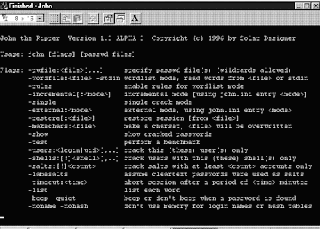
1. John the Ripper
John the Ripperis a free password cracking software tool initially developed for theUNIX operating system. It is one of the most popular passwordtesting/breaking programs as it combines a number of password crackersinto one package, autodetects password hash types, and includes acustomizable cracker. It can be run against various encrypted passwordformats including several crypt password hash types most commonly foundon various Unix flavors (based on DES, MD5, or Blowfish), Kerberos AFS,and Windows NT/2000/XP/2003 LM hash. Additional modules have extendedits ability to include MD4-based password hashes and passwords storedin LDAP, MySQL and others.
2. Nmap
Nmapis my favorite network security scanner. It is used to discovercomputers and services on a computer network, thus creating a "map" ofthe network. Just like many simple port scanners, Nmap is capable ofdiscovering passive services on a network despite the fact that suchservices aren't advertising themselves with a service discoveryprotocol. In addition Nmap may be able to determine various detailsabout the remote computers. These include operating system, devicetype, uptime, software product used to run a service, exact versionnumber of that product, presence of some firewall techniques and, on alocal area network, even vendor of the remote network card.
Nmapruns on Linux, Microsoft Windows, Solaris, and BSD (including Mac OSX), and also on AmigaOS. Linux is the most popular nmap platform andWindows the second most popular.
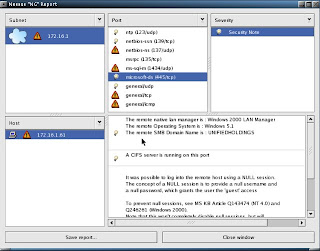
3. Nessus
Nessusis a comprehensive vulnerability scanning software. Its goal is todetect potential vulnerabilities on the tested systems such as:
-Vulnerabilities that allow a remote cracker to control or access sensitive data on a system.
-Misconfiguration (e.g. open mail relay, missing patches, etc).
-Defaultpasswords, a few common passwords, and blank/absent passwords on somesystem accounts. Nessus can also call Hydra (an external tool) tolaunch a dictionary attack.
-Denials of service against the TCP/IP stack by using mangled packets
Nessusis the world's most popular vulnerability scanner, estimated to be usedby over 75,000 organizations worldwide. It took first place in the2000, 2003, and 2006 security tools survey from SecTools.Org.
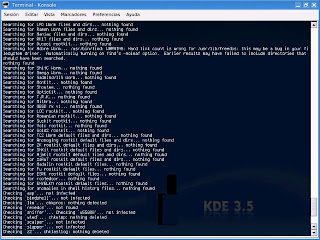
4. chkrootkit
chkrootkit(Check Rootkit) is a common Unix-based program intended to help systemadministrators check their system for known rootkits. It is a shellscript using common UNIX/Linux tools like the strings and grep commandsto search core system programs for signatures and for comparing atraversal of the /proc filesystem with the output of the ps (processstatus) command to look for discrepancies.
It can be used from a"rescue disc" (typically a Live CD) or it can optionally use analternative directory from which to run all of its own commands. Thesetechniques allow chkrootkit to trust the commands upon which it dependa bit more.
There are inherent limitations to the reliability ofany program that attempts to detect compromises (such as rootkits andcomputer viruses). Newer rootkits may specifically attempt to detectand compromise copies of the chkrootkit programs or take other measuresto evade detection by them.
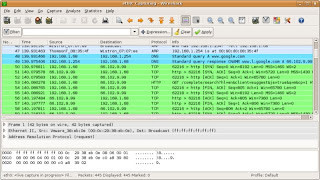
5. Wireshark
Wiresharkis a free packet sniffer computer application used for networktroubleshooting, analysis, software and communications protocoldevelopment, and education. In June 2006, the project was renamed fromEthereal due to trademark issues.
The functionality Wiresharkprovides is very similar to tcpdump, but it has a GUI front-end, andmany more information sorting and filtering options. It allows the userto see all traffic being passed over the network (usually an Ethernetnetwork but support is being added for others) by putting the networkinterface into promiscuous mode.
Wireshark uses thecross-platform GTK+ widget toolkit, and is cross-platform, running onvarious computer operating systems including Linux, Mac OS X, andMicrosoft Windows. Released under the terms of the GNU General PublicLicense, Wireshark is free software.
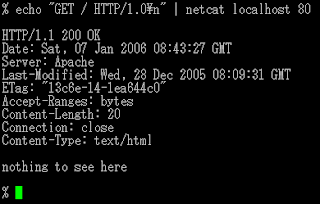
6. netcat
netcat is a computer networking utility for reading from and writing to network connections on either TCP or UDP.
Netcatwas voted the second most useful network security tool in a 2000 pollconducted by insecure.org on the nmap users mailing list. In 2003, itgained fourth place, a position it also held in the 2006 poll.
The original version of netcat is a UNIX program. Its author is known as *Hobbit*. He released version 1.1 in March of 1996.
Netcat is fully POSIX compatible and there exist several implementations, including a rewrite from scratch known as GNU netcat.
7. Kismet
Kismetis a network detector, packet sniffer, and intrusion detection systemfor 802.11 wireless LANs. Kismet will work with any wireless card whichsupports raw monitoring mode, and can sniff 802.11a, 802.11b and802.11g traffic.
Kismet is unlike most other wireless networkdetectors in that it works passively. This means that without sendingany loggable packets, it is able to detect the presence of bothwireless access points and wireless clients, and associate them witheach other.
Kismet also includes basic wireless IDS featuressuch as detecting active wireless sniffing programs includingNetStumbler, as well as a number of wireless network attacks.
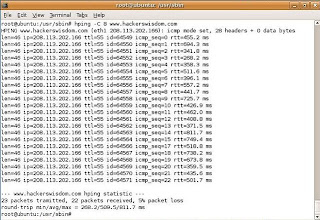
8. hping
hpingis a free packet generator and analyzer for the TCP/IP protocol. Hpingis one of the de facto tools for security auditing and testing offirewalls and networks, and was used to exploit the idle scan scanningtechnique (also invented by the hping author), and now implemented inthe Nmap Security Scanner. The new version of hping, hping3, isscriptable using the Tcl language and implements an engine for stringbased, human readable description of TCP/IP packets, so that theprogrammer can write scripts related to low level TCP/IP packetmanipulation and analysis in very short time.
Like most tools used in computer security, hping is useful to both system administrators and crackers (or script kiddies).
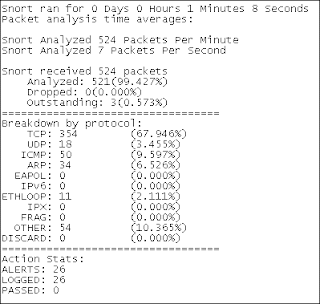
9. Snort
Snortis a free and open source Network Intrusion prevention system (NIPS)and network intrusion detection (NIDS) capable of performing packetlogging and real-time traffic analysis on IP networks.
Snortperforms protocol analysis, content searching/matching, and is commonlyused to actively block or passively detect a variety of attacks andprobes, such as buffer overflows, stealth port scans, web applicationattacks, SMB probes, and OS fingerprinting attempts, amongst otherfeatures. The software is mostly used for intrusion preventionpurposes, by dropping attacks as they are taking place. Snort can becombined with other software such as SnortSnarf, sguil, OSSIM, and theBasic Analysis and Security Engine (BASE) to provide a visualrepresentation of intrusion data. With patches for the Snort sourcefrom Bleeding Edge Threats, support for packet stream antivirusscanning with ClamAV and network abnormality with SPADE in networklayers 3 and 4 is possible with historical observation.
10. tcpdump
tcpdumpis a common computer network debugging tool that runs under the commandline. It allows the user to intercept and display TCP/IP and otherpackets being transmitted or received over a network to which thecomputer is attached.
In some Unix-like operating systems, auser must have superuser privileges to use tcpdump because the packetcapturing mechanisms on those systems require elevated privileges.However, the -Z option may be used to drop privileges to a specificunprivileged user after capturing has been set up. In other Unix-likeoperating systems, the packet capturing mechanism can be configured toallow non-privileged users to use it; if that is done, superuserprivileges are not required.
The user may optionally apply aBPF-based filter to limit the number of packets seen by tcpdump; thisrenders the output more usable on networks with a high volume oftraffic.
Do you have a favorite security software tool for Linux? Feel free to comment and tell us about it.
A man who hacked into a third partyValve file server and stole the credit card numbers of Steam Cyber Caféusers has been caught by Dutch police.
The hacker, who went by the onlinehandle MaddoxX, managed to break into a server containing credit cardinformation, transaction amounts, Valve's bank balance and data thatallowed the creation of counterfeit Cyber Café websites.
MaddoxX posted the information on a website, but didn't use the information for personal gain. According to ShackNews, he posted a message that said: "We also don't want money from VALVe, we want a simple message on their site."
Despite making a moral standing on that occasion, the Dutch Ministry ofthe Interior said that the 20 year old hacker had managed to "burn 13million Euros playing poker online and shopping for notebooks, flatscreens and MP3 players." Based on that, we're guessing he wasn't asmorally resolute every time he came across personal data.
Inaddition to the Valve incident, he is also being charged with hackinghis way into an Activision server and downloading an unfinished copy ofEnemy Territory: Quake Wars. Which, if nothing else, is not the gameyou want to get caught hacking for.
Of course your content is your copyright and others should not copyit without your permission. But a feed can be repurposed in many ways,and we need to look at what parts of the feed are being copied and whoprofits.
Copyright lawyers will have to fill me in on the latest case law onall of this, but I think in practice we have despatched the question whether links are legal (is the web legal?) with a resounding yes.
Shouldn’t You Have To Ask Permission If You Want To Take A Blog’s Feed For Your Profit? which has attracted considerable comment.
As Sir Tim father-of-the-web-but-not-a-lawyer Berners-Lee has said:
There are some fundamental principles about links onwhich the Web is based. These principles allow the world of distributedhypertext to work. Lawyers, users and technology and content providersmust all agree to respect these principles.
What of link+title? In principle there is copyright in a title, butit’s hard to see anyone any longer seeking to enforce copyright here.
But an RSS feed is an aggregation, so what of a bunch oflinks+titles? Here there is a stronger case for saying that thisaggregation is protected by copyright, and if we’re talking about anaggregation of links+titles+descriptions or even +excerpts, that isclearly protected. So let’s talk about permission, express or implied.
I don’t believe there’s any implied permission for others to republish feeds.But in practice, why publish a feed if you don’t want it to berepublished? It will be, and there’s little you can do to stop it. Youcan frame some stern T & Cs or apply a more friendly CC licence,but most, whether intentionally or by default, will take little notice.
Susan makes much of others taking your (blog) feed “for profit”. Weare all miffed if we see others profiting from our work at our expense.But, with feed repurposing, in most cases we profit too, sufficientlythat we do not see it as being at our expense.
Google indexes, caches and republishes parts of my website, myblog, my feeds without my permission. Google profits handsomely, but Iprofit too.
Other specialist search engines and directories - like Tehcnorati,Blawg Search - also index and repurpose my content. If I’ve submittedmy site to them, I’ve probably given them permission to do this, but inmost cases my signing up only legitimates what they have been doing /would do anyway. (Susan, Technorati indexes your blog whether you’veclaimed it or not.) They profit, but I profit too.
Smaller fish might also republish my feeds, but in all cases shortof their republishing my full text, I profit as much as or more thanthey do. All items link back to me. And I really am not going to losesleep if they choose to wrap Google ads around it or seek to profit inother ways. (I do view sploggers etc as the scum of the earth, but I blame Google Adsense.)
So in practice, what we are all most concerned about is othersclaiming our real work - our full posts or articles - as their own; andthere is a simple answer: if you want to protect your content, includeonly excerpts rather than full text in your feeds. Syndicate yourmetadata, not your data.
Sitecom has unveiled a router designed to provide a low latency and lag-free service online. The router uses StreamEngine Technologythat separates incoming data into five categories: game, VoIP, Movie,File Sharing and email.
Bandwidth is rationed accordingly, so the services that need massive amounts - i.e. gaming - get the priority treatment.
To top it all off, the box contains preconfigured application levelgateways for the most recent games and supports up to 300Mbps.
The Gaming Adapter goes on sale in August 2008 and its recommend retail price is £109.99
When Valve summoned a handful of US and UK journalists to itsSeattle headquarters at the end of last month, it promised to talkabout the future of Steam, its digital distribution system. That itdid, revealing the ambitious Steam Cloud service for remote storage of game data, and boasting that it would soon be making more money selling games digitally, all the while remaining untroubled by piracy.
Valvemastermind Gabe Newell and his cohorts had an ulterior motive forbringing reporters together, however, and unusually for an ulteriormotive, it wasn't a wholly self-interested one. It was this: toevangelise the PC as the games platform of the future.
"Thisreally should be done by a company like Intel or Microsoft, somebodywho's a lot more central to the PC," says Newell, pointing out thatcompanies like Blizzard, PopCap and GameTap would have just as much tosay as Valve about how PC gaming is leading innovation in technology,business models, and community-building. But, notwithstandingMicrosoft's occasional promotionof Games For Windows - an initiative Newell refrains from attackingdirectly, but exudes disdain for - that support has not beenforthcoming.
Where console platforms have merciless andwell-funded PR armies poised to combat any criticism, negative storiesabout the PC - mostly publishers, or developers like Crtyek,complaining of rampant piracy and flat sales - run unimpeded. Salesdata that focuses solely on boxed copies sold at retail appear to backthem up. Valve has had enough. "There's a perception problem," saysNewell. "The stories that are getting written are not reflecting whatis really going on."
You want figures? There are 260 million online PC gamers, a marketthat dwarfs the install base of any console platform, online oroffline. Each year, 255 million new PCs are made; not all of them forgaming, it's true, but Newell argues that the enormous capitalinvestment and economies of scale involved in this huge market ensurethat PCs remain at the cutting edge of hardware development, andconsoles their "stepchildren", in connectivity and graphics technologyespecially. Meanwhile, Valve's business development guru, JasonHoltman, notes that without the pressure of cyclical hardware cycles,PC gaming projects - he points to Steam as an example - can groworganically, over long periods of time, and with no ceiling whatsoeverto their potential audiences.
More pertinent, perhaps, are thefigures directly relating to games revenue that the retail charts -admittedly a stale procession of Sims expansions and under-performingconsole ports - don't pick up. "If you look into the future, there's animportant transition that's about to happen, and it's going to happenon the PC first," says Newell.
At its heart, he explains, is a shift from viewing games as aphysical product, to viewing them as a service - something that is alsohappening in other entertainment media. Digital distribution is part ofthat; more fluid and varied forms of game development, with games thatchange and engage their communities of players over time, are another;as is, naturally, the persistence and subscription (or otherwise)revenues of MMO games. None of this is reflected in the sales chartsanalysts, executives - and gamers - obsess over.
Valve sees 200per cent growth in these alternative channels - not just Steam, butincluding the likes of cyber-cafes as well - versus less than 10 percent in bricks-and-mortar shop sales. Steam has a 15 million-strongplayer-base with 1.25 million peak concurrent users, and 191 per centannual growth; none too far off a console platform in itself. The PCcasual games market, driven by the likes of PopCap, has gone from nextto nothing to USD 1.5 billion dollar industry in under ten years, andhas doubled in size in just three. Perhaps most surprisingly, Valve hasfound that digital distribution doesn't cannibalise retail sales - infact, a free Day of Defeat weekend on Steam created more new retailsales than online ones.
And then there is the game that many claim has been the death of PCgaming, but that Valve sees as its greatest success story, and itsfuture. "Until recently, the fact that World of Warcraft was generating120 million dollars in gross revenue on a monthly basis was completelyoff the books," Newell says. "Essentially, [Blizzard is] creating a newIron Man every month, in terms of the gross revenue they're generatingas a studio. Any movie studio would be shouting about that from therooftops. But it was essentially invisible."
Newell thinks thatWOW is "arguably the most valuable entertainment franchise in any mediaright now", and also believes, rightly, that it could only ever havehappened on the PC. He also tips his hat to South Korea's Nexxon forits enormous success with free-to-play, microtransaction-driven gameslike Kart Rider and Maple Story, soon to be aped by EA's BattlefieldHeroes.
There is another reason for the gulf between theperception and the reality of the games market, Valve thinks, and it'sa geographical and linguistic one. The dominance of the Englishlanguage gives the US and UK games markets, where the PC is weakest,undue prominence. In several major Western markets - notably Germanyand the Nordic countries - the PC performs much better. What's more, inthe emerging markets of China, Korea and Russia, where gaming is seeingunprecedented, explosive growth, console install bases are negligible,and the PC is king. Valve thinks that there's a silent majority ofglobal gamers who are skipping the console era entirely, the way thesedeveloping nations already skipped dial-up internet.
Steam isavailable in 21 languages for this reason, and Valve reckons that itsspeedy localisation and lack of physical distribution is an effectivecounter to the piracy common in these markets. It's also allowing Valveto get games to players in regions traditional channels don't support."PC's are everywhere in the world," says Holtman simply. "PC's are thesame all over the world. All of sudden, if you can open up emergingmarkets and go somewhere like Russia or South East Asia, you've goneway further than you can go with a closed console. There are 17 millionPC gaming customers in Russia alone."
A key shift in this brave new world of games as services rather thanproducts - and one that runs contrary to the traditional image of PCgaming - is a move away from graphical fidelity being the yardstick ofprogress. "As a company that's really proud of the job we do withgraphics it's funny to say this," Newell says, "but we get a betterreturn right now by focusing on those features and technologies thatare about community, about connecting people together."
He citeseasy uploading of gameplay videos to YouTube as a bigger source ofentertainment value than marginal improvements in graphics. "I thinkthat people thinking about how to generate web hits on their serversare a lot closer to the right mentality for what's going to besuccessful in entertainment going forward, than somebody that's used tohaving conversations about how to get end caps at Best Buy."
Therevolution in distribution and business models also offers a major newopportunity for smaller games - and smaller games developers - tothrive. The demands of retail - the logistical problems of gettingboxes to shops, and the budgetary drain of huge marketing campaigns -mean that bigger is necessarily better in the traditional games market.
Notso on Steam and its equivalents, says Valve, pointing to the hugesuccess of indie darling Audiosurf, as well as its own Portal. "As youmove away from that huge first weekend, big blockbuster mentality,"says Newell, "you're getting back to an area where smaller and smallergroups can connect with customers. I think you're going to find thatthe enjoyment of being in the game industry as a developer on the PC isa lot greater than outside of it."
He's backed up by an actual indie, Audiosurf creator Dylan Fitterer.This one-man development, created without financial backing -impossible on consoles, due to the cost of development kits - was thebest-selling game on Steam full-stop at its release, outclassing manybig-budget titles. "I didn't have to ask anybody if I could release it,except for my wife," Fitterer says. "It took a few years, and I waspretty darn tired by the time it was ready. Something likecertifications? No thanks." He also points out the tight limitations ofconsole servers versus PC servers for online gaming; Audiosurf'sscoreboard for every song ever recorded would be out of the question ona closed platform.
Holtman argues that Steam and Steamworks - thesuite of free tools it offers - revolutionise the environment fordevelopers and publishers. The auto-updating system means that a gamecan be developed right up to release and beyond. It eases painfulcrunch times, and allows game makers to respond to their audiences,publishers to develop their titles as continuously evolving franchisesrather than finite products.
"All of a sudden, PC games becomethis thing that's reliable and up-to-date," says Holtman. Team Fortress2 designer Robin Walker weighs in, noting that the PC version of theshooter has had no less than 53 updates since its release last year -something that certification cost and time have prohibited for onconsole - and that this "ship continuously" ethos is a key component tothe success of the best multiplayer titles. Steam, he says, makes thatprocess fast and transparent.
"I don't want anyone between me andmy customers," says Walker. "I want to write code today and I want allmy customers running it tomorrow." Possible on the PC - Steam inparticular, naturally. Not possible on consoles. For his part, Fittereradded achievements to Audiosurf in a total of two days. This constantiteration creates a feedback loop between developer and customer that,reckons Walker, can only improve the quality of the game. "The more Italk to my customers, the better my decisions will be. Without a systemof talking to my customers, I will make bad decisions."
The implication is a striking one: sporadic, excessively controlledupdating means that console multiplayer games will never reach theheights of their PC counterparts. There is a counter-argument - that PCgames descend into a poorly-defined, indistinct mess of constantpatching - but it is effectively squashed by the fact that, if you lookfor a multiplayer game with the longevity and massive popularity of aWOW or a Counter-Strike on console, you won't find one (with the veryarguable exception of Halo).
Auto-updating is the reason Valvecreated Steam in the first place. It's the reason it now finds itselfin an odd position for a developer: semi-publisher, leadingdistributor, market analyst, agony uncle and technocrat - not tomention defender of a platform that's still being proclaimed dead, whenall signs point to the very opposite.
At the end of the day, PCgaming's health - and its trickiest challenge - comes down to a bottomline that even the format's detractors can't refute: there are just somany of the damn things. "We think the number of connected PC gamers weare selling our products to dwarf the current generation of consolesput together," states Newell. "There are tremendous opportunities infiguring out how to reach out to those customers.
UK01 claims to be a real GSM operator, and has just signed a dealwith Spectrum Interactive to put its GSM base stations into phonekiosks run by the Wi-Fi hotspot operator, establishing a few hundredlocations from which UK01 customers will be able to make, and receive,calls.
Behind UK01 is a company called Mapesbury Communications Ltd, whoseCEO Magnus Kelly said in a statement that "this agreement is animportant milestone, as it accelerates our ability to launch the UK's6th mobile phone network".
The spectrum used for UK01's network is around 1800MHz, so withinthe operating band of most mobile handsets, but the operator's licenceis only for low-power deployments which will have very limited range -so customers won't be able to wander far from the kiosk bearing theUK01 service mark.They'll also have to manually select the UK01 network, as the companyapparently has no roaming agreements with other operators to provideadditional coverage.
The lack of roaming is unsurprising, as Mapesbury only paid around£77,000 for the limited-power licence. To get into the door of a realoperator you'd need at least a billion quid's worth of spectrum.
UK01 is much more like a Wi-Fi hotspot operation, and the deal withSpectrum Interactive underlines that. Punters seeing the service markmight decide to switch to UK01 for a cheaper tariff, as long as theyhang around nearby, though the company might like to remember PhonePoint, Phone Zone and Rabbit as similar services that crashed andburned.
The spectrum was part of Ofcom's first spectrum auction, and thenewly-formed regulator imagined it might be used for private networksor operator in-fill, both of which are being deployed by otherlicensees. The use of 1800MHz prevents 3G data services (3G is stillcorralled at 2.1GHz), so it's EDGE at best, though UK01 hasn'tannounced any kind of data service as yet.
We tried to speak to Mapesbury Communications to ask whether UK01intends to expand its network, but we were told that the only chap whocould help us was Mr Kelly, the CEO, and he's not around today. Sowe're left to speculate.
Samsung has finally confirmed the rumours that it is putting their laptop HDDs Spinpoint M6 and M2 into mass production.
TheM2 – which Samsung call 'one of the world's fastest laptop hard drives'– is a 250GB 2.5in hard drive which operates at a 7200rpm rotationspeed, the MP2 which would appear to be well-suited to desktopreplacement laptops and gaming laptops.
The Spinpoint M6, a500GB drive, is built for the expanding data storage needs of modernlaptops and features a 5400rpm spindle speed, a 8MB cache, and 3.0GbpsSATA interface.
Stick it in your notebook "TheSpinpoint M6 is ideal for notebook power users who require vast amountsof storage space for their data, video and music files," said HubbertSmith, Director of Storage, Samsung Semiconductor.
"The MP2 hasspeed, features and capacity similar to a 3.5in hard drive and isperfect for users who require a smaller form factor with advanced datastorage needs."
F1 racing Meanwhile,Samsung has confirmed that its new Spinpoint F1 RAID Class SATA 1TBcapacity HD has gone into mass production and will be available soon.
Featuringa 334GB per-platter capacity, a 7200RPM spindle speed and a 32MB cache– Samsung has also included its rotational vibration controller and anoptimised system-on-chip (SOC) that lowers power consumption.
Mitt Romney Mitt Romney has made computer games part of the thrust of his campaign,with references to the media genre in an ad campaign. In the promotional slot,he implicates them in "oceans of filth" in which America's youth areswimming. You can only imagine what he'll do if he gets into the WhiteHouse.
According to a Common Sense Media survey,which posted questions about interactive and other entertainment to theleading candidates, he intends to, "get serious against those retailersthat sell adult video games that are filled with violence and that wego after those retailers," and "to restore values so children areprotected from a societal cesspool of filth, pornography, violence, sexand perversion." Surprisingly similar to his Democratic opposite,Hillary Clinton.
John McCain Second-time Presidential runner McCain has a team that thinks seriously about technology. In response to a CNet survey,"McCain" (aka his policy-writers) tackles net neutrality, governmentsubsidies for high-speed internet access, internet data privacy andcopyright issues. Unfortunately, there was only an oblique reference togames.
GamePolitics suggeststhat the anti-game slant of Independent candidate Joseph Liebermann mayhelp his friend McCain, whose inability to connect with the ReligiousRight in the US could be bolstered by their association.
McCain didn't respond to the CSM report, and so his intentions remain a mystery, for now.
Mike Huckabee The evangelical Iowa caucus winner has been completely silent on thesubject of computer games, although, like McCain, he "expressedinterest" in participating in the CSM survey.
At the moment, games aren't an important policy issue, but I predictpolitical eyeballs will turn towards interactive entertainment whencontroversy temperatures rise in the summer months. If the potentialcandidates are silent now, they'll have to take a stand one way or theother. My guess is that all will play conservative, and with varyingseverity, call for federal government regulation of games in the US.
Meanwhile, in this country, we are anxiously awaiting the release of the Byron Report later this year, which should establish a useful baseline about the effects of violent videogaming on consumers.
Not sated by this roundup? Catch the dirt on the Democratic candidates in yesterday's post, or go to Gamepolitics for coverage. They have a special category, Game Decision 2008.
Debate over World of Warcraft - an interesting take.
We don't actively support wegame.com Take a look at one of the comments below...
Quote:
did anyone notice the voices sound like george bush and that guy whos running for president? XD really well done..
Quote:
LOL funny work
There are a surprising number of British media eyeballs on the earlystages of the US elections. Reports suggest that people are coming outin droves to participate in caucuses, primaries and polls, particularlypopulations who've neglected politics before. And this includes a wholeraft a newly-eligible voters, many of whom happen to be computer gamers.
While it's still too early to suggest who'll be sworn in come 2009,there's still a whole lot of side-taking happening throughout the gamesblogosphere. Gamepolitics, the most obvious platform, is having a fieldday publishing satirical casual games, posts about candidate Obama'slikeness to Tiger Woods (seriously), and rumours about potentialsenatorial anti-games candidates.
This is undoubtedly a technologically-saturated election. All of thecandidates have MySpace pages (demonstrating the lightening speed withwhich politics adopts new media; where are their Twitter updates forgoodness sake?), and with the next few gaming months certain to be hotwith the release of the latest episode in a certain controvesry-ridingfranchise, we can expect to see gaming and techno-morality in a fewpolitical broadcasts.
So where do the front-runners sit with regards to computer games?This handy primer gives the dirt on their past actions and theircurrent attitudes. Today, the Democrats. Tomorrow, the Republicans.
Hillary Clinton New Hampshire Democrat primary winner Hillary (whatever happened to the Rodham?) Clinton has never been a fanof computer games. Two years ago, Sen. Clinton introduced the FamilyEntertainment Protection Act (FEPA) in the wake of the Hot Coffeeincident, to regulate and counteract the effects of violent andsexually-explicit content in digital media. Had it passed, it wouldhave mandated:
On-site store managers would be subject to a fine of $1,000 or 100hours of community service for the first offense and $5,000 or 500hours of community service for each subsequent offense.
The bill would also require an annual, independent analysis ofgame ratings and require the FTC to conduct an investigation todetermine whether hidden sexual content like what was in Grand TheftAuto: San Andreas is a pervasive problem and to take appropriateaction...
Finally, the bill would authorize the FTC to conduct an annual,random audit of retailers to monitor enforcement and report thefindings to Congress.
more information from gamepolitics More recently, in response to a Common Sense Media poll of the attitudes of the candidates to video game entertainment, Clinton argued,
"When I am President, I will work to protect children from inappropriate video game content"
Barack Obama The Iowa caucus winner has suggested on several occasions that gamersare slackers. "It's time to turn off your Game Boys," he said at anAustin, Texas event last February. He's also returned a donation made by the Electronic Software Association's Doug Lowenstein and has repeatedly argued that working harder means playing fewer games.
In the CSM poll, Obama promoted industry self-regulation:
I would call upon the video game industry to give parents betterinformation about programs and video games by improving the voluntaryrating system we currently have. Broadcasters and video game producersshould take it upon themselves to improve this system to include easierto find and easier to understand descriptions of exactly what kind ofcontent is included. But if the industry fails to act, then myadministration would.
Indeed, in the same response, he does hint at federal regulation,and promotes funding research into the "impact of video games onchildren's cognitive development."
John Edwards Edwards was the likable second to Hillary's first before Obama camealong, but his standings in the recent primary and caucus suggest thathe may take a back seat in November. However, he too could become aComeback Kid, so it's worth taking a look at what might happen to gamesif he gets the keys to the White House.
Edwards notably launched his campaign inside virtual world Second Life, and like many high-profile areas in this cyber-space, it was subsequently vandalised. Otherwise, he's been quiet on the digital entertainment front, with little action in either direction.
So it's unsurprising that when the question was posed, point blank,in the CSM poll, he (and his policy-writers) played a cautious,hands-off game; he applauds the work of the internal ratings boards,but suggests that there's much more to do to keep inappropriate contentaway from kids:
If the industry does not continue to make progress in keeping videogames with intense violence and adult content away from children, wewill need to consider further steps to ensure that parents' decisionsabout their children's exposure to these games are not being underminedby retailers, advertisers and manufacturers.
Of the three Democrats, only Clinton appears to have made this apolitical issue, and has thought seriously about the implications ofinteractive media. She's the only one ready to take action, one way orthe other. While Obama has despaired at games in the past, both he andEdwards are less explicit about any actions they would take if theywere to take up residence on Pennsylvania Avenue next year.
Tomorrow, we cover the Republican candidates, but in the meantime,more information on where the candidates stand is available at gamepolitics, in their category Game Decision 2008.
Disclaimer for articles or content containing "wegame.com": iVirtua Media Group (UK) does not recommend nor endorse the third party service "Wegame.com" or any of its associates. For more information contact our Public Relations team via William Tildesley in our Social Media Department - william.tildesley@iVirtua.co.uk or williamtildesley@gmail.com
Based on the books rather than the Schwarzenegger films, Age of Conanis a violent, massively multiplayer online game (MMO). Think World ofWarcraft with sharper swords and bigger breasts. The game leads yougently into the action and even allows you to learn the ropes in asingle-player environment before braving the multiplayer wilds. Andexperienced players get to build, or conquer, opponents' castles andkeeps. But the real innovation is the combat which, unlike most MMOs,involves reflexes and timing. The game looks mightily pretty; prepareto gawp at a sunset or distant mountain. But this graphical opulencecomes at a price, with loading screens a far-too-common annoyance.Worse, these breaks in play make the world feel less like a coherentwhole, lessening the feeling of immersion that games like WoW and Lordof the Rings Online engender so effectively. But assuming you have apowerful PC - which is essential for this game - Age of Conan is worthvisiting.
Age of Conan: Hyborian Adventures is a fantasy-themed massively multiplayer online role-playing game (MMORPG) developed by the Norwegian computer, video game developer company Funcom for PC and the Xbox 360.The game launched at 9 p.m. (GMT) on May 17, 2008in a limited way, being available to those who had pre-ordered the gameand registered for early access. The full release of the game for NorthAmerica was May 20, 2008 and for Europe May 23, 2008 for the PC version.The Xbox 360 version is scheduled to be released a year after the PC release.
After a long build up, including an eight-week delay to apply the finalpolish, Age of Conan: Hyborian Adventures (AoC) has been launched.
DreamWorld Engine
The DreamWorld graphics engine was developed by Funcom circa 2000. Other computer games powered by DreamWorld technology include Anarchy Online and its various expansion packs. When Funcom began developing Age of Conan: Hyborian Adventures,the company reviewed its existing technology base and decided to focuson the further evolution of their proprietary DreamWorld engine asopposed to licensing a third-party engine like many online RPGcompanies do. As such, Funcom began to retool their engine with theoverall design, pipeline and implementation process was taken intoaccount. In light of these changes, the DreamWorld engine has beenrebuilt for Age of Conan: Hyborian Adventures with new features, special effects and optimizations.[30]
"Real Combat"
"Real Combat" is being touted by Funcom as a revolutionary approachto combat in online RPGs where the player is in direct control of thecharacter's weapon strikes in real time. This multi-point melee andranged combat system is purportedly easy-to-learn and is one of theprime attractions of the title. Allegedly, the "Real Combat" systemwill take the ritualized combat experience previously found in onlineRPGs in a new direction. For this system, Funcom has also added aspectssuch as formation combat, mounted combat, siege combat and hive combat.[31]
Cheetah
Cheetah is a shader-oriented proprietary render engine re-written from scratch by Funcom featuring a phong per pixel lighting system. This engine allows for improved graphics and ambience. This is coupled with a trapezoidal shadow system, an in-house system developed by Funcom that allows all objects to cast shadows onto everything.[32]
Perlin noise-based cloud generating system
Perlin noise-based cloud generating system is a five-layered procedural system that enables multiple layers of dynamic clouds; thus, visually-realistic cloud behavior.[33]
SpeedTree
SpeedTree is a programming package produced by Interactive Data Visualization, Inc. (IDV) that aims to produce high-quality virtual foliage in real time, suitable especially for video gamesbut also aimed to a lesser extent at some other kinds of simulations.It has so far been licensed to a substantial number of video gamedevelopers, including developers of the Unreal engine series. SpeedTree is currently being used in several games, including (but not limited to) the MMO action game World War II Online and The Elder Scrolls IV: Oblivion.[34]
DirectX 10
"Funcom is proud to be one of the few developers who is tapping intothis technology, and we look forward to showing you even more of DirectX 10. Some of the improvements visible in the videos and the screenshots are improved parallax mapping, better lighting and more advanced shadows technology."[35]The game did not include support for DirectX 10 at the time of launch.DirectX 10 features are now slated to be premiered at the GamesConvention in Leipzig in August 2008.
Pre-Launch acclaim
During the past several years, Funcom has twice previewed Age of Conan: Hyborian Adventures at the Electronic Entertainment Expo, more commonly known as E3,and the product has received various critic awards for thesedemonstrations. The following information is a partial listing of thoseawards.
E3 2005
The latest forecast for the growthof the global games industry shows that the next four years are boomyears, with a growth of $41.9 billion in global sales last year to apredicted $68.3 billion in 2012.
The PricewaterhouseCoopersdata is drawn from the forthcoming Global Entertainment and Media Outlook: 2008-2012 report.
Console games up Consolegames are predicted to grow by 6.9 percent annually, going from salesof $24.9 billion last year to $34.7 billion in 2012.
Online andwireless games are predicted to have the fastest rate of growth overthe next four years (16.9 per cent and 19 per cent, respectively), withthe in-game advertising industry also predicted to reap massive rewardsin the coming years, going from the $1 billion level in 2007 to $2.3billion in 2012.
"That's phenomenal growth," PwC partner StefanieKane told Reuters, "especially considering that in-game advertisingonly works with certain kinds of games, sports being a primary example."
PC games down OfflinePC gaming is the only gaming sector predicted to fall in terms ofrevenue growth from $3.8 billion last year to $3.6 billion in 2012.
PricewaterhouseCoopers report lists the following factors that feed into the rapid growth of the games industry over the next four years:
* mobile phones capable of downloading games with sophisticated graphics and displaying them on relatively large screens;
* an online market driven by the increased penetration of broadband households;
*the increasing popularity of massively multi-player online games thatearn revenue through subscription fees and micro-transactions.
The street of dreams is paying attention to video game tech these days, and not just in terms of potential investments.
Wall Street & Technology reports that the same graphics processors (GPUs) employed in modern game consoles are powering specialized financial displays.
Frank Tan, a Deutsche Bank options trader, told WS&T:
Withthe advancement of computer gaming and graphics technology likePlayStation and Xbox, these graphics cards are a lot more capable [thanever]. The idea is to use the GPUs for financial calculations ratherthan playing games and generating graphics...
First,there is the sheer number of messages and data coming in... Every timethe underlying price changes, or if there is a shift in the optionsquotes, the options prices... have to be recomputed. The GPU has thecapability to solve the second computational issue. Before GPUtechnology came out, in order to solve this problem in real time, youwould have to buy supercomputers.
A new research study conducted by Nielsen BASES andNielsen Games on behalf of IGA Worldwide finds that in-game ads providebrands a measured lift in overall consumer awareness and opinion.
Nielsentested multiple variables with multiple brands across multiple games -as opposed to just a single brand in a single game. The companysurveyed over 1,300 PC gaming participants in their homes by linkingIGA's proprietary measurement software with research trackers embeddedwithin sample game discs.
Participating brand advertisersincluded Taco Bell, Jeep and Wrigley, and game titles were provided byElectronic Arts and Activision.
The study found that 82per cent of consumers felt that games were just as enjoyable with adsas without. In addition, there was an average 61 per cent increase inconsumers' favorable opinions of products advertised in-game post-play.
Thestudy also found that there is an average 44 per cent increase inpost-game aided recall from pre-awareness and that the games increasedpositive brand attribute association 33 per cent across all brands.
Over70 per cent of consumers who were most opinionated about in-game adsfelt the ads made them feel better about the brand, feel more favorabletoward the brand, make them more interested in the brand, and believethe ads are for innovative/cutting edge brands.
Over 60 per centof that group felt the ads caught their attention, made games morerealistic, did not interrupt the game experience and were promotingrelevant products.
"With young adults now spending on average 6hours a week gaming, advertisers should be excited at how well theirmessages were embraced and the brands positively perceived," saidJustin Townsend, CEO of IGA Worldwide.
"The consumer insightswe've gleaned from this data will help drive the industry' firstresearch-based in-game advertising measurement standards as well asstrengthen IGA's position as an effective in-game ad network brands cantrust to efficiently deliver their message to target audiences."
Quote:
In-gamead exposures with a duration over 2 seconds, as they are measured inIGA's in-game ad methodology, generate on average an almost 30 per centincrease in key ad metrics, including ad noticeability +100 per cent,recall +42 per cent, and fit +27 per cent versus ad exposures with aduration of less than 1 second.
"This study offers proof thatdynamic in-game advertising is an influential digital ad medium," saidDave Anderson, a senior director of business development for Activision.
"Justas important to us is how users react to the ads. From the research itis clear that the overwhelming majority of consumers enjoyed the gamingexperience just as much, if not more, with dynamic ads present.
"As game publishers, it is reassuring to know advertisers and consumers both stand to benefit from dynamic ads."