An exclusive gaming industry community targeted
to, and designed for Professionals, Businesses
and Students in the sectors and industries
of Gaming, New Media and the Web, all closely
related with it's Business and Industry.
A Rich content driven service including articles,
contributed discussion, news, reviews, networking, downloads,
and debate.
We strive to cater for cultural influencers,
technology decision makers, early adopters and business leaders in the gaming industry.
A medium to share your or contribute your ideas,
experiences, questions and point of view or network
with other colleagues here at iVirtua Community.
this is stupid, a lot of what that guy said is not true. for example, win98 is NOT eyecandy, and w/e it does have that would be considered that can be turned off. win95 is not good for everyday tasks. is it suitable to do so? sometimes, but a newer os would be much better, even if its 98. and how is the whole "3d" look annoying? not only would be insignificantly take up disk space and ram, but it helps you actually see whats the boarder of something. and, from what i remember, win98 was under 700mb. big whoop, 200+mb for a LOT more features, stability, and functionality. if you're that cheap, go with linux and use a live cd every time you start up your computer - at least that way you take up no space at all.
as for his complaint about programs such as firefox working on a newer os, maybe he just needs to get into the new ages and just buy a new computer. it would not surprise me that hes using a newer os on something that isn't even 1ghz. this guy needs to learn to think - FIREFOX IS DESIGNED FOR MODERN COMPUTERS. obviously it'll run slow if you run it on something that wasn't designed for something THAT new.
with his whole comment on security and stability, one of the greatest complaints about the first win95 that came out was it was very INSECURE, which results in instability. win98 was considered so great because it was so much more stable and well designed. win95 was the first os of its kind for MS, you HAVE to expect problems with it. if this guy were to do as much tweaking and fixing with win98 or any other os as he did with 95, he'd get the exact amount of stability and security as he would with 95 but probably with less work, making his comments void.
i can understand his whole native feeling argument, but 1 thing that just plain makes no sense is why can't he just make the emulator fullscreen? that way, its like he really IS running DOS. Again, his point is void.
i couldn't tell if he was kidding or not in the next paragraph. even in the NT based OSes, if you're running IE and type "c:\", a file browser in explorer will run and replace IE. works the same way if you type in a website in explorer. Again, this guy just doesn't think. and who really gives a crap about those "essential tools". ever heard of right clicking? And how is forward, back, and favorites awkward? first of all, they're optional. secondly, its for a different type of organization, and apparently it worked well since the old fashioned tree idea (which i'm assuming is what he finds is better) is no longer used for regular file and website browsing whereas these buttons are. to comment on the last sentence, win98 has columns as well as every other os with menus, so idk where hes getting that from. instead of alphabetical order, its made in order of installed date, which is easier to navigate. and unlike win95, you can edit the menus yourself so they are in alphabetical order. also, the scroll arrows are NOT slow on a NORMAL computer DESIGNED for the os and they're for organization, which again, is proven effective since the idea is still being used today.
i'm completely fine with people using win95, but the reasons this guy gave are just plain wrong or stupid, or invalid.i don't mean to be this critical, but this is just ignorance.
Linuxis a hacker’s dream computer operating system. It supports tons oftools and utilities for cracking passwords, scanning networkvulnerabilities, and detecting possible intrusions. I have here acollection of 10 of the best hacking and security software tools forLinux. Please always keep in mind that these tools are not meant toharm, but to protect.
1. John the Ripper
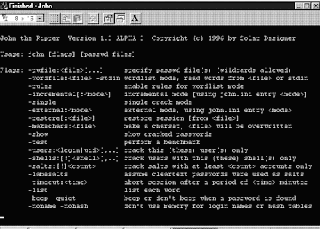
John the Ripperis a free password cracking software tool initially developed for theUNIX operating system. It is one of the most popular passwordtesting/breaking programs as it combines a number of password crackersinto one package, autodetects password hash types, and includes acustomizable cracker. It can be run against various encrypted passwordformats including several crypt password hash types most commonly foundon various Unix flavors (based on DES, MD5, or Blowfish), Kerberos AFS,and Windows NT/2000/XP/2003 LM hash. Additional modules have extendedits ability to include MD4-based password hashes and passwords storedin LDAP, MySQL and others.
2. Nmap
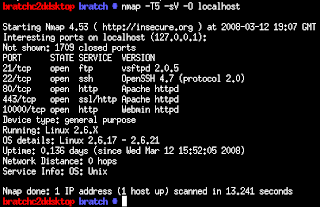
Nmapis my favorite network security scanner. It is used to discovercomputers and services on a computer network, thus creating a "map" ofthe network. Just like many simple port scanners, Nmap is capable ofdiscovering passive services on a network despite the fact that suchservices aren't advertising themselves with a service discoveryprotocol. In addition Nmap may be able to determine various detailsabout the remote computers. These include operating system, devicetype, uptime, software product used to run a service, exact versionnumber of that product, presence of some firewall techniques and, on alocal area network, even vendor of the remote network card.
Nmapruns on Linux, Microsoft Windows, Solaris, and BSD (including Mac OSX), and also on AmigaOS. Linux is the most popular nmap platform andWindows the second most popular.
3. Nessus
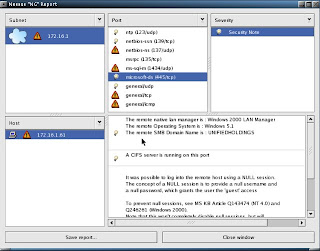
Nessusis a comprehensive vulnerability scanning software. Its goal is todetect potential vulnerabilities on the tested systems such as:
-Vulnerabilities that allow a remote cracker to control or access sensitive data on a system.
-Misconfiguration (e.g. open mail relay, missing patches, etc).
-Defaultpasswords, a few common passwords, and blank/absent passwords on somesystem accounts. Nessus can also call Hydra (an external tool) tolaunch a dictionary attack.
-Denials of service against the TCP/IP stack by using mangled packets
Nessusis the world's most popular vulnerability scanner, estimated to be usedby over 75,000 organizations worldwide. It took first place in the2000, 2003, and 2006 security tools survey from SecTools.Org.
4. chkrootkit
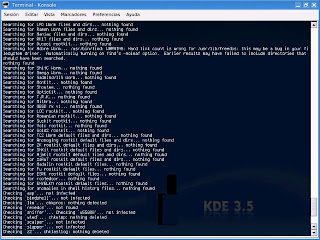
chkrootkit(Check Rootkit) is a common Unix-based program intended to help systemadministrators check their system for known rootkits. It is a shellscript using common UNIX/Linux tools like the strings and grep commandsto search core system programs for signatures and for comparing atraversal of the /proc filesystem with the output of the ps (processstatus) command to look for discrepancies.
It can be used from a"rescue disc" (typically a Live CD) or it can optionally use analternative directory from which to run all of its own commands. Thesetechniques allow chkrootkit to trust the commands upon which it dependa bit more.
There are inherent limitations to the reliability ofany program that attempts to detect compromises (such as rootkits andcomputer viruses). Newer rootkits may specifically attempt to detectand compromise copies of the chkrootkit programs or take other measuresto evade detection by them.
5. Wireshark
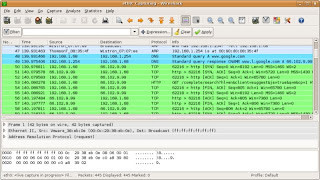
Wiresharkis a free packet sniffer computer application used for networktroubleshooting, analysis, software and communications protocoldevelopment, and education. In June 2006, the project was renamed fromEthereal due to trademark issues.
The functionality Wiresharkprovides is very similar to tcpdump, but it has a GUI front-end, andmany more information sorting and filtering options. It allows the userto see all traffic being passed over the network (usually an Ethernetnetwork but support is being added for others) by putting the networkinterface into promiscuous mode.
Wireshark uses thecross-platform GTK+ widget toolkit, and is cross-platform, running onvarious computer operating systems including Linux, Mac OS X, andMicrosoft Windows. Released under the terms of the GNU General PublicLicense, Wireshark is free software.
6. netcat
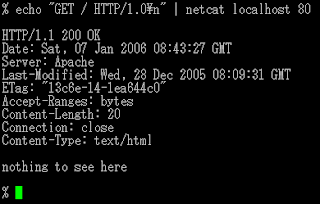
netcat is a computer networking utility for reading from and writing to network connections on either TCP or UDP.
Netcatwas voted the second most useful network security tool in a 2000 pollconducted by insecure.org on the nmap users mailing list. In 2003, itgained fourth place, a position it also held in the 2006 poll.
The original version of netcat is a UNIX program. Its author is known as *Hobbit*. He released version 1.1 in March of 1996.
Netcat is fully POSIX compatible and there exist several implementations, including a rewrite from scratch known as GNU netcat.
7. Kismet
Kismetis a network detector, packet sniffer, and intrusion detection systemfor 802.11 wireless LANs. Kismet will work with any wireless card whichsupports raw monitoring mode, and can sniff 802.11a, 802.11b and802.11g traffic.
Kismet is unlike most other wireless networkdetectors in that it works passively. This means that without sendingany loggable packets, it is able to detect the presence of bothwireless access points and wireless clients, and associate them witheach other.
Kismet also includes basic wireless IDS featuressuch as detecting active wireless sniffing programs includingNetStumbler, as well as a number of wireless network attacks.
8. hping
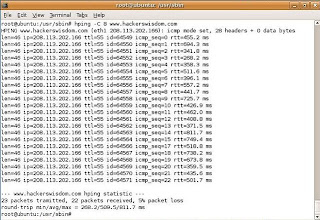
hpingis a free packet generator and analyzer for the TCP/IP protocol. Hpingis one of the de facto tools for security auditing and testing offirewalls and networks, and was used to exploit the idle scan scanningtechnique (also invented by the hping author), and now implemented inthe Nmap Security Scanner. The new version of hping, hping3, isscriptable using the Tcl language and implements an engine for stringbased, human readable description of TCP/IP packets, so that theprogrammer can write scripts related to low level TCP/IP packetmanipulation and analysis in very short time.
Like most tools used in computer security, hping is useful to both system administrators and crackers (or script kiddies).
9. Snort
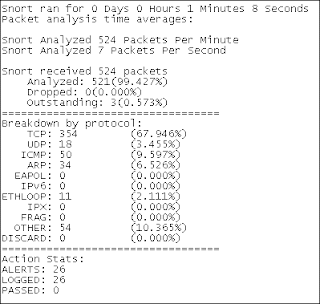
Snortis a free and open source Network Intrusion prevention system (NIPS)and network intrusion detection (NIDS) capable of performing packetlogging and real-time traffic analysis on IP networks.
Snortperforms protocol analysis, content searching/matching, and is commonlyused to actively block or passively detect a variety of attacks andprobes, such as buffer overflows, stealth port scans, web applicationattacks, SMB probes, and OS fingerprinting attempts, amongst otherfeatures. The software is mostly used for intrusion preventionpurposes, by dropping attacks as they are taking place. Snort can becombined with other software such as SnortSnarf, sguil, OSSIM, and theBasic Analysis and Security Engine (BASE) to provide a visualrepresentation of intrusion data. With patches for the Snort sourcefrom Bleeding Edge Threats, support for packet stream antivirusscanning with ClamAV and network abnormality with SPADE in networklayers 3 and 4 is possible with historical observation.
10. tcpdump
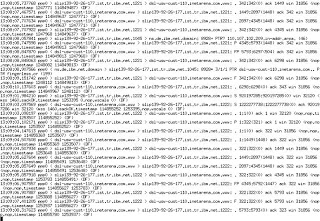
tcpdumpis a common computer network debugging tool that runs under the commandline. It allows the user to intercept and display TCP/IP and otherpackets being transmitted or received over a network to which thecomputer is attached.
In some Unix-like operating systems, auser must have superuser privileges to use tcpdump because the packetcapturing mechanisms on those systems require elevated privileges.However, the -Z option may be used to drop privileges to a specificunprivileged user after capturing has been set up. In other Unix-likeoperating systems, the packet capturing mechanism can be configured toallow non-privileged users to use it; if that is done, superuserprivileges are not required.
The user may optionally apply aBPF-based filter to limit the number of packets seen by tcpdump; thisrenders the output more usable on networks with a high volume oftraffic.
Do you have a favorite security software tool for Linux? Feel free to comment and tell us about it.
I would post a screenshot of my desktop but its a screensaver so you can't see the desktop in animation.
Here is a similar idea of what I'm doing, I'm just doing a different screensaver and I don't have compiz effects on cause my computer sucks:
http://youtube.com/watch?v=cXTKBdyWT60
As you all may have noticed, you have to sacrifice desktop items for the screensaver ability. Since Ubuntu allows you to make multiple auto-hiding panels with icons on them, I added 3 (one with Linux programs, one with Windows programs, another with special panel additions) so I still have my good ol desktop but just in a different form. Anything that would normally be placed on my desktop is just 1 click away from my Home folder, so I don't have to worry about anything getting lost.
Linux Thedaddy of people power, this open source operating system owes prettymuch everything to the massive community of users and developers who'vebuilt it, broken it, put it back together again and added all sorts ofgoodies.
The penguin logo unites a truly incredible group oftalented people, from driver developers to desktop designers, advocatesto application builders.
Firefox Even people who think that Linux is a character in the Peanutscartoon know about Firefox. What makes it special isn't the open sourcecommunity that created and maintain it, however; It's the efforts ofthe developer community whose extensions make Firefox the Swiss ArmyKnife of the internet.
Whether you want to block annoying ads,keep track of interesting sites or just stay up to date with footieresults from around the world, if you can imagine it, there's almostcertainly an extension that does it.
Half-Life 2 This month we've mostly been playing Minerva, Adam Foster's excellent mod for Half-Life 2 (http://developer.valvesoftware.com/wiki/MINERVA). Modders have been creating new stories since the days of Doom, and a quick look around Moddb (www.moddb.com) uncovers stacks of mods for your favourite PC games.
Smartdevelopers - such as Half-Life's Valve - know that mods make theirgames even more attractive, so the firms make modding as easy andaccessible as possible.
Xbox Is your original Xbox gathering dust in the loft? Why not dust it down and turn it into a fully-fledged media centre?
While Microsoft blabs about the 360's multimedia features, the talented team at the Xbox Media Center project (www.xboxmediacenter.com)can turn an ageing original Xbox into a multimedia marvel (although ifyou don't fancy modding your console, steer clear - XBMC only works onhacked machines).
Job done, they're turning their attention to other platforms: a Linux version of the software is in development.
TiVo Thecommunity that's sprung up around the TiVo digital video recorder(www.tivocommunity.com) is a thing of wonder, with users offering eachother advice, commenting on the company and fiddling with its products- often in ways that would give film and TV studios heart attacks.
While TiVo claims not to encourageor discourage the hacking community, it's pretty obvious that thehacking community makes the product even more attractive to tech-heads- and hackers' ideas often turn up in the official product, such aswhen the community found and fixed a date problem in older TiVo boxes.
iPhone iPhonehackers aren't just trying to free the phone for use on any network.They've found ways to turn your existing tunes into ringtones withoutpaying for them all over again, created all kinds of add-onapplications and best of all, found a way to change the truly horriblefont on the Notes screen.
PlayStation Portable Sonydoesn't like it - recent firmware updates mean that unless you've gotan older PSP, your options are limited - but thanks to Homebrew (www.psp-homebrew.eu)you can add all kinds of goodies to the device. There are loads,including customisers, emulators, chat programs and GPS software.
Overclocking Changingchips' clock speeds and hoping they wouldn't set your house on fireused to be a shadowy pursuit that tech firms frowned upon. Thenhardware firms realised that overclockers had money as well as PCs toburn.
Now, motherboard makers often provide everything a speeddemon needs, either in the motherboard BIOS or on the driver CD, andgraphics card firms are keen too. For example, ATI actively encouragesoverclockers to ramp up their Radeons.
Windows Media Center Microsoft'smedia system is pretty nifty, but it's niftier still when you tweak ituntil it squeaks. Microsoft knows this, which is why it happily linksto two independent community sites: the Media Center-specific GreenButton (thegreenbutton.com), and the general audio-visual AVS Forum(www.avsforum.com/avs-vb).
The software giant also has its own community site (www.microsoft.com/windowsxp/expertzone/communities/mediacenter.mspx), where media center experts share their top tips.
Web apps Firms who make it easy to interact with their online apps have createda massive community of developers. Google Maps has been adapted toprovide maps of speed cameras (http://spod.cx/speedcameras.shtml) and to create flight simulators (http://www.isoma.net/games/goggles.html), while keen developers have created software for apps such as Google Mail and Flickr.
You'll also find useful and useless apps alike on social networks such as Facebook.
RM dumped the Eee name, as it feels the connotations of the letter in between of D and F with drug misuse/abuse wouldn’t fit all that well with kids and the Education market sector.
So fresh from rehab comes a 8.9-inch RM Asus Minibook for schools. The firm expects to see 50,000 units sold by the year end. This is compared to the 7-inch original model launched at the Handheld Learning Conference in London October 2007, which has sold 23,000 to date.
linux-fuelled-eee/rmasus.jpg" border="0" onLoad="SMR_resize(this);" />
Specifications for the education aimed lite-laptop are exactly as the ASUSTeK 900 model itself, with this SKU shipping with 12GB SDD and a 1GB memory. When querying an Asus spokesperson at the event about which battery will be shipping with said units, we were informed that the new models will soon have the standard extended one that’s seen elsewhere in the world. Saving the local education authorities the £11.75 they are currently charging for swapping out the old one for the new.
One of the clear reasons why RM has gone down this route with Microsoft is the simple fact that most educational software is designed to run on Windows. This in turn makes it easier for schools to add their favourite curriculum software to the RM Asus Minibook.
“The Minibooks have proved a popular choice since launch and we are very excited to be expanding our range to include the Windows version. At around the £200 mark these devices mean that no pupil in the UK should be disadvantaged by not having access to the very best learning and the very best technology.” said Tim Pearson, CEO of RM
Tim let slip that he could be breaking an NDA over the following information – there’s a £25 price difference between the Linux version and the Windows XP. This came across that there’s an additional cost to customers from choosing the vole version over the penguin, but their product manager cleared this up later. The CEO was just referring to an internal cost for Asus and that’s all. RM will continue to offer the original Minibook models with Linux applied, just in case you were worried.
Although the model we saw was still Celeron based, they are planning to introduce an Intel Atom version after the summer school holidays – just in time for the Autumn school term.
The Minibook does arrive initially with Windows XP Home installed and they’re leaving it to schools to upgrade to XP Pro if needed, although they do offer factory-ordered customisation for a cost. The price for the 8.9-inch Minibook is just £285 and the reason behind the low cost, is solely down to schools not getting charged VAT (thanks Emil).
The new machine does have something of an identity crisis – Acer iscalling it a “mobile internet device” when others are calling similarlaptops sub-notebooks, micro laptops and suchlike. There certainlyseemed to be some discrepancy between Acer’s label for the machine andIntel’s descripton of it as a ‘netbook.’ Acer has even sent us a‘positioning document’ that says “the Aspire one is an all-newcommunication device designed to provide a true mobile and wirelessexperience through continuous access to the Internet no matter whereyou are.” Nice.
But, marketing claptrap aside, the Aspire One looks like aformidable prospect, especially given its £199 price point for the 8GBLinux version with 512MB of RAM. Acer has engineered a bespokeinterface, rather like Asus’ for the Eee PC. Open Office is offered, asis a Messaging app that can handle MSN/Windows Live, AIM, Yahoo andGoogle Talk. Likewise an integrated email app can handle variousaccounts including Google Mail, but not Hotmail.
Windows XP Home is also an option (£299) but Acer only had the LinuxLite version available for us to look at during this morning’s launch.The uprated Windows XP option provides 1GB of RAM with an 80GB harddrive. Various models will be available, including a version with7.2Mbps HSDPA. Acer was also talking up WiMAX, but we all know itsappearance in the UK will be long and drawn out. 802.11b/g Wi-Fi isincluded as standard – part of Intel’s 945GSE chipset.
The Atom N270 chip is the Diamondville variant (Silverthorne is forUMPCs and MIDs) and runs at 1.6GHz with a thermal envelope of 2.5W.That’s the top end of the spectrum for Atom, which doesn’t need a fan.
In terms of weight and size, the Aspire 1 is just over 1KG and ismore-or-less perfect for a train-top table. It’s still an 8.9-inchdisplay, though Acer plans some bigger-screened models in future. Othernotable features include an SD slot for expanding the memory as well astwo available batteries – a 3-cell that Acer says promises three hoursof battery life as well as a 7-cell for a pretty impressive sevenhours. Take some time off this if you’re buying an XP-based variant.
The Aspire One will make an impression on the market, that’s forsure. The £199 Linux offering is impressive and pound-for-pound the XPversion is better value than the MSI Wind. Acer clearly wants to makean impact – the company will hope the Atom will give the Aspire One thespringboard it needs.
The future of gaming on the move just got a whole lot more exciting.
Just imagine playing World of Warcraft, Crysis or Age of Conan on themove with no compromise in gameplay from playing the same games on ahigh-spec PC at home. According to Intel this is no longer a dream but anear-future possibility.
Inteldemoed the latest streaming software by StreamMyGame at Computex inTaipei this week, which allows the latest high spec PC games to bestreamed and played remotely on mobile devices, with NO compromise ingameplay.
WiMAX is the key Games weredemoed running on a powerful Intel processor-based desktop PC hostingwhich were then streamed and played remotely on a mobile deviceconnected to the internet, made possible by a combination of powerfulmicroprocessors and a fast WiMAX wireless broadband network.
“Onlinestreaming of video and audio has radically changed the broadcast andmobile industries re-inventing the way consumers purchase and watchmedia,” Intel states in a press release, adding, “StreamMyGame takesthis evolution one step further.”
Real-time streaming ThePC game's video and audio is captured in real-time and sent over theInternet to a remote device. The keyboard input at the remote device issent back to the PC and used to control the game.
"We areentering a new mobile age where everything from video, audio, softwareapplications and games can be accessed and played on the move" saidRichard Faria, StreamMyGame's CEO.
"Our members can play games installed on their home PCs whenever and wherever they choose.”
StreamMyGame can stream to both Windows and Linux including Ubuntu, Fedora and Xandros. To see more you can watch the webcast of Intel’s keynote online.
It's a small form factor notebook, just like the Asus Eee and the HP2133.He wouldn't tell me what OS it's running, or the pricing, but that it'sa low-cost notebook meant for developing countries, and I hope here.
Maybe it's Atom-powered. Who knows? But I do see three USB ports, acard reader, VGA out, Ethernet, and that red candy shell. I couldn'ttell how big the screen was before it was tucked away into a blacksleeve and ushered from the building, but it's small. Update: Dell just released a pair of shots that add to the sense of scale, but no official name yet.
SPEC:
8.9-inches dolled up in a sub-$500 price tag with a choice of bothWindows XP Home or Ubuntu Linux, 8-in-1 card reader, integrated webcam,direct media playback buttons, and a "host of wireless access options."Expect more next week as the Computex show kicks off.
Gizmodo.com and Direct2Dell.com published yesterday images of the Dell Mini Inspiron ultraportable laptop, the company’s first low-cost mini-notebook.
Detailsof the Dell Mini Inspiron are currently unknown. However, Gizmodonoticed that the small laptop has three USB ports, a memory cardreader, VGA output, and Ethernet LAN port. The notebook has a red lid.
Earlier reports say Dell’s 8.9-inch screen mini-laptop will be launched in June and will start at $399.
The channel lineup on Zattoo is excellent, and unlike many others it’s all broadcast legally as well. It also supports mac, windows and linux. Live P2P television services do provide an alternative to on demandservices such as Joost. Live P2P television lets you watch channels youmay otherwise never have access to; the valueprovided is similar to the value many, many people get by downloadingAmerican television shows from Bit Torrent instead of waiting 6-12months to watch them locally. It’s another nail in the coffin forgeospecific broadcasting; when more and more people bypass traditionalbroadcast models, the old location based television model willeventually fail and we’ll all get to watch programs at close to thesame time worldwide.
The player itself (Mac, Windows and Linux) is incredibly simple,comprising of one window for the video stream, and a second listing theavailable channels. Clicking on each channel invokes a few seconds ofbuffering before the live stream begins playing. Other than that, youhave a volume control, a full-screen option, and a play/stop button.And that’s pretty much it.
In terms of picture quality, this isn’t quite on-par with regulardigital television, but isn’t far off either. With the window set atquarter size on my laptop, it was great, and at full-screen, stillperfectly watchable. Channel line-up varies per-country, but theversion I tested had all of the BBC’s channels, along with ITV1, MTV,Bloomberg, and European stations such as Canal and Eurosport.
Thedownside is — after initially launching in Switzerland where thecompany claims one in five broadband users subscribe to Zattoo — theservice is only additionally available in Spain and Denmark, with theUK currently in a public testing phase (though the company is working hard to launch elsewhere).That’s a pity for now, as Zattoo is a nice compliment to other InternetTV services. Despite the trend towards anytime and on-demand content,there’s still a place for ‘live’ TV, in particular with regards tosports events or breaking news. Another thing lost with on-demandtelevision is the communal viewing experience that often creates those‘water cooler’ moments the following day.
Zattoo’s business model is ad-supported. When a user first selects or switches channel, they are served up a 3-105 second advertisement (the time it usually takes for the stream tobuffer). The ads are also clickable, with links to get more information.
About:
Zattoo is a proprietary peer-to-peer Internet Protocol Television system ("P2PTV") with current focus on European channels, licensed content, and Digital Rights Management. It is developed by researchers and programmers based out of Ann Arbor, Michigan, with corporate offices in San Francisco and Zurich. The player is based on H.264 (FFmpeg), and is Mac OS X, Linux, Windows 2000, Windows XP and Windows Vista compatible. It needs a minimum downstream bandwidth of 500 kbit/s on the client side.
Zattoo was first tried out with Swissfree-to-air channels coinciding with the 2006 FIFA World Cup. Starting from 4 Swiss TV channels (SF 1, SF 2, TSR 1 and TSI 1), it now offers 60 free-to-air or free-to-view TV channels in Switzerland. According to the website, other channels will be added in the future.
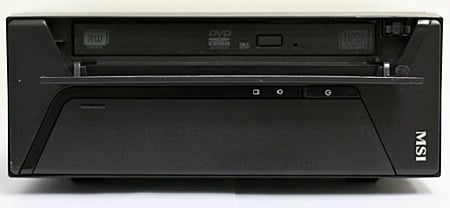
Fed up of waiting for Asus' desktop Eee PC? Rival Taiwanesemanufacturer MSI has stepped in with a mini machine of its own, whichit's punting at just £235.
MSI's Titan: desktop Eee rival before there's a desktop Eee
The PC's called the Titan - something of a misnomer given the unit'ssmall size. It measures 240 x 185 x 70mm, so it's footprint is lessthan that of an A4 sheet of paper.
Plenty of portage
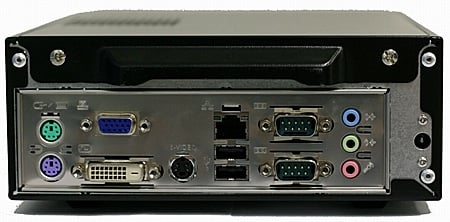
The box packs in a dual-layer multi-format DVD writer, 250GB SATAhard drive, and a stack of I/O ports including Gigabit Ethernet, twoUSB 2.0 ports, TV out, VGA, 5.1-channel digital audio out, and legacyPS/2 and serial connectors.
This latest Small, Cheap Computer™ incorporates a VIA C7 processorclocked at 2GHz and backed up with 1GB of DDR 2 memory. It uses VIA'sCN700 integrated chipset.
The only thing the unit doesn't come with is software - one of thereasons it's as cheap as it is. That's good news for Linux buffs whowon't have to pay the so-called 'Windows tax'.
Because we think it’s informative to see how OS X performs on a computer that isn’t a Mac, Macworld ordered a Psystar Open Computer about a week or so ago. The machine, which Psystar touts as a low-cost alternative to Apple’s hardware, has arrived in our lab, where we plan to put it to the test, just like the home-made Mac built by our own Rob Griffiths.
Thesystem we bought from Psystar features a 2.2GHz Intel Core 2 Duoprocessor, 2GB of 667MHz RAM, and a 250GB Hard Drive (specifically, aHitachi Deskstar in our machine). Though the base model includesIntel’s integrated graphics, we splurged and purchased an NvidiaGeForce 8600GT for $110 so that we could test the Open Computer withboth cards.
I ordered our Open Computer directly from thePsystar Web site, since that was the only way to place an order at thetime. (Psystar now offers sales over the phone.) Originally, I placedan order for an Open Computer without OS X installed—Psystar charges$155 to install the operating system, and I figured we could save a fewbucks on our order with a little do-it-yourself know-how. But a fewdays after ordering, I called Psystar looking for a status update. Alive human being answered the phone—somewhat surprising to me, giventhe storiesthat had appeared about the company immediately after it announcedplans to sell a Mac clone—and put me on hold to look up the order.Moments later, another Psystar employee came on the line and stronglysuggested that I pay to have OS X pre-installed. He explained that,unlike the Windows and Linux, installing OS X is a very difficult andcomplicated process and that the company does not provide installationinstructions for OSX. I reluctantly pulled out the credit card, and thesystem shipped out to us a few days later. The system cost us $399.99,plus $50 for a FireWire card. Add in the $110 graphics card and the$155 OS installation, and the machine cost $714.99; shipping broughtthe price to $751.47.
As I mentioned above, we’re currentlytesting the Open Computer to see how it performs compared to anhonest-to-goodness Mac. But here are some first impressions gleanedfrom receiving and setting up the machine…
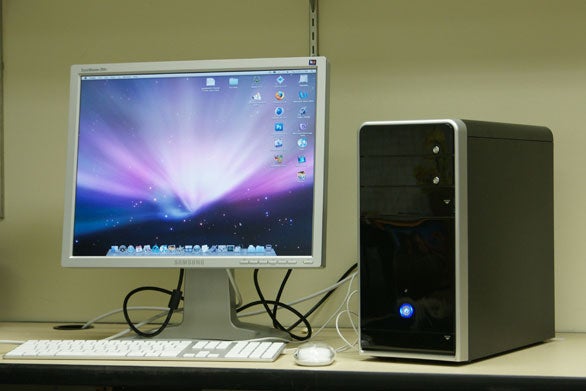
The Psystar Open Computer, resting comfortably in our Lab
IfPsystar is all about giving you the Mac OS X experience at a moreaffordable price, it was obvious right away that product packaging isone area where the company is looking to trim costs. When the boxarrived, we found it stuffed with white foam packing peanuts, makingthe unpacking process a big mess—I hate those things. The Open Computerwas just sitting in there with the packing peanuts, with nothingcovering it. Some of the doors on the front of the case that cover theoptical drive and the USB ports were a ajar with little pieces of thepacking peanuts lodged in there. After we cleared out the offendingbits, the doors closed properly and the computer appeared to be noworse for wear.
We had a bit of scare, however, when we tried to start up thecomputer. As soon as I hit the power button it sounded like I’d turnedon the garbage disposal. I quickly unplugged the power cable and openedthe case. It turns out that one of the power cables was getting caughtin the fan. I rerouted the cable and restarted. The crunching sound ofthe cable hitting the fan was gone, but the fan was still pretty darnloud. You won’t want this computer sitting on your desk.
After using Rob’s home-made Frankenmacfor a few days last week, I was prepared for all of those elegant PCBIOS and bootup screens. Unlike Rob’s machine though, there were noother visible partitions or operating systems stored on the hard drive.Once the Open Computer was all booted up, I was able to plug in aFireWire drive and have it be recognized. The system asked if I wantedto use the external drive as a Time Machine backup drive, and I clickedYes. And though the icon of the drive changed to reflect its new statusas Time Machine volume, the backup would immediately fail each time itattempted to run.
The Psystar site features a pagewith lots of available software update downloads, including one forfixing Time Machine errors. Psystar turns off the Mac OS’s automaticSystem Update feature, so you need to download and install updatesmanually. One might think that the company would send you a machinethat’s as up-to-date as possible, but that’s not the case. I calledPsystar tech support and learned that the company will offer a downloadin the next couple weeks that will enable Psystar users to takeadvantage of Apple’s Software Update utility.
Macworld Labuses Migration Assistant to transfer our Speedmark user files andfolders to our test system from a clean system booted into FireWireTarget Disk Mode, and that process worked just fine with the OpenComputer. We found, however, that we were unable to boot the OpenComputer into FireWire Target disk mode. The tech support person didn’tthink that Psystar offered that feature. Other startup options, likeSafeBoot, zapping of PRAM, and startup drive selection via the Optionkey are also not available.
I tried cloning the internal drive to an external FireWire drive using Carbon Copy Cloner.It cloned successfully, but I was unable to boot from it, even though amessage said the volume would be bootable. It sounds like a couple of folksin the Psystar forums were able to find a way to do it, but theyweren’t giving out specific instructions. We’ll continue to look intothat.
That said, I’ve been impressed by how compatiblethe Psystar is with applications and peripherals—many of the OS Xfeatures work as they would on a legitimate Mac. Look for Speedmarkresults for our Open Computer, as well as other interesting tidbits wecome across, in the coming days.
I've always hated Dell from the beginning. First of all, their computers ALWAYS fail. I've fixed a lot of computers and I've been given a lot too. 8 out of 10 computers have been Dells. Not only does that bother me but they actually sell their products for less than some of the hardware is actually worth. I'd rather pay more for my comptuer and get an efficient comptuer that doesn't have all this inflated BS software I'll never use. Then they try going cheaper and sell computers with Linux. The last thing linux users want is more people complaining about their computer not working, which would be more Dell's fault than anyone.
So, for the time being, I'm afraid we are all back on re-evaluation-of-Linux duty. Never mind. I've already done the spadework. Let me lead you through a few simple steps to a full-on Open Source experience.
Blog
At any given time, in various places and languages around the world, there are simultaneously 14 blog entries being written by Linux neophytes, documenting their first faltering steps.
This rate is well down from the 2002 peak of 37 such articles generated per hour, but is still impressive, especially when you remember that back in the old days most blog software defaulted to subject line 'I try Linux!!!' .
(Although I believe Google, showing the clever innovation for which that company is justly famous, indulged in word play with their default of 'Bye bye Windblows!!'.)
Anyway, I say the best thing is to get the blog over and done with before going near the software. After all, the text itself rarely varies: it nearly always reports the difficulties the writer had configuring a driver for his sound card. Here is a perfect example to get you started. Off you go.
Choosing your distro
There are many hundreds of Linux distributions, each of which has its own plus and minus points. It can be very confusing.
The conscientious would-be Linux user should take time to mull over the pros and cons of the Red Hat versus SUSE, and Debian versus Gentoo. He will want to evaluate the various package installation schemes - comparing .deb with .rpm - and will spend many hours on the web absorbing great quantities of freely offered advice over whether to go for Gnome or risk post-Trolltech takeover KDE, or just run the whole thing in text mode, like a Real Beard.
After he has done all this, he will install Ubuntu, because that's what everybody does.
'Ubuntu', by the way, is an African word 'too beautiful to translate into English'. The term was first popularised by Alexander McCall Smith in his The No.1 Ladies' Detective Agency series of books, in the following, typically action-packed, scene:
'Mma Ramotswe?'
'Yes, Mma Makutsi? Would you like to boil the kettle to make some more bush tea?'
'No, Mma Ramotswe. I was going to say: there are unpleasant brown stains all over the floor, and also a smell. I wondered if you perhaps had trod in some ubuntu? The Tlokweng Road is covered in it today.'
'No, Mma. I do not have any ubuntu on my shoes. I am very careful. Perhaps you have some ubuntu on your shoes.'
'No, Mma Ramotswe. I do not have any ubuntu on my shoes either. It is a mystery.'
'Perhaps Charlie, Mr J. L. B. Matekoni's unsatisfactory senior apprentice, brought it in on his shoes.'
'Ah yes, Charlie. I am quite sure that this is the correct explanation.'
Precious Ramotswe allowed her traditional build to lean back in her chair and relaxed. Later on, she would go out in her tiny white van and investigate something. Later, but not just yet. The wall lizards basked in the morning sunshine, and flies buzzed laconically around the light fitting.
'Mma Ramotswe?'
'Yes Mma Makutsi, what is it now?'
'Shall I fetch the mop?'
Although modern Ubuntu has come on a long way in the last few years, its default desktop theme is still shaded the same brown colour, as a reminder of its inspiration.
Incidentally, Ubuntu also famously gives its releases hippy alliterative names: 'Feisty Fawn', 'Hoary Hedgehog' and so on. These names are created using the same algorithm that fellow wrinklies will remember as the old CompuServe password generator. This knowledge enables me to predict with confidence that when the current 'Gutsy Gibbon' release is retired, the next four will be called Weedy Willie, Sexy Sadie, Lorelei Lee and Moon Unit Zappa.
Selecting your database
When choosing which of the Big Two to install, one issue dominates.Never mind such concerns as scalability, performance, fitness forpurpose or licensing. The fact is that while MySQL has a fairly awful name, reeking of turn-of-the-millennium marketing, PostgreSQL has a really appalling name, which nobody at all knows how to pronounce. This simple error means that PostgresSPostGREPogres that database is inevitably doomed, even if the software were ten times better than anything else. Sorry, guys.
While we are doing databases, a quick mention for SQLite.This is an excellent cross-platform C library, which lets one do properSQL without needing to supply a separate SQL engine. SQLite is publicdomain, and instead of the usual copyright threats, the source code contains a blessing:
May you do good and not evil
May you find forgiveness for yourself and forgive others
May you share freely, never taking more than you give
May you never find ubuntu on your shoe
Actually, I suspect my copy of SQLite somehow got corrupted during the download. Must remember to check those MD5s.
Don't inhale
'Running Linux with one foot on the bottom' refers to the practiceof running Linux under a VMware virtual machine, so if that if thingsall go wrong, one can beat a cowardly retreat to the safety of thefamiliar. Also, it avoids the somewhat scary business of scrapingWindows off your hard disk.
Microsoft can take heart that timid persons (like me) lack the confidence to commit fully to Linux in this way.
On the other hand, we are experimenting with Linux instead ofgetting familiar with Vista, so maybe they should not take too muchheart.
Missing
Even if they don't use Firefox already, modern IE has pretty muchthe same user interface, so Windows users should feel completelycomfortable in their web browsing after crossing the great divide.Similarly the OOo'sofferings, despite coming from an outfit whose abbreviation looks likea deflating balloon, are much closer in use to 'proper' Word and Excelthan Office 2007.
But I must be up front about this. You will find that there are core Windows features that are missing from Linux:
That silly animation that runs while Windows is copying a file,together with its wild estimations of time to complete: 30 secondsremaining, 2 minutes, 9 minutes, 25 minutes, 37 minutes, 30 seconds.
The registry
Virus checking software
The window that comes up when a program crashes and sends the crashdump to Redmond, to give them a much needed laugh. Linux programsinstead lay a small binary turd file in situ. After a while you end upwith quite a large collection of these, decorating your directories.
Automatic updates fixing vulnerabilities in Outlook Express. Who uses Outlook Express these days? Why?
Windows genuine disadvantage
The Windows pause, by which I mean that increasingly prevalentnothing-happening-for-no-reason delay that intrudes between the userpoking and the software flinching.
I'd like to expand on that last point. For example, if you delete afile from your hard disk - not on the network, not locked - by pressingthe Delete key in Explorer, on some machines that I know the sequenceis 1) the screen freezes and nothing at all happens, 2) after twoseconds the cursor turns to an hourglass, 3) after a further 20seconds, Explorer's window goes blank and is repainted, 4) the deletedfile is missing from the repainted list.
In Nautilus, the Gnome equivalent of Explorer, the file simply disappears and reappears in its 'wastebasket'. As you'd expect.
Where I work, we have an expression to cover this kind of behaviour. We say: Windows is helping you.
Invective
Time for some balance. The most amusing piece of Linux-relatedinvective on the Internet is Netscape/emacs legend Jamie Zawinski'sfamous rant about Linux video players.Never mind that it is wildly out of date - if you haven't read it andyou enjoy swearing, you are in for an audio cock-shaped treat. NSFW.
Still hard work
You may have heard it said that modern Linux is as easy to set up asWindows, requiring three or four clicks to install a file server assecure as a laptop containing a sensitive government database leftovernight on the front seat of a civil servant's Renault Nicole.
For the most part I would say this is true, but there are severalplaces where it is not, and Samba is definitely one of them. Yourcorrespondent recently set up a Samba system on a Windows 2003 domain(the full whack, with proper security and everything, not justhardwired in with root privileges everywhere). Getting it going was hergreatest intellectual triumph since passing Latin O-level.
Editors
By decree of the state of California, there must be at least 17 texteditors installed into each copy of Linux. Some are GUI based, but mostrun in consoles. Some support UTF-8, some include spell checkers orLISP implementations. All have mutually incompatible keystrokes.
Legendary line-oriented relic ed is by no means the most difficult to use. If you think you are hard, try joe, which emulates the dreaded Wordstar, the Wordprocessor that Time Joined the Foreign Legion to Forget.
Ubuntu installs a gnomic thing called gedit,and sets it, Notepad-style, as the default opener of all text files. Inthis case, the gnomes have taken Notepadness rather too far for myliking. Try opening a 4MB database dump - surely not such a huge thingthese days - and watch gedit die on its backside.
Magic LAMP
To be briefly serious, one of the best things to do with a Linux box is run a few LAMPapplications for your intranet. There is something exquisitelysatisfactory about this. It's like buying one of those plants that looklike a tangle of dead roots, and adding water to see it spring to lifein a blur of green shoots.
One excellent LAMP application to try is MediaWiki,the Wikipedia software. It will take you an hour or so to set up, butonce it is done it will not only serve as an excellent way of creatingan ad hoc documentation system across the department, it willalso give the children something to do on rainy afternoons in theschool holidays, as evidenced by Enid Blyton's masterpiece Five set up a database of erotic classics.
With MediaWiki, the only limit is your imagination. For example, Iam using it to organise my collection of notable corporate letterheads.There is a little overkill here, as it is a collection currentlycomprising just one item, but you must admit it is a good one:
After reading this other article earlier today, piracy was mentioned in it, and I feel it is worthy of discussion.
First of all, as I mentioned in the other article, developers really need to stop complaining. Part of being a programmer is being creative and innovative, not repetitive and cliche. For about a decade, key codes have been used to protect products. Then online registrations were used. Sometimes keys had a limit to them. None of this is efficient. Key codes are useless cause they're just about the easiest thing to crack, anyone could do it if they spent some time and research. Online registration WOULD be useful, if the systems weren't automated, making it just as ineffective as registering a product offline. Limited registrations would be a good idea, but what happens when someone just happens to install a program one too many times on the same computer? That isn't really fair, because there could be only 1 product key being used at a time and you would have to buy a new one when thats empty.
As another note, sometimes, programmers need to know that their products are just asking to be pirated. Look at Linux for example - there are THOUSANDS of decent programs and utilities that are free, and whatever the equivalent program/utility on Windows or Mac would be is something you'd have to pay for. Why would someone pay for some simple program like an audio editor or a CD writer when you could get it for free? Programmers need to think, especially when it comes to making something that has already been released several times. And if they want money, they ought to make a package deal if they are to do simple and/or cliched programs.
So to conclude this, do I myself have any efficient ideas on how to stop piracy? No, but that is partially why I posted this - so you can help give out ideas.
The rest of the server world can play with their piddling 2-3GHz chips. IBM, meanwhile, is prepared to deal in the 5GHz realm.
The hardware maker has unveiled a Power6-based version of itshighest-end Unix server - the Power 595. The box runs on 32 dual-core5GHz Power6 processors, making it a true performance beast. This bigbox completes a protracted roll out of the Power6 chip across IBM'sUnix server line.
document.write('\x3Cscript src="http://ad.uk.doubleclick.net/adj/reg.main_hardware.4159/servers;cta='+cta+';ctb='+ctb+';ctc='+ctc+';sc='+sc+';cid='+cid+';'+RegExCats+GetVCs()+'pid='+RegId+RegDT+';'+RegKW+'maid='+maid+';test='+test+';pf='+RegPF+';dcove=d;sz=336x280;tile=3;ord=' + rand + '?" type="text/javascript">\x3C\/script>'); <ahref="http://ad.uk.doubleclick.net/jump/reg.main_hardware.4159/servers;dcove=d;sz=336x280;tile=3;ord=Pfyn29Rk6jgAAE1BkUgAAACP?"target="_blank"><imgsrc="http://ad.uk.doubleclick.net/ad/reg.main_hardware.4159/servers;dcove=d;sz=336x280;tile=3;ord=Pfyn29Rk6jgAAE1BkUgAAACP?"width="336" height="280" border="0" alt="" />
Along with the big daddy, IBM revealed a new water-cooled version ofthe Power 575 server dubbed the Hydro-Cluster. In addition, itrefreshed the existing midrange Power 570 server.
IBM's top Power executives showed off the fresh gear during acustomer and press event here in San Francisco. They wheeled out threePower customers who were thrilled to be part of IBM's Unix experience.We guess that a disgruntled Power user or two could not be located onshort notice to provide balance.
The Power 595 ships in a massive cabinet that looks just like thatof its predecessors, except IBM has added a few green touches to thecase. This green reflects the environmentally friendly nature of IBM'shulking metal tower, we're told.
The Power 595, available on May 6, relies on a series of four-socket"books" or boards. You can fill a system with between one and eightboards, using both 4.2GHz and 5.0GHz chips. This monster can hold up to4TB of DDR2 memory. You'll find the rest of the specifications here where IBM details the various options with its I/O drawers.
Usually, IBM will hit customers with a massive TPC benchmark scorewhen it rolls out a new 595-class system - just to let HP know how muchit cares. Apparently, the company is saving that gem for a later date,opting instead just to show how the Power 595 wallops HP's Itanium gearand Sun's SPARC systems on SAP and SPEC benchmarks. We're told thatIBM's new system beats out the rivals by 2x to 3x. We thought it rathersporting of IBM to include Sun's gear in the benchmarks.
The Power 575 is a different type of high-end creature with IBMcharacterizing the system as a supercomputing machine. As mentioned,IBM has layered water-filled coils over each of the boards in the 575,allowing it to create a more dense design.
Customers can fit up to 14 2U boards in the huge 575 case with 164.7GHz dual-core chips per board. You'll also manage to outfit eachboard with up to 256GB of memory. The rest of the rather complexspecifications are here.
According to IBM, the water-cooling can reduce typical data centerenergy consumption by 40 per cent when compared to air cooled 575s. Inaddition, the refreshed box offers up 5x the performance of older 575systems. IBM has benchmarked a single 575 board at 600 GFlops.



 linux
linux