An exclusive gaming industry community targeted
to, and designed for Professionals, Businesses
and Students in the sectors and industries
of Gaming, New Media and the Web, all closely
related with it's Business and Industry.
A Rich content driven service including articles,
contributed discussion, news, reviews, networking, downloads,
and debate.
We strive to cater for cultural influencers,
technology decision makers, early adopters and business leaders in the gaming industry.
A medium to share your or contribute your ideas,
experiences, questions and point of view or network
with other colleagues here at iVirtua Community.
30. Rise of the Argonauts (PS3, X360, PS3) Publisher: Codemasters
Developer: Liquid Entertainment
Est. Release Date: Sep 2008
Officially Announced for E3: Yes
Anaction RPG that promises to be way more action than RPG, Rise of theArgonauts has a winning mythological premise and lots of little designtouches that keep the game looking fresh. Take the Argo—the ship oflegend will act as a seafaring headquarters from which your recruitedArgonauts will provide support. There is also a “deed” system that willincrease Jason’s abilities via the acquisition of Xbox LiveAchievement-like trophies. So it’s bursting with interesting ideas, andit’s all running on the reliable Unreal Engine 3—this could be thesleeper hit of the year.
29. High School Musical 3: Senior Year Dance (PC, Wii, PS2, NDS, X360) Publisher: Disney Interactive
Developer: TBA
Est. Release Date: Holiday 2008
Officially Announced for E3: Yes
Considerthis your representative sample of licensed games that promise to sellgangbusters regardless of quality or media reaction. And High SchoolMusical 3 is likely to be the biggest game of its breed this year: themovie of the same name is the first time this children’s blockbusterfranchise will see a theatrical release, meaning the marketing for theproperty is likely to be even more inescapable than usual. Beyond theusual niceties of rhythm games—coop and competitive modes, mechanicsspecific to each system’s control scheme—it will have the songs fromHigh School Musical movies past and present. That last one is almostcertainly the only feature the game needs to add another million insales to the franchise’s life-to-date count.
28. Borderlands (PC, X360, PS3) Publisher: 2K Games
Developer: Gearbox Software
Est. Release Date: 2009
Officially Announced for E3: Yes
Capabledeveloper Gearbox has never swung for the fences with quite as muchgusto as with Borderlands. The fact that the game is original IP isn’teven the half of it—it also promises a procedural item creation systemthat will provide this sci-fi first-person shooter over half a millionweapons. If that’s not enough, Borderlands also shares some ambitionswith big-budget role playing games: the world will be expansive,character growth and classes comes standard, and missions and sidequests will populate the landscape. Borderlands has all the earmarks ofa breakout hit, and its scope should easily take the breath away fromboth shooter and science fiction fans.
27. Mortal Kombat vs. DC Universe (X360, PS3) Publisher: Midway
Developer: Midway
Est. Release Date: Holiday 2008
Officially Announced for E3: Yes
Goingon the title alone, Mortal Kombat Vs DC Universe feels a decade late,like it should have been slugging it out with Marvel Vs Capcom for thequarters of 90s teenagers. But it’s actually a better idea,commercially, in 2008—now the game can ride the tide of successfulcomic book film blockbusters. It can pull from the years of soliddesign work and franchise reputation rebuilding that culminated inMortal Kombat: Armageddon. And with an anticipated ESRB rating of T forTeen, there’re no retail hurdles to keep the adolescent maledemographic from eating this up with a spoon.
26. S.T.A.L.K.E.R.: Clear Sky (PC) Publisher: Deep Silver
Developer: GSC Game World
Est. Release Date: Aug 29, 2008
Officially Announced for E3: Yes
S.T.A.L.K.E.R.:Shadow of Chernobyl was hardly the biggest first-person shooter of 2007in the west. But it posted platinum-level sales in Eastern Europe,where its freeform gameplay and mythos steeped in Russia’s uniquescience fiction struck a strong chord. With little similar competitionin the region, its sequel Clear Sky should do well for itself therealso. Which isn’t to say the rest of the world shouldn’t (or won’t)give it a go as well—Clear Sky will add a tactical, squad-based turfwar to the already eccentric proceedings, and should be just as curiousand interesting a beast as its predecessor.
25. Star Wars: The Force Unleashed (PS3, X360, Wii, PS2, PSP, NDS) Publisher: LucasArts
Developer: LucasArts
Est. Release Date: Sep 2008
Officially Announced for E3: No, but it might as well be
TheForce Unleashed could well be the biggest project to bear the Star Warsfranchise name since Episode III ended the franchise’s non-animatedtheatrical run. Every Star Wars fan has been curious about the periodright before the Original Trilogy when Darth Vader had his run of thegalaxy; Force Unleashed promises to capture this period from theperspective of the Dark Side, using exciting new technologies torealistically render bot the AI and the Force itself. If the persistentrumors are true, this could well be the last project completely builtby LucasArts’ internal studio—but in that case, it will be one heck ofa send-off that a lot of Star Wars fans will experience.
24. Beyond Good and Evil 2 (PS3, X360) Publisher: Ubisoft
Developer: Ubisoft Montpellier (likely)
Est. Release Date: TBA
Officially Announced for E3: No
Allthat’s known about Beyond Good and Evil 2 is that it’s currently beingworked on by Ubisoft premier designer Michel Ancel. But in this case,that’s more than enough—Ancel’s resume does include perennial hitRayman and (naturally) the first Beyond Good and Evil, after all. Andthe first Beyond Good and Evil is particularly beloved. The smallaudience that played it has been talking about it ever since, praisingits varied gameplay and realistic, strong female protagonist Jade. Sothe sequel is exciting, and though its commercial success is by nomeans assured it’s possible that maybe the adult gaming audience isfinally ready for this franchise.
23. Lock’s Quest (NDS) Publisher: THQ
Developer: 5th Cell
Est. Release Date: Fall 2008
Officially Announced for E3: Yes
2007’sbiggest surprise sales blockbuster was a little DS game called Drawn toLife, built by a little mobile developer called 5th Cell. That gamegave the independent studio a reputation for creating innovations withstrong market appeal, and it could cement that reputation with Lock’sQuest, a curious RTS/Action/RPG/minigame hybrid with cute graphics,quick thrills and a world that can be completely remodeled by theplayer. In other words, it has a lot of elements that appeal across awide variety of gaming demographics, as well as a lot of ambition. Ifthis one lives up to its potential, it would be great to see it succeed.
22. Puzzle Quest: Galactrix (PC, X360, NDS) Publisher: D3 Publisher of America
Developer: Infinite Interactive
Est. Release Date: Fall 2008
Officially Announced for E3: Yes
Lastyear’s Puzzle Quest combined the most addictive parts of the casual“match three” puzzle game with the most addictive parts of RPGcharacter development, a powerful cocktail that murdered productivityand sold in huge numbers. There’s no reason this follow-up shouldn’tcontinue in that trend—it’s still a match three puzzle game (this timemore Collapse than Bejeweled), it still has those all-important RPGelements, and it’s being built by the same studio. The only differences(besides the science fiction setting) all look like improvements.There’s an element of strategy gaming. Players can enhance not justtheir character, but also their spacecraft. Downloadable content willabound. It all sounds like a game that players will itch to play afterthe first hit.
21. Crysis: Warhead (PC) Publisher: Electronic Arts
Developer: Crysis
Est. Release Date: Fall 2008
Officially Announced for E3: Yes
Allegedlythe last PC exclusive from the bastion of PC gaming high technology,Crytek’s side story to 2007’s Crysis looks every bit as graphicallydazzling as its predecessor. It also promises to be a moremarket-friendly title (a tall order considering Crysis’ million-sellingstatus); Warhead provides a less strategic, more bombastic run-and-gunaffair compared to the original Crysis. And with a year of hardwareadvancements in between Crysis and Crysis: Warhead, that more widelyappealing design will find that a lot more people have the rigs toactually run it well. And who knows? If Warhead does manage to findthat perfect balance, perhaps Crytek will stick to their PC-exclusivestomping grounds for a while longer.
20. Tomb Raider Underworld (Wii, PS2, PS3, X360, PC, NDS) Publisher: Eidos
Developer: Crystal Dynamics
Est. Release Date: Holiday 2008
Officially Announced for E3: Yes
It’sbeen a few years since Crystal Dynamics took the Tomb Raider franchiseand reinvigorated it with Legend. But it’s really with Underworld thatthe series’ previous mistakes have been taken to heart. Rather thanrest the game on its laurels again, Underworld is a creation that lookstoward with the new; the game engine is all new, the way the worldinteracts with Lara is more realistic, combat now has melee and willflow fluidly into the puzzle mechanics. And if that wasn’t enough toguarantee sales, Lara has a motorcycle now too.
19. Sonic Unleashed (Wii, PS2, PS3, X360) Publisher: SEGA
Developer: Sonic Team/Dimps
Est. Release Date: Holiday 2008
Officially Announced for E3: No
Thesedays it feels like SEGA promises the moon with every Sonic title, tothe point where it’s hard to fall for it anymore. Take Sonic Unleashed;it’s promise of a revamped, re-invented Sonic echoes the promises SEGAmade before this generation’s first Sonic the Hedgehog hit the Xbox 360with a sad plop. And yet, franchise sales have never followed the samecurve as the blue blur’s review scores. This is mostly because ofSonic’s strong appeal to the child market, but on some level thegraying Genesis owner wants to believe what we’re told, that this nextSonic really will reclaim the glory days. Anyway, Sonic Unleashed. It’srunning on a new engine and has some 2D environments. It’ll sell, andas for the rest of it? Here’s hoping.
18. MadWorld (Wii) Publisher: SEGA
Developer: Platinum Games
Est. Release Date: 2009
Officially Announced for E3: No
PlatinumGames, formerly Seeds, formerly Clover Studios, isn’t known for makingcommercial hits. No, that team is known more for making instant,beloved classics. Okami certainly, but Viewtiful Joe is in there aswell, and the only people who remember God Hand these days love it toabsolute death. MadWorld, a blood-soaked black and white Wii exclusive,feels like a return to the playful, experimentation that made this teamfamous. Will it sell? Well, it’s nice to think that just maybe, thistime, the market has caught up to what Platinum is doing.
17. Animal Crossing Wii (Wii) Publisher: Nintendo
Developer: Nintendo
Est. Release Date: TBA
Officially Announced for E3: No
Asof this writing, Animal Crossing Wii still exists as a hopeful glimmerin the eye of the gaming public. Nintendo hasn’t said anything at allabout it yet, though almost all speculation says that it exists andwill be announced soon—and if that’s the case, E3 is as good a place toshowcase it as any. It’s a completely believable theory. Nintendo’sChristmas lineup is currently a complete mystery, and Animal Crossing,already a surprise hit on GameCube and DS, is such a good fit for thecasual Wii-loving audience it’s startling it’s not on the systemalready.
16. Left 4 Dead (PC, X360) Publisher: Valve Software
Developer: Turtle Rock Studios
Est. Release Date: Holiday 2008
Officially Announced for E3: Yes
Valvedoesn’t release duds, and it doesn’t buy teams that can’t deliver. Sothe fact that it purchased Turtle Rock Studios and have put a greatdeal of PR muscle behind Left 4 Dead speaks volumes as to how good thisgame could be. The game has a completely innovative, yet highly marketfriendly hook in its “four survivors must cooperate to survive thezombie horde” premise, though players of a less polite persuasion canalso take up the role of a super-powered zombie. This could very wellbe the next major online phenomenon, like Team Fortress 2 before it.
15. Resistance 2 (PS3) Publisher: Sony Computer Entertainment
Developer: Insomniac Games
Est. Release Date: Holiday 2008
Officially Announced for E3: Yes
Thefirst Resistance was the big win for the PlayStation 3 at launch, butResistance 2 looks set to spin that good first impression into anempire. Resistance 2 pushes the game out of London to the morerelatable (in the US, anyway) environs of the United States. A goodmove, but not as good as the massive 60-man multiplayer that the gamepromises. That’s fantastic scale for an online console game; add onsome more focused, objective-oriented teamplay and Resistance 2 is agood contender for gamer’s next networked obsession.
14. Killzone 2 (PS3) Publisher: Sony Computer Entertainment
Developer: Guerilla Games
Est. Release Date: 2009
Officially Announced for E3: Yes
Threeyears on and Killzone 2 is still trying to shake off its disastrous“showing” at E3 2005. Admittedly the team at Guerilla has done a finejob of actually approaching the target in that first badly marketed“target render,” with more recent previews showing the game asappropriately attractive and bombastic for its high position in Sony’sportfolio. But it still needs a big floor to show off, and it needs aman to say “in-game graphics” about one thousand times in front of somehuge HD Killzone if it wants to really nail the market. E3 historicallyhas had some very big floors.
13. Fable 2 (X360) Publisher: Microsoft
Developer: Lionhead Studios
Est. Release Date: Oct 2008
Officially Announced for E3: Yes
Alot on Fable 2 is already known, and most of it is interesting on avariety of levels. There’s the in-game dog, a character ofunconditional love that will act as the player’s anchor to the game’sworld. There’s the Pub Games, a series of Xbox Live Arcade titles thatwill act as both encapsulated products and previews for the bigrelease. Then there’s the gay marriage, pregnant adventuring, and allmanner of family matters to deal with in the game as well. It’s a gamethat promises to push boundaries and break some of the medium’s moreridiculous unnecessary taboos. Considering the success of the originalGable, it’s likely many people will choose to experience this moveforward—surely a good thing.
12. Command and Conquer: Red Alert 3 (PC, X360) Publisher: Electronic Arts
Developer: EA Los Angeles
Est. Release Date: Holiday 2008
Officially Announced for E3: Yes
RedAlert’s Cold War gone hot is one of the most beloved scenarios is allof strategy gaming, and the franchise’s long seven year absence makesthis game even more exciting and desirable. And by adding thepseudo-Japanese Empire of the Rising Sun faction the festivities geteven more campy and strange, complete with towering mecha, psychicschoolgirls and parachuting bears. So it’s got a lot of hooks for boththe longtime fan and sugar-crazed newcomer alike.
11. Far Cry 2 (PC, X360, PS3) Publisher: Ubisoft
Developer: Ubisoft Montreal
Est. Release Date: Holiday 2008
Officially Announced for E3: No
FarCry 2 has found a unique gaming setting in the jungles, savannahs andtowns of Africa, and it plans on giving the player a lot of thatsetting – 50 square kilometers, to be precise. Plenty of new gameplayelements will make themselves known as the player crosses that expanse:some wounds have to be treated with field medicine (ie. fishing abullet out with a knife) and brush fires can be started, only to bewhipped up realistically by wind. Far Cry 2 is an underutilized brandmoving to an underutilized setting while adding multiple newinnovations, making it an extremely strong contender in the hardcoreshooter market.
10. Prince of Persia (X360, PS3) Publisher: Ubisoft
Developer: Ubisoft Montreal
Est. Release Date: Holiday 2008
Officially Announced for E3: No
Princeof Persia: The Sands of Time was one of the last generation’s definingmoments, so it would have been easy for Ubisoft to just build astandard sequel on the successes of its previous trilogy. The fact thatthis is not the case, that the series is instead being rebooted with anincredible hand-painted aesthetic and open world, show a strongdedication to making the Prince one of the most lasting and importantfranchises in gaming (though the big budget movie helps on that scoreas well). While previous PoP titles did sell well, after theblockbuster success of Assassin’s Creed, the timing is perfect for thePrince to really make it big.
9. Final Fantasy XIII (PS3) Publisher: Square Enix
Developer: Square Enix
Est. Release Date: TBD
Officially Announced for E3: Yes
Sinceclosing the door on the last console genre, Square Enix has relied onhandheld games and Wii side stories alone. If the publisher’s lastfiscal statement said anything, it was that’s no way for a company tolive—so while Square Enix has some other interesting console games inthe pipe, it needs to bring its megaton franchise back into the publiceye. It’s not surprising that Final Fantasy XIII will show up in someform at E3—and regardless of what form it takes or what the game lookslike now, it could certainly steal the show if it tried.
8. Street Fighter IV (PC, X360, PS3) Publisher: Capcom
Developer: Capcom/Dimps
Est. Release Date: 2009
Officially Announced for E3: Yes
Atworst, this is a surprise come back of one of gaming’s most iconicfranchises. At best, this could be the surprise come back of agenre—certainly if anything could revive a flagging fighting gamefield, a new numbered entry in its greatest series would be the thingto do it. Perhaps the best sign that this game knows what it will taketo succeed is its reverence to Street Fighter II—all of the charactersfrom that game will return, and the gameplay mirrors the measured paceof that early entry. Considering versions of SFII still sell in strongnumbers, it’s easy to see how this strategy could succeed on the market.
7. Rock Band 2 (X360, PS3, PS2, Wii) Publisher: MTV Games
Developer: Harmonix
Est. Release Date: Sep 2008 (X360 timed exclusive, with other versions to follow)
Officially Announced for E3: Yes
Nomatter what other companies say, the fast-paced game of catch-up thathas gripped the music genre says one thing louder: the four-piece RockBand is the standard for the field. And while little is known about itat this point, what is known proves that Harmonix hasn’t lost the plotwith Rock Band 2. Sticking to its “platform” guns, the game will befully backwards compatible—with old DLC, with old instruments, theworks. And while user-created content is not a go this time, there arecertainly things about the game yet to be announced—you don’t want tomiss this one at the show.
6. LittleBigPlanet (PS3) Publisher: Sony Computer Entertainment
Developer: Media Molecule
Est. Release Date: Oct 2008
Officially Announced for E3: Yes
Despiteseemingly constant delays, LittleBigPlanet remains one of the mostunique products in Sony’s first-party arsenal. The idea of a game thatlives and dies by the content created by its users has been triedbefore in first-person shooters, but LittleBigPlanet, with its lovelytextured graphics and universal, non-violent charm wants to be muchmore—the YouTube of games perhaps, or the Legos of the 21st century. Ofall the games that could bring PlayStation 3 to the mass market, thisremains the best hope.
5. Halo Wars (X360) Publisher: Microsoft
Developer: Ensemble Studios/Bungie
Est. Release Date: Oct 2008
Officially Announced for E3: Yes
HaloWars is more than just the next title from Microsoft to have the Haloname. It’s also more than the first Halo project not spearheaded byBungie. Halo Wars wants to be a revolution in real-time strategy, aconsole exclusive built from the ground up for a console controller—inother words, Halo Wars wants to do for real-time strategy what Halo didfor first-person shooters. If it succeeds, it could crack wide open thenascent console RTS market as gamers try it based on the franchisealone. It’s been reported that the game will be playable by the mediaat E3, so the show should give a much better idea as to how itssucceeding.
4. Spore (PC, Mac) Publisher: Electronic Arts
Developer: Maxis
Est. Release Date: Sep 7, 2008
Officially Announced for E3: Yes
It’scertainly something that even after the seemingly endless amount ofwords typed about Spore, even though it’s appeared in publications asnon-game centric as The New Yorker, even though the wait for the gamehas been years long and interminable, almost everyone who knows aboutit is still excited at its promise. And after the success of therecently released Creature Creator, that excitement is still mounting.Will Wright’s SimEverything could very well the next big thing, tossingaside silly ideas like “demographics” and just appealing to everyoneeverywhere. In other words, the next Sims.
3. Gears of War 2 (X360) Publisher: Microsoft
Developer: Epic Games
Est. Release Date: Nov 2008
Officially Announced for E3: Yes
Gearsof War 2 is a lot of things. To the gamer, it is epic, the sequel tothe game that dominated man hours spent on Xbox Live for most of 2007.To developers, it’s the new baseline, as every new Epic game has cometo represent the state of the art for the now industry standard UnrealEngine 3. In both regards Gears of War 2 looks great. A fewimprovements to the constantly evolving engine have already been shown,and most gamers agree that new mechanics like martyrdom and the “meatshield” look like fantastic fun. Gears of War is already one of thisgeneration’s emblematic franchises, so it will be great to see how thesequel goes about cementing that status.
2. Resident Evil 5 (X360, PS3) Publisher: Capcom
Developer: Capcom
Est. Release Date: 2009
Officially Announced for E3: Yes
RE5is not even close to a retail release, and yet it’s already one of themost interesting topics in the industry. It brings with it the highlyrespected pedigree of Resident Evil 4, hands-down one of the best gamesof the last generation, and will probably sell strongly to the audiencethat loved, or even heard about, that game. Yet it’s also mired incontroversy over some concerns regarding racism. So it’s a projectthat’s walking many tightropes of expectation, and there’s potentialfor huge success or massive failure here. As a result this E3 could bethe most important public showing for RE5 until its release—it shouldbe fascinating.
1. Fallout 3 (PC, X360, PS3) Publisher: Bethesda Softworks
Developer: Bethesda Softworks
Est. Release Date: Oct 2008
Officially Announced for E3: Yes
Fallout3 shows great evolutionary leaps every time it’s displayed for publicviewing, with recent revelations—the childhood simulating charactercreator, the 500 endings—being particularly fascinating. Now that it’scoming precariously close to its announced release date, this E3 shouldrepresent the game’s biggest showing yet. If there are any surprisesleft in the title to announce, expect them to get announced at somepoint during the week. But even if there aren’t, Fallout 3 has alreadyproven itself to be a sprawling, ambitious project that anyone in thegaming audience would wait to spend more time with.
There are differing leaks out there regarding the track list for Rock Band 2.Both are unattributed, one to a friend of a friend who got a look at anemail from Harmonix to MTV or something. But in the interest ofrumormongering, we'll repeat both with the caveat that there is no wayof knowing if this stuff is for real or not. But if, combined, they'rehalf right then this could be one hell of a track list, possibly thebest of any rhythm game.
Also, an IGN Insider interview (transcript provided by reader Max)let slip that buyers of Rock Band 2 will have access to all of thesongs off the original Rock Band disc, available as free DLC. Fulldetails on both after the jump.
Says IGN 360 editor Nate Ahern:
Rock Band 2 and Guitar HeroWorld Tour create an interesting situation for gamers. If you boughtRock Band 1 then chances are you'll feel cheated by the release of RB2,thus you'd think that GHWT would be the way to go as it somewhatredefines the music gaming genre. However, if you didn't buy the firstRock Band then I would absolutely agree with notagoth. Immediately uponpurchasing Rock Band 2 you'll have the ability to download a hugelibrary of songs, as well as all of the songs off of the original discas a free download. Then again, Guitar Hero World Tour does allow usersto create and share their own songs, so it's really only a matter oftime until the Rock Band library is eclipsed. At the end of the day itcould come down to which series has earned your allegiance over thelast year since RB's original release."
And on to the leaked track lists. The first is from Demp, a commenter on 8bitfix, and he's got the FOAF who saw the email source. That's like fourth-hand hearsay, but whatever, this ain't court.
1 AC/DC Let There Be Rock
2 AFI Girl's Gone Grey
3 Alanis Morissette You Oughta Know
4 Alice in Chains Man in the Box
5 Allman Brothers Ramblin' Man
6 Avenged Sevenfold Almost Easy
7 Bad Company Shooting Star
8 Beastie Boys So Whatcha Want
9 Beck E-Pro
10 Bikini Kill Rebel Girl
11 Billy Idol White Wedding Pt I
12 Blondie One Way or Another
13 Bob Dylan Tangled Up in Blue
14 Bon Jovi Livin' on a Prayer
15 Cheap Trick Hello There
16 Devo Uncontrollable Urge
17 Dinosaur Jr Feel the Pain
18 Disturbed Down with the Sickness
19 Donnas, The New Kid in School
20 Dream Theater Panic Attack
21 Duran Duran Hungry Like the Wolf
22 Elvis Costello Pump it Up
23 Fleetwood Mac Go Your Own Way
24 Foo Fighters Everlong
25 Go-Go's, The We Got the Beat
26 Grateful Dead, The Alabama Getaway
27 Guess Who, The American Woman
28 Guns N' Roses Shackler's Revenge
29 Interpol PDA
30 Jane's Addiction Mountain Song
31 Jethro Tull Aqualung
32 Jimmy Eat World The Middle
33 Joan Jett Bad Reputation
34 Journey Anyway You Want It
35 Judas Priest Painkiller
36 Kansas Carry On Wayward Son
37 L7 Pretend We're Dead
38 Lacuna Coil Our Truth
39 Linkin Park One Step Closer
40 Lit My Own Worst Enemy
41 Lush De-Luxe
42 Mastodon Colony of Birchmen
43 Megadeth Peace Sells
44 Metallica Battery
45 Mighty Mighty Bosstones Where'd You Go
46 Modest Mouse Float On
47 Motorhead Ace of Spades
48 Muffs, The Kids in America
49 Nirvana Drain You
50 Norman Greenbaum Spirit in the Sky
51 Offspring, The Come Out & Play (Keep 'em Seperated)
52 Panic at the Disco Nine in the Afternoon
53 Paramore That's What You Get
54 Pearl Jam Alive
55 Presidents of the USA Lump
56 Rage Against the Machine Testify
57 Ratt Round & Round
58 Red Hot Chili Peppers Give it Away
59 Replacements, The Alex Chilton
60 Rise Against Give it All
61 Rush The Trees
62 Silversun Pickups Lazy Eye
63 Smashing Pumpkins Today
64 Social Distortion I Was Wrong
65 Sonic Youth Teenage Riot
66 Soundgarden Spoonman
67 Squeeze Cool for Cats
68 Steely Dan Bodhitsattva
69 Steve Miller Band Rock'n Me
70 Survivor Eye of the Tiger
71 System of a Down Chop Suey
72 Talking Heads Psycho Killer
73 Tenacious D Master Exploder
74 Testament Souls of Black
75 Who, The Pinball Wizard
BONUS SONGS (all HMX bands)
76 Abnormality Visions
77 Anarchy Club Get Clean
78 Bang Camaro Night Lies
79 Breaking Wheel Shoulder to the Plow
80 Libyans, The Neighborhood
81 Main Drag, The A Jagged Georgeous Winter.
82 Speck Conventional Lover
83 Sterns, The Supreme Girl
84 That Handsome Devil Rob the Prez-O-Dent
And then from Loading Reality,which notes that this numbers only about 60. Some of the tracks are thesame as the list above, just in a different order. "Keep in mind, someof these could easily be DLC that's in the works," Loading Realitywrites. A wise caveat.
1) Tangled Up in Blue (Bob Dylan)
2) Bad to the Bone (George Thorogood)
3) We've Got the Beat (Go-Gos)
4) Bad Reputation (Joan Jett)
5) Pinball Wizard (The Who)
6) Dammit (Blink 182)
7) That's What You Get (Paramore)
The Trees (Rush)
9) Ace of Spades (Motorhead)
10) Chop Suey (System of a Down)
11) Testify (Rage Against the Machine)
12) Spirit In the Sky (Norman Greenbaum)
13) Ramblin' Man (Allman Brothers)
14) Rebel Girl (Bikini Kill)
15) Eye of the Tiger (Survivor)
16) Panic Attack (Dream Theater)
17) Everlong (Foo Fighters)
1 One Step Closer (Linkin' Park)
19) Lump (Presidents of the USA)
20) Come Out and Play (Offspring)
21) Drain You (Nirvana)
22) Carry On Wayward Son (Kansas)
23) Peace Sells (Megadeath)
24) Souls of Black (Testament)
25) Livin' On a Prayer (Bon Jovi)
26) Round and Round (Ratt)
27) New Kid In School (The Donnas)
2 Alright Now (Free)
29) Today (Smashing Pumpkins)
30) Man In the Box (Alice In Chains)
31) Any Way You Want It (Journey)
32) Holiday In Cambodia (Dead Kennedys)
33) Give It Away (Red Hot Chili Peppers)
34) White Wedding (Billy Idol)
35) Hello There (Cheap Trick)
36) Cool for Cats (Squeeze)
37) Psycho Killer (Talking Heads)
3 ? (Devo)
39) One Way or Another (Blondie)
40) De-luxe (Lush) [dare to dream, shoegaze in Rock Band!]
41) Push It (Static-X)
42) Pump It Up (Elvis Costello)
43) Master Exploder (Tenacious D)
44) Bandages (Hot Hot Heat)
45) PDA (Interpol)
46) My Own Worst Enemy (Lit)
47) Float On (Modest Mouse)
4 Aqualung (Jethro Tull)
49) Spoonman (Soundgarden)
50) Bodhisattva (Steely Dan)
51) Suffer (Bad Religion)
52) I Was Wrong (Social Distortion)
53) American Woman (The Guess Who)
56) You Oughta Know (Alanis Morrissette)
57) Mountain Song (Jane's Addiction)
5 Stop! (Against Me)
59) Hungry Like the Wolf (Duran Duran)
60) Alabama Getaway (Grateful Dead)
So there you have it. Could be real, could be bs, again that's thefun of rumors. But even if this is in-progress thinking, and not finalstuff, it shows Harmonix is not F-in around, and will move to counterGuitar Hero: World Tour's peripherals and custom song features withoutstanding content.
Rock Band Two Rumored Track List [8bitfix, in comments]
60 Rock Band 2 Tracks Leaked [Loading Reality, thanks Max]
Linuxis a hacker’s dream computer operating system. It supports tons oftools and utilities for cracking passwords, scanning networkvulnerabilities, and detecting possible intrusions. I have here acollection of 10 of the best hacking and security software tools forLinux. Please always keep in mind that these tools are not meant toharm, but to protect.
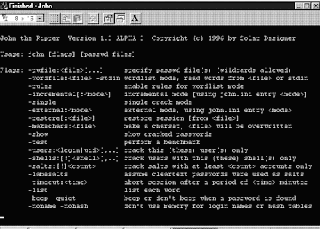
1. John the Ripper
John the Ripperis a free password cracking software tool initially developed for theUNIX operating system. It is one of the most popular passwordtesting/breaking programs as it combines a number of password crackersinto one package, autodetects password hash types, and includes acustomizable cracker. It can be run against various encrypted passwordformats including several crypt password hash types most commonly foundon various Unix flavors (based on DES, MD5, or Blowfish), Kerberos AFS,and Windows NT/2000/XP/2003 LM hash. Additional modules have extendedits ability to include MD4-based password hashes and passwords storedin LDAP, MySQL and others.
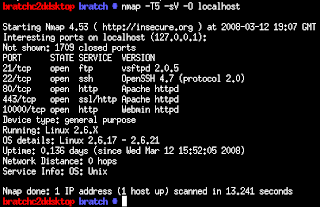
2. Nmap
Nmapis my favorite network security scanner. It is used to discovercomputers and services on a computer network, thus creating a "map" ofthe network. Just like many simple port scanners, Nmap is capable ofdiscovering passive services on a network despite the fact that suchservices aren't advertising themselves with a service discoveryprotocol. In addition Nmap may be able to determine various detailsabout the remote computers. These include operating system, devicetype, uptime, software product used to run a service, exact versionnumber of that product, presence of some firewall techniques and, on alocal area network, even vendor of the remote network card.
Nmapruns on Linux, Microsoft Windows, Solaris, and BSD (including Mac OSX), and also on AmigaOS. Linux is the most popular nmap platform andWindows the second most popular.
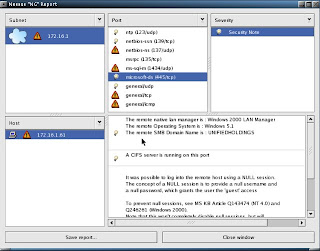
3. Nessus
Nessusis a comprehensive vulnerability scanning software. Its goal is todetect potential vulnerabilities on the tested systems such as:
-Vulnerabilities that allow a remote cracker to control or access sensitive data on a system.
-Misconfiguration (e.g. open mail relay, missing patches, etc).
-Defaultpasswords, a few common passwords, and blank/absent passwords on somesystem accounts. Nessus can also call Hydra (an external tool) tolaunch a dictionary attack.
-Denials of service against the TCP/IP stack by using mangled packets
Nessusis the world's most popular vulnerability scanner, estimated to be usedby over 75,000 organizations worldwide. It took first place in the2000, 2003, and 2006 security tools survey from SecTools.Org.
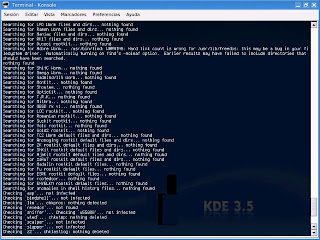
4. chkrootkit
chkrootkit(Check Rootkit) is a common Unix-based program intended to help systemadministrators check their system for known rootkits. It is a shellscript using common UNIX/Linux tools like the strings and grep commandsto search core system programs for signatures and for comparing atraversal of the /proc filesystem with the output of the ps (processstatus) command to look for discrepancies.
It can be used from a"rescue disc" (typically a Live CD) or it can optionally use analternative directory from which to run all of its own commands. Thesetechniques allow chkrootkit to trust the commands upon which it dependa bit more.
There are inherent limitations to the reliability ofany program that attempts to detect compromises (such as rootkits andcomputer viruses). Newer rootkits may specifically attempt to detectand compromise copies of the chkrootkit programs or take other measuresto evade detection by them.
5. Wireshark
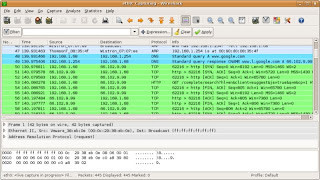
Wiresharkis a free packet sniffer computer application used for networktroubleshooting, analysis, software and communications protocoldevelopment, and education. In June 2006, the project was renamed fromEthereal due to trademark issues.
The functionality Wiresharkprovides is very similar to tcpdump, but it has a GUI front-end, andmany more information sorting and filtering options. It allows the userto see all traffic being passed over the network (usually an Ethernetnetwork but support is being added for others) by putting the networkinterface into promiscuous mode.
Wireshark uses thecross-platform GTK+ widget toolkit, and is cross-platform, running onvarious computer operating systems including Linux, Mac OS X, andMicrosoft Windows. Released under the terms of the GNU General PublicLicense, Wireshark is free software.
6. netcat
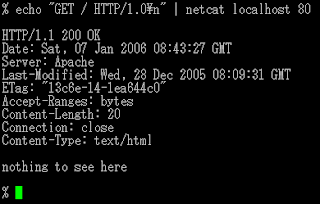
netcat is a computer networking utility for reading from and writing to network connections on either TCP or UDP.
Netcatwas voted the second most useful network security tool in a 2000 pollconducted by insecure.org on the nmap users mailing list. In 2003, itgained fourth place, a position it also held in the 2006 poll.
The original version of netcat is a UNIX program. Its author is known as *Hobbit*. He released version 1.1 in March of 1996.
Netcat is fully POSIX compatible and there exist several implementations, including a rewrite from scratch known as GNU netcat.
7. Kismet
Kismetis a network detector, packet sniffer, and intrusion detection systemfor 802.11 wireless LANs. Kismet will work with any wireless card whichsupports raw monitoring mode, and can sniff 802.11a, 802.11b and802.11g traffic.
Kismet is unlike most other wireless networkdetectors in that it works passively. This means that without sendingany loggable packets, it is able to detect the presence of bothwireless access points and wireless clients, and associate them witheach other.
Kismet also includes basic wireless IDS featuressuch as detecting active wireless sniffing programs includingNetStumbler, as well as a number of wireless network attacks.
8. hping
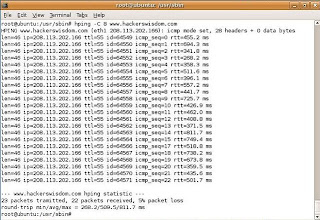
hpingis a free packet generator and analyzer for the TCP/IP protocol. Hpingis one of the de facto tools for security auditing and testing offirewalls and networks, and was used to exploit the idle scan scanningtechnique (also invented by the hping author), and now implemented inthe Nmap Security Scanner. The new version of hping, hping3, isscriptable using the Tcl language and implements an engine for stringbased, human readable description of TCP/IP packets, so that theprogrammer can write scripts related to low level TCP/IP packetmanipulation and analysis in very short time.
Like most tools used in computer security, hping is useful to both system administrators and crackers (or script kiddies).
9. Snort
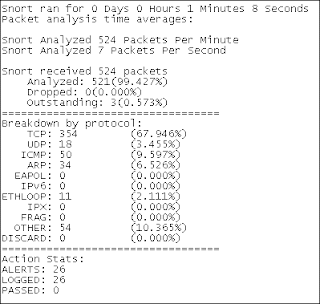
Snortis a free and open source Network Intrusion prevention system (NIPS)and network intrusion detection (NIDS) capable of performing packetlogging and real-time traffic analysis on IP networks.
Snortperforms protocol analysis, content searching/matching, and is commonlyused to actively block or passively detect a variety of attacks andprobes, such as buffer overflows, stealth port scans, web applicationattacks, SMB probes, and OS fingerprinting attempts, amongst otherfeatures. The software is mostly used for intrusion preventionpurposes, by dropping attacks as they are taking place. Snort can becombined with other software such as SnortSnarf, sguil, OSSIM, and theBasic Analysis and Security Engine (BASE) to provide a visualrepresentation of intrusion data. With patches for the Snort sourcefrom Bleeding Edge Threats, support for packet stream antivirusscanning with ClamAV and network abnormality with SPADE in networklayers 3 and 4 is possible with historical observation.
10. tcpdump
tcpdumpis a common computer network debugging tool that runs under the commandline. It allows the user to intercept and display TCP/IP and otherpackets being transmitted or received over a network to which thecomputer is attached.
In some Unix-like operating systems, auser must have superuser privileges to use tcpdump because the packetcapturing mechanisms on those systems require elevated privileges.However, the -Z option may be used to drop privileges to a specificunprivileged user after capturing has been set up. In other Unix-likeoperating systems, the packet capturing mechanism can be configured toallow non-privileged users to use it; if that is done, superuserprivileges are not required.
The user may optionally apply aBPF-based filter to limit the number of packets seen by tcpdump; thisrenders the output more usable on networks with a high volume oftraffic.
Do you have a favorite security software tool for Linux? Feel free to comment and tell us about it.
I would post a screenshot of my desktop but its a screensaver so you can't see the desktop in animation.
Here is a similar idea of what I'm doing, I'm just doing a different screensaver and I don't have compiz effects on cause my computer sucks:
http://youtube.com/watch?v=cXTKBdyWT60
As you all may have noticed, you have to sacrifice desktop items for the screensaver ability. Since Ubuntu allows you to make multiple auto-hiding panels with icons on them, I added 3 (one with Linux programs, one with Windows programs, another with special panel additions) so I still have my good ol desktop but just in a different form. Anything that would normally be placed on my desktop is just 1 click away from my Home folder, so I don't have to worry about anything getting lost.
Adobe seems to be hard at work at Adobe Creative Suite 4*. In May, they releasedpublic betas of CS4 versions of Dreamweaver, Fireworks, and Soundbooth.Existing CS3 owners are able to continue to use these applicationsbeyond the initial 48 hour window.
One of the most obvious changes in the new CS4 applications is the userinterface, and this change will also be carried over into the nextversion of Adobe's Photoshop. This decision is describedin detail by Adobe's John Nack. Nack describes how Adobe has beentrying to make the interfaces on their apps more consistent and showsoff a screenshotof the new Mac Photoshop "application frame". This application framecontains both user interface elements as well as documents themselves.Despite expressing his own initial resistance, Nack explains theadvantages to the consolidated window:
- It facilitatesN-up (2-up, 3-up, etc.) document layouts that adapt as you adjust theinterface. Think "live window tiling"--great for comparing,compositing, etc.
- It makes it easier to move the entire application and its contents, including from one monitor to another.
- It prevents documents from getting obscured by panels (palettes).
- It blocks out the contents of the desktop, minimizing visual clutter.(A number of Mac users have requested this option for many years. I'veknown quite a few people who open a small blank document, hit F to putit into full-screen mode, and then put it into the background to hidethe desktop. Willingness to live with that kind of hack demonstratessome genuine desire for a real fix.)
ForMac users resistant to the change, Nack assures readers that the newinterface is optional, and users can easily disable the consolidatedview, or you can use choose to use elements of both methods.
There's been no public timeframe for the release of this next version of Adobe's Photoshop, but there were some contested claims of an October release target. The next Mac version of Photoshop has been announced to remain a 32-bit application. 64-bit support is expected on the subsequent version for the Mac.
* Note that Adobe has objected to labeling this next version of Creative Suite as "Creative Suite 4" or "CS4", but for consistency's sake with the rest of the world, we are using that designation until Adobe officially announces otherwise.
iPhone features showed off during the keynote include push email(Blackberry’s home turf) and support for Microsoft Exchange 2007 -making it a great alternative to businesses who’re bored of the currentincumbents.
RIM's Bold move RIM, of course, is moving in the opposite direction. With the launch of the Blackberry Bold 9000 in May, it’s finally moving out of the cloistered corridors of enterprise towards a more consumer-oriented future.
Youonly have to examine the Blackberry Bold’s high-class design, 480 x 320pixel colour display and support for iTunes using Blackberry Media Syncto see how true that is.
And then there's the Blackberry Thunder- an iPhone rival with a rumoured full-face display instead of thescreen-and-physical-keyboard combo we've been used to with Blackberrydevices to date.
Of the two platforms, the Blackberry still verymuch has the edge for business users. It offers wider push email accessthan the iPhone, with support for IBM Lotus Domino and Novell Groupwareas well as Microsoft Exchange.
IM and third party apps TheBlackberry also includes Instant Messaging - something the iPhone can’tyet do, despite iChat’s inclusion in OS X on the Mac.
AllBlackberries, of course, are also compatible with thousands ofthird-party applications aimed at business users, the Apple iPhone hashardly got started.
iPhone 3G vs Blackberry Bold Specfor spec, the iPhone and Blackberry Bold 9000 are more or less par -both offer Wi-Fi , GPS and 3G (the Bold is the first Blackberry modelto do so).
The iPhone 3G beats the Bold hands-down when it comesto on-board storage though: you get a choice of either 8GB or 16GB onthe iPhone; the Blackberry Bold holds 1GB, plus a side-mounted SD cardslot.
The decider for many corporate types of course will be whattheir company chooses to give them. Businesses are still more likely topick a Blackberry for their employees, but it’s the iPhone that manyof us would buy given a choice.
The real threat? Intruth, the iPhone 3G and the Blackberry very distinct platforms thatcan easily find room to manoeuvre in the rapidly growing smartphonespace.
If anything the iPhone and Blackberry pose more of athreat to Windows Mobile, Palm and Symbian platforms than they do toeach other. We expect both to clean up in the coming months.
The latest news on Will Wright’s magnum opus, Spore, is that the minimum PC (and Mac) specifications required to run the game are surprisingly low.
This is great news for the majority of casual PC gamers who don’t tend to spend an inordinate amount of time and money constantly upgrading their PCs and graphics cards.
Maxis/EA has also released the Sporepedia on the official Spore.com site to whet the appetites of those PC and Mac gamers looking forward to Wright’s immense and hugely ambitious game.
The Specs required to run Spore on your PC or Mac are as follows:
Windows XP 2.0 GHz P4 processor or equivalent 512 MB RAM A 128 MB Video Card, with support for Pixel Shader 2.0 At least 6 GB of hard drive space
Windows Vista 2.0 GHz P4 processor or equivalent 768 MB RAM A 128 MB Video Card, with support for Pixel Shader 2.0 At least 6 GB of hard drive space
Mac OS X Mac OS X 10.5.3 Leopard or higher Intel Core Duo Processor 1024 MB RAM ATI X1600 or NVidia 7300 GT with 128 MB of Video RAM, or Intel Integrated GMA X3100 At least 4.7GB of hard drive space for installation, plus additional space for creations.
Apple hasunveiled MobileMe, which is a push method of controlling calendars,emails and contacts by sending the information from a remotely storedbase. The service replaces the .Mac service which hasn’t really set the world alight so far. The programme works with Mac, PC and iPhone, and works with Mail, iCal and Address book on the Mac, or Outlook on Windows. Applehas also built a suite of web 2.0 applications for the MobileMe serviceusing Ajax, which provides a desktop-like experience on the web tointeract with the data, and can be accessed at me.com. Send photos from the beach Photoscan even be synched over the air, either from the iPhone or a Mac orPC, which means Apple is working to drop hard into the Web 2.0 spaceGoogle and Yahoo have been beavering away at over the last two years. MobileMealso has over the air interaction; i.e. email is sent to the device, itinteracts with Google Maps, finds a restaurant mentioned in the email,and stores it as a contact for use on your computer. Unveiled atWWDC, it was termed as a perfect application for the iPhone or iPodtouch for $99 per year with 20GB storage, but it comes with a free 60day trial.
MobileMe Difference between .Mac and MobileMe While mostly replacing .Mac (which was primarily centered aroundInternet services for Apple's desktop and notebook computers), MobileMeprovides Internet services for both Mac OS X and the iPhone OS as well as the iPod touch device and Microsoft Windowsusers. This means that now you are not restricted to a Mac runningsoftware like Mail and iCal, but can access your personal data from anycomputer connected to the internet. Features Storage 20GB of online storage featuring 200GB of monthly transfer. Thefamily pack includes this for the main user as well as 5GB of storageand 50GB of transfer for each sub user (up to four additional users)
Mail Free Push Mail. Includes a @me.com email address. When a message is received it is sent directly to all the user's devices.
Address Book Address Book (Push). When a contacted is added or amended it is updated immediately on all the user's devices.
Calendar Calendar (Push). When a calendar appointment is added or amended it is updated immediately on all the user's devices. Gallery Public photo gallery. Photos can be uploaded in the web browser or synced by iPhoto on a mac
iDisk iDisk, which is accessible via a web browser, the Finder on a Mac, or as a remote disk in Microsoft Windows.The iDisk can also share files by emailing a link to the intendedrecipient. Another feature is to set an expiration on the link. Thismeans access to file will stop after a set number of downloads or aftercertain time period.
Web 2.0 MobileMe uses web 2.0 technologies to provide the look and feel of desktop-class applications in the user's web browser.
Pricing An Individual purchase of a MobileMe account for one-year is $99 USD (£59), while a Family Packsubscription (which includes one individual account and four familyaccounts with a specific email address for each one) is $149 USD (£89)for one year. The Individual account will have 20GB of combined emailand file storage and 200GB of monthly data transfer, while the FamilyPack will have, for each account in the Pack, 5GB of combined email andfile storage, and 50GB of monthly data transfer.
Competitors MobileMe is supposed to comprise Microsoft Exchange-like features for consumers.
Browser Support MobileMe's online services can be accessed in Desktop Applications.MobileMe also allows access to the user's data in desktop-likeenvironment in a web browser. Featured browsers are:
"Now I'd like to talk about something near and dear to my heart. That'sthe iPhone. In a few weeks it's going to be the iPhone's firstbirthday. An amazing intro -- certainly the most amazing we've everhad."
Steve! "Isn't that great? We've been working on that for a while. I think we finally got it right."
".Mac users can continue to use service, but they'll be automatically upgraded to MobileMe. So that's MobileMe."
"We'regoing to create a free 60 day trial, available along with iPhone 2.0.You might be asking what about .Mac? MobileMe replaces .Mac."
"It's available for $99 per year -- 20GB of storage."
Send to MobileMe option from photo. Send to the library of yourchoosing in the cloud. More applause. "So that's MobileMe, anincredible new experience for all your information. It's like havingExchange for the rest of us. Push email, contacts, calendars -- workswith native apps on the Mac and PC. And most exciting are theseincredible new web apps. The perfect companion."
Showing calendar push -- demoing the amount of time it takes tomake changes to calendar events over the air from PC to iPhone. 12seconds, by our count.
Log-off is power-on/off icon. Demo of OTA interaction... email getspushed to the device. Email to Gmaps, saves restaurant as a newcontact. Back to the computer -- what should happen to be there but theemail that was pushed to the phone, including the state (read orunread), and there's the restaurant contact.
11:22AM PT -Photos: photo skimming works, resizing thumbs -- it looks exactly likedesktop iPhoto. Wonder how much of this is Flash. iDisk is supported aswell -- looks like .Mac might be going bye-bye.
Quick reply mailfeature -- really fast way to send an inline reply. Contacts searchwith real-time text entry filter. Calendar, you know... it's a calendar.
"Ican run this on a Mac or PC -- you might guess which my favorite is.I'm going to launch my favorite browser -- which happens to be Safari.Just log right in." Looks pretty solid, almost identical to the desktopapps.
"It's a breakthrough web 2.0 app interface." Demo time!
Mail, contacts, calendar -- all this stuff looks exactly like Apple's native apps. This is pretty nice.
"Go to any browser, type me.com. Simple, easy to remember. Login... you get an incredibly rich email client. It feels like a desktop."
"What's really going to surprise people, we've built an incredible suite of web 2.0 apps using Ajax."
11:16AM PT - "Itworks with the native apps on my Mac or PC -- it works with Mail.app,iCal, Address Book... as well as Outlook. You'd expect that it wouldwork with those native apps."
Example of email -- gets pusheddown to all devices. Change a contact? Gets pushed up to MobileMe, downto all other device. "The best part of this, it works over the air.Everything is up to date."
"MobileMe stores your info up in the cloud so you can get to itanywhere using any of your devices -- Mac, PC, iPhone -- it will pushinformation up and down to keep everything up to date all the time."
Push email, contacts, and calendars... everything is up to date wherever you are.
Schiller just called ActiveSync ActiveStink -- the mockery! Guffawing.
Appletook the wraps off version 2.0 of its iPhone firmware at WWDCtoday.But it didn't send thousands of iPhone owners scurrying away toclickon 'Check for Update' in iTunes.
The 2.0 firmware, and by associationthe new iPhone3G, are due to be rolled out worldwide on July 11.
Thenew iPhone 3G is undoubtedly theheadline act – it updates Apple'spioneering smartphone withtri-band HSDPA connectivity, GPS and improvedbattery life. If theiPhone was hard to beat before, it's even toughernow. But the new2.0 firmware that's being rolled out with it is equallyimportant.
Enterprise, SDK and 'new features' Availableon both the 3G and original2G iPhones, version 2.0 adds a several newfeatures to the iPhoneplatform. There are those that we've alreadyseen: push email andcalendaring (via MS Exchange), Cisco VPN supportand downloadablethird-party applications via the forthcoming App Store.
And there are those features we didn'tsee coming: a pushnotification service, a scientific version of Calcand a nifty ContactSearch. These hardly make compelling front pagenews. Apple has improvedthe iPhone in very subtle ways.
When it hits on July 11, version2.0 ofthe iPhone firmware won't offer a major overhaul of theiconictouchscreen interface. Why should it? If it 'aint broke... AsSteveJobs explained in his keynote, there are three elements to theiPhone2.0 software – enterprise, the SDK and 'new features'.
SinceApple firstrevealed the iPhone 2.0 software back in early March, we'veknownabout its enterprise plans. Apple's support for MS Exchangewillenable the sort of push calendaring, push email, push contactsandremote wipe capabilities that businesses have been crying outfor.Ditto the built-in Cisco VPN client.
What we're reallyinterested in is thepersonal apps and games. With 250,000 softwaredeveloper kitsdownloaded since March, Jobs revealed that Apple hadadmitted 4,000applicants to its iPhone developer programme (from25,000applications).
With access to the iPhone's coreAPIs(shared with Mac OS X), plus its accelerometer, cameraandlocalisation features, we now have a better idea of what theiPhoneis capable of.
Super Monkey Ball for $9.99 Just as it did back in March, Segashowed off an updated cut of its GameCube favourite Super MonkeyBall.This game will be available on the App Store for $9.99 when itlaunchesin July. That's about £5 or £6 in UK money,although expect thereal-world exchange rate to be avoided in favourof $1=£1. At least it'sa lot less than the rumoured $25 pergame that was swirling around techwebsites pre-keynote.
In comparison, the rest of the earlyAppStore line-up at WWDC seems a little simplistic – anuninspiringselection of games, medical applications and prettied-upnews feeds. Butthere are some bright sparks.
The mobile version of TypePad,forexample, has been designed to tie in with the iPhone's camera,enablingyou to take shots and upload them to a website. Looptoffers a mix ofsocial networking with location-aware intelligence,while the AssociatedPress plans anapp that will map your whereabouts to deliver relevantnews.
Apple itself has developed a pushnotification service,designed to keep a persistent IP connectionopen that can notify you ofnew emails or instant messages. And itdoes this without the relevantapplications running in thebackground. It's a big deal, but pencilSeptember in your diary forthis one.
Like the iPhone 3G, the AppStoreshould launch on July 11th. 2G and 3G iPhone owners will be abletodownload apps less than 10MB over 2G/3G, Wi-Fi or via iTunes.Anythinggreater than 10MB will be limited to Wi-Fi connections anddownloads viaiTunes.
The 2.0 upgrade will be free for iPhoneusers, but it will cost iPod touch owners $9.95.
"The price is a maximum of $199 all around the world -- we're really,really excited about the new iPhone 3G. And as you might expect, wehave a new ad! I'd love to show it to you." Lights are down... spytheme.
"70 countries this year. We're going to start with 22 ofthe biggest, rolling out the iPhone 3G at the same time in all of thesecountries. July 11."
"The big news, is $399 to $199 -- we think we can check off more affordable."
"We think the iPhone 3G will be affordable to almost everyone. 16GB model for $299 -- for that model we have a white one
"iPhonestarted off at $599 for an 8GB device, which now sells for $399 -- wewant to make it even more affordable. I'm happy to tell you the 8GBwill sell for $199."
"These deals are all signed, sealed, anddelivered. Our stretch goal was 25 countries -- we'll be in 70countries this year, we think we can check off more countries."Applause. "Which brings us to more affordable."
Don't worry people, we'll have maps!
Huge, huge applause. People are on the edges of their seats. "We'llbe rolling it out in 70 countries in the next severeal months. Nexttime you're in Malta and you need an iPhone 3G, it'll be there for ya."
Showing all the countries, playing Small World -- most of SouthAmerica... Norway, Sweden, Finland, Estonia, Latvia, Lithuania,Denmark, Netherlands, Belgium, Poland, Czech, Switzerland, Portugal,Spain, Italy, Malta, Croatia, Slovakia, Hungary, Romania, Greece,Turkey, Jordan, Egypt, Niger, Mali, Senegal, Guinea, Ivory Coast,Cameroon, Kenya, Botswana, South Africa... man, way too many countries!
"Wethink we can check off third party apps. We distro iPhones in sixcountries -- we set ourselves the goal of 12 countries for the iPhone3G, and the stretch goal of 25 countries... Here we go..."
"Enterprise support: as we explained earlier, full Exchangesupport. All secure VPN, everything everyone's asked for is built-in.We're on exactly the right track, we can now check off enterprisesupport. Third party apps -- the SDK, you saw the great apps, and we'vegot the best way to distro them."
Zig-zagging down Lombard street. "So! Built in GPS, and much, muchfaster data. We think we can check off 3G and add built-in GPS toboot." Big applause.
Showing tracking ping -- crap, that's hot.
"Locationservices is going to be a really big deal on the iPhone -- you saw abit of that here today, it's going to explode. We get location fromcelltowers, from WiFi, and now we get it from GPS." So that's A-GPS."We can actually do tracking."
11:38AM PT - "Sogreat performance, great battery life. Now, one other thing thatbenefits from fast data is GPS -- we've built that into GPS." The crowdroars.
"Browsing, 5-6 hours of high speed browsing. Video - 7 hours, audio - 24 hours." Big applause. Dizamn.
"2Gtalk time is up from 8 hours to 10 hours. 3G talk time... other phoneshave 3 - 3.5 hours, we've managed 5 hours of 3G talk time, which is anindustry-leading amount of time."
"If we compare this to WiFi,we'll see 3G approaches WiFi speeds. We're also really proud that we'redoing this with great battery life -- standby time is 300 hours."
Email attachment download demo. 5s over 3G, 18s over EDGE.
"We took two other 3G phones -- the iPhone 3G is 36% faster thanthe nokia N95 and Treo 750 -- and look at the result you get, by theway! Full page on the iPhone, and quite a bit less on the otherphones." Big applause.
"It's even more remarkable when you lookat this next to WiFi -- you can see 3G speeds are actually approachingWiFi. It's amazing zippy -- 17s."
Still waiting to load... people are murmuring. Duh, Steve, we'vebeen saying this since the beginning. People are whistling now. 59s onEDGE. "Slow."
Showing EDGE vs. 3G -- let's see how we do. 3G version takes 21s to load... PAINFULLY slow on EDGE.
"How does the iPhone 3G tackle these things? Let's take a look at3G. Why do you want 3G? Faster data downloads, right? There's nowherethat you want it more than the browser and downloading email. First,the browser..."
"Improved audio, it's really, really great... and it feels even better in your hand, if you can believe it."
"Flush headphone jack."
"Solid metal buttons, the same gorgeous 3.5-inch display, camera"
"We'velearned so much with the first iPhone. We've taken everything we'velearned and more and created the iPhone 3G. It's beautiful. This iswhat it looks like. "Black back! "Thinner at the edges. Full plasticback, it's really nice."
HUGE applause.
"Today w'ere introducing the iPhone 3G.
"The number onereason people didn't buy iPhones is because they just can't afford it(56%). So as we arrives iPhone's 1st bday -- we're going to take it tothe next level."
"And last but not least -- everyone wants an iPhone, but we need to make it more affordable." Big applause.
"Second:enterprise support, third: third party apps, fourth: we need to sell itin more countries. We've sold iPhone in six countries so far, butbelieve me, they're in use ALL over the world." Hehe. "It's clear thereis a demand."
"What are these next challenges? 3G." Huge applause.
"Inthat first year we sold 6m iPhones since we ran out some weeks ago. Wedid figure out what our next challenges are... the next mountain wehave to climb to go to the next level."
"That's all great, butthe thing that makes us the happiest is that users love the iPhone. 90%customer satisfaction -- that's off the charts. What products todayhave that? 98% are browsing -- mobile browsing has gone from nothing to98% with the iPhone. 94% are using email, 90% are using SMS -- 80% areusing 10 or more features. You can't even begin to figure out how touse 10 features on a normal phone!"
"And iPhone has had tremendous critical acclaim -- best inventionof the year -- it's the widely believed that this it the phone that'schanged phones forever." Applause
"Now I'd like to talk about something near and dear to my heart.That's the iPhone. In a few weeks it's going to be the iPhone's firstbirthday. An amazing intro -- certainly the most amazing we've everhad."
Steve! "Isn't that great? We've been working on that for a while. I think we finally got it right."
".Mac users can continue to use service, but they'll be automatically upgraded to MobileMe. So that's MobileMe."
"We'regoing to create a free 60 day trial, available along with iPhone 2.0.You might be asking what about .Mac? MobileMe replaces .Mac."
"It's available for $99 per year -- 20GB of storage."
"I can run this on a Mac or PC -- you might guess which my favorite is.I'm going to launch my favorite browser -- which happens to be Safari.Just log right in." Looks pretty solid, almost identical to the desktopapps.
Works with the native applications you know.
Doeverything you need to do on every device you own. MobileMe works withMail, Address Book, and iCal on a Mac; Microsoft Outlook on a PC withWindows XP or Vista; and the built-in applications on your iPhone oriPod touch.
Push email. Push contacts. Push calendar.
MobileMestores all your email, contacts, and calendars on a secure onlineserver — or “cloud” — and pushes them down to your iPhone, iPod touch,Mac, and PC. When you make a change on one device, the cloud updatesthe others. Push happens automatically, instantly, and continuously.You don’t have to wait for it or remember to do anything — such asdocking your iPhone and syncing manually — to stay up to date.
Read about MobileMe on your
PC | Mac | iPhone or iPod touch
"It's a breakthrough web 2.0 app interface." Demo time!
Mail, contacts, calendar -- all this stuff looks exactly like Apple's native apps. This is pretty nice.
"Go to any browser, type me.com. Simple, easy to remember. Login... you get an incredibly rich email client. It feels like a desktop."
"What's really going to surprise people, we've built an incredible suite of web 2.0 apps using Ajax."
11:16AM PT - "Itworks with the native apps on my Mac or PC -- it works with Mail.app,iCal, Address Book... as well as Outlook. You'd expect that it wouldwork with those native apps."
Example of email -- gets pusheddown to all devices. Change a contact? Gets pushed up to MobileMe, downto all other device. "The best part of this, it works over the air.Everything is up to date."
"MobileMe stores your info up in the cloud so you can get to itanywhere using any of your devices -- Mac, PC, iPhone -- it will pushinformation up and down to keep everything up to date all the time."
Push email, contacts, and calendars... everything is up to date wherever you are.
Schiller just called ActiveSync ActiveStink -- the mockery! Guffawing.
"Good morning, I'm really excited to tell you about this brand newservice... so what's the idea? It's like having Exchange for the restof us."
Phil Schiller's up! Demo time.
"We're very very excited about this. It's called MobileMe."
"Now, we've got something entirely new."
"Imagineyou're a professor teaching a class on how to write iPhone apps! Youwant people to mail apps around... you can get certified and registerup to 100 iPhones, apps can be circulated and posted for up to 100iPhones. We think we've got a great story now." Applause.
11:02 a.m.: Forstall's back. He thanks all the developers whodemonstrated their applications. He mentions one feature request fromdevelopers: instant-messaging developers want to deliver notificationseven when the application isn't running. This is the background-runningissue that arrived after the March event. Forstall says backgroundprocesses are bad for a number of reasons, such as battery life andperformance. He uses the opportunity to ding Windows Mobile's taskmanager for handling background processes the way desktop Windows does,to widespread laughter and applause.
11:00 a.m.: Forstall promises that Digital LegendsEntertainment is the last demo for this morning. These guys built agame in two weeks, and Xavier Carrillo Costa shows off his game. Theirgame is called Krull, and it's another caveman adventure gamewhere you battle enemies, swing across rope bridges, and solveproblems. They expect to have the game ready by September.
10:57 a.m.: Mimvista has another medical application thatbuilds on their niche, medical imaging software. Mark Cain isrepresenting Mimvista, and he says developing one of their types ofapplications before the iPhone wasn't going to work. The idea is toconnect doctors with their workstations, so they can evaluate medicalimaging from the golf course. The application, like Modality's, canshow extremely detailed pictures of the human system, as well as movingimages. "The iPhone has created a new direction for our company."
MLB on the iPhone
(Credit: James Martin/CNET News.com)
10:53 a.m.: Modality is the next company that Apple isshowing off. These folks, represented by Dr. S Mark Williams, havedeveloped an application that helps medical students ditch their flashcards and use an iPhone to view anatomical images of the body that arevery detailed, down to the arteries and veins, and can quiz students onthe various parts of the heart, for example. Within weeks of the AppStore launching, they will have about a dozen applications availablefor various health-care needs.
10:50 a.m.: MLB.com is getting in on the action, so we canwatch the tortured season of the New York Mets on our iPhones. JeremySchoenherr shows off At-Bat, as we check out the Royals-Yankees game.You can see who's at bat, who's pitching, the count, and the score: Mussina'soff to a decent start this morning. You can get real-time videohighlights of the Yankees turning a double play. They aren't really"real-time" since the highlights arrive after the fact, but still.
10:48 a.m.: It's a parade of developers. An app called Bandwas made by a solo developer named Mark Terry, whereas all the otherapps so far have been corporate-developed. Band lets you create musicon the iPhone, with a touch-screen piano, and the demo guy cranks out apassable version of John Lennon's "Imagine." There are also drums and a12-bar blues creation app, which lays down a bass line while you playguitar over the track, and a bass guitar, which is used to play theslinky bass line from Pink Floyd's "Money." There's other stuff, buttime is limited. Terry says Band will appear on the App Store in a fewweeks' time.
Developer shows off music application on the iPhone.
(Credit: James Martin/CNET News.com)
10:45 a.m.: More applications! Brian Greenstone of Pangea Software comes up to show off two games they ported from Mac OS X to the iPhone, Enigmo, a 3D puzzle game, is very CPU intensive, says Greenstone, and it doesn't miss a beat in the demo. Cromag Rally,which is apparently a caveman racing game, is the other game shown off.Driving looks hard, but he is racing on snow, and people fromCalifornia don't know how to drive in the snow. Both games will cost$9.99.
10:41 a.m.: Our good friends at the Associated Press alsohave an application to show off. Benjamin Mosse of the AP is showingoff their application, which is essentially a reader-style applicationthat focuses on local news. This is another location-aware applicationthat sends you local news based on where you are. You can customize thefeeds for your favorite sports teams, and browse AP photos and video.Those stores can be shared via text or e-mail, and civilians can uploadtheir own stories and pictures to the AP from the iPhone, andcontinuing with the trend, it will be free.
10:39 a.m.: TypePad is next up, for the mobile bloggers inthe audience. Michael Sippey of TypePad shows off what they've puttogether, with a simple interface that lets you create a post, take aphoto, or add a photo. You can take photos with the iPhone's camera andadd them to a post, as well as add photos from your library on youriPhone. This will be yet another free application.
eBay application on iPhone.
(Credit: James Martin/CNET News.com)
10:36 a.m.:Looptis the third company to demo, and they're talking about alocation-based application. Again, no distinction is made whether thisis an application using GPS or the current location-based service onthe iPhone. Loopt blends your social networks with the Mapsapplication, so you can see where your friends are. You can also go totheir journal to see what they've been doing today, what picturesthey've added, and so on. This app will also be free.
10:33 a.m.: eBay is the next developer to show off anapplication, and Ken Sun of eBay comes onstage to show off Auctions onthe iPhone. The iPhone is already the primary mobile device used oneBay's Web site, he says. The app has a basic front door with optionsto track auctions you've bid on, see whether you've been outbid, and toplace new bids. You can also pick up the photos from the auctionlistings, and blow them up to full screen. eBay is making this appavailable for free.
10:30 a.m.: This demo is showing off the capabilities of theaccelerometer, where the iPhone can be tilted back and forth toaccelerate or brake. The tester gets a nice hand from the audience forhurling Baby Monkey through the goal. Super Monkey Ball will be available at the launch of the App Store for $9.99.
10:29 a.m.: Forstall is bringing third-party developersonstage to talk about their application, and Sega revisits the stage.They demoed a game called Super Monkey Ball in March, andthey've refined it. Ethan Einhorn of Sega comes up onstage to talkabout the app. The initial game had four stages developed in two weeks,now they've got 110 stages, with all four classic monkeys.
Showing tilt control on Sega games.
(Credit: James Martin/CNET News.com)
10:26 a.m.: The application finds your friends within acertain radius, but Forstall says nothing about whether the applicationwas designed for the current iPhone, which uses a Wi-Fi/cell tower typeof location-aware application, or the new iPhone, which is expected tohave GPS. Forstall reads off a few quotes from corporate developerpartners like Disney--once again--and Fox Interactive.
10:23 a.m.: His mock application is going to merge thecontacts databases and location-aware services. He's taking us throughthe actual development experience, dragging and dropping icons thatrepresent things like the iPhone's search bar around the developmentenvironment. Once the application is done, the developer can test itright on a Mac for bugs or to make different aesthetic choices, such aswhether to put things in the toolbar or within the regular fields.
Forbes isanticipating that Apple will launch the long-promised App Store featurenext week, allowing outside developers to sell iPhone and iPod Touchapplications.
If so, Forbes says, Apple could be a new and dangerous foe for Nintendo's DS handheld.
Thearticle notes that developers continue to create ever moresophisticated games for Nintendo's four year-old handheld, and thatApple has struggled with gaming on the Mac. Nevertheless, the authorthinks Apple may be a threat due to the fact that the company'sproducts have both a touch-screen interface and motion sensingaccelerometers - features which have been popular separately with theDS and the Wii.
In addition, the ability to download software into the iPhone wirelessly may be a selling point for developers.
Apple introduced an iPhone development kitearlier this year, showing versions of Super Monkey Ball and Sporerunning on the device during a demonstration of the technology.
Onlytime will tell if the multi-touch screen and accelerometers, thirdparty support and a huge installed base will make gaming a success onApple's iPhone and iPod Touch - but even so, the company is unlikely tosignificantly threaten Nintendo any time soon. After all, Sony's PSP -which offers multimedia and phone capabilities similar to Apple'sproducts - hasn't caught up with sales of the DS in the three yearsthat it has been on the market.
Click here for an in-depth analysis of Apple's games service.
Ok, Scott, we love what you've done here, but we're yawning. Thenagain, the thousands of devs in the audience are probably stoked --those that haven't used the SDK anyway.
Demo time! "I want toconcentrate on how we construct a UI..." making an app called NearbyFriends. Accesses the contacts database and Core Location to filter allcontacts with contacts within 10mi. Building the UI with InterfaceBuilder. Dragging and dropping interface elements.
Going over debungging and Xcode, instruments -- all the stuff from the March iPhone roadmap event.
10:20AM PT - "Wetop it all off with Cocoa Touch -- our UI object oriented framework,which makes building an app for our fullscreen touch interface anabsolute breeze. We have a great set of APIs. On top of this we have areally powerful set of tools."
"With the SDK in iPhone 2.0 we'reopening the same native APIs and tools we use internally... that meansyou as a dev can build apps for the iPhone the same way we do. Let'sstart by talking about the APIs. The APIs and frameworks on the iPhoneshare extensively with OS X... We use the same kernel in the iPhonethat forms the basis of OS X... almost all of them share the samesource code line-for-line as OS X." He's going over the bits of CoreServices: SQL lite, OpenGL ES, OpenAL
Steve's back on: "That gives you a sense of what we're doing in theenterprise, all this stuff built into iPhone 2.0. Next up is the SDK,to take us where we are there and to show us some really excitingstuff, I'd like to bring up Scott Forstall." Applause.
Still going... the Army sure does love the new iPhone software!
Going over some firms, testimonials style. Great if you care about the petabytes in the datacenters of Disney, we guess!
10:13AM PT -"We've had phenomenal participation from higher education. Again,gotten fantastic feedback. We made a video of these customers, I'd loveto show it to you..." Video time!
"We've had a beta going... 35%of the Fortune 500 has participated in that beta program. The top 5banks, top 5 securities firms, 6 or 7 top airlines, 8 of 10 top pharma,and 8 of 10 top entertainment companies."
"Exchange... as you know, we've done it... push email, calendars,contacts, auto-discovery, global address lookup, remote wipe, all thisstuff built in. In addition we've worked with Cisco to build in theirVPN services... all sorts of security demanded by the enterprise.Everything they told us they wanted, we built in."
"iPhone 2.0 software, there are three parts: enterprise support, SDK, and new end-user features. Let me start with enterprise."
10:10AM PT -"Let's talk about iPhone, the place to start is our new software -- theiPhone 2.0 platform, a giant step forward from where we've been... westarted a dev program in March, which is just 95 days ago. In those 95days we've had over 250k download the free SDK. We've had over 25kpeople apply to the pay developer program... unfortunately we couldn'ttake everybody, so we admitted 4k people to the program..."
"Tohelp me, I'm going to ask Scott Forstall and Phil Schiller to help mewith parts of this. Then... Bertrand Serlet will give you a sneak peakat the next version of OS X called Snow Leopard."
"Let's get started. As you know there are three parts to Apple --the first part is Mac, second part is our music business, iPod andiTunes, and the third part is the iPhone. I'm going to take thismorning to talk about the iPhone."
"I'm sorry for all those folks that couldn't be here... we're goingto have a great week this week. 147 sessions, 85 on the Mac, and 62 onthe iPhone... it's going to be packed! 169 hands-on labs, 1k Appleengineers, iFund and Intel sessions. I think it's going to be one ofthe best WWDCs ever."
10:07AM PT - "Thankyou very much. I'm really glad to be here this morning. We've beenworking hard on some great stuff... thank you for coming to WWDC 2008.We've got a record 5200 attendees -- we wish we could have had more,but we sold out!"
Roar, applause.
Music's over, and here we go... lights all the way down, Steve's on stage!
10:06AM PT - Lights are coming down! Crowd beginning to roar!
Announcer: "Turn off all cellphones, iPhones, PDAs... our program will start in a few minutes."
10:02AM PT - OK, weird, a bunch of attendees just stood up and started clapping -- we don't know why, since it wasn't Jobs (or so we think).
9:51AM PT - Peoplestill funneling in -- this auditorium seats thousands of people, so ittakes a little while. Say, is that Gavin Newsome? Oh, and there's AlGore.
9:46AM PT -We're in! The cattle rush of the media was pretty mellow this timearound. Shockingly enough, they're playing oldies -- not the usualsoundtrack of Gnarles Barkley, Coldplay, Gorillaz, etc.
9:37AM PT - Everybody is crowding up at the closed gates, preparing for the Running of the Media.
9:16AM PT - People are really filing in. You've never heard so many people say the word "iPhone" in your life.
8:43AM PT - We'rein line at the Moscone Center (which is actually pretty spare at themoment), but it's early. The media's got a ton of MacBook Airs. Staytuned for our live coverage of the event.
Already hundreds of devs and attendees are piling up downstairs to get in.


 RedAlert’s Cold War gone hot is one of the most beloved scenarios is allof strategy gaming, and the franchise’s long seven year absence makesthis game even more exciting and desirable. And by adding thepseudo-Japanese Empire of the Rising Sun faction the festivities geteven more campy and strange, complete with towering mecha, psychicschoolgirls and parachuting bears. So it’s got a lot of hooks for boththe longtime fan and sugar-crazed newcomer alike.


 The Trees (Rush)