An exclusive gaming industry community targeted
to, and designed for Professionals, Businesses
and Students in the sectors and industries
of Gaming, New Media and the Web, all closely
related with it's Business and Industry.
A Rich content driven service including articles,
contributed discussion, news, reviews, networking, downloads,
and debate.
We strive to cater for cultural influencers,
technology decision makers, early adopters and business leaders in the gaming industry.
A medium to share your or contribute your ideas,
experiences, questions and point of view or network
with other colleagues here at iVirtua Community.
You. Your friends and family. Your classmates and coworkers. In thebrave new world of the internet, everybody has power. Information isinteractive, knowledge is collaborative and history is open source. Thenerdy kid next door has just as much influence as a high schoolteacher; the dorky dude at the comic book shop has just as much voiceas a college professor.
Problem is, the nerds and dorks tend to have a lot morefree time - and passion - than the teachers and professors. The endresult? A hilariously skewed, terrifyingly twisted view of the world inwhich all the wrong things are deemed "important" and worthy of seriousacademic discussion.
Here are 15 mind-boggling examples.
See what we mean? When the deadliest, costliest war in the history of mankind has been trumped by a videogame franchiseabout that war,you know something's off. One involved over 50 countries and took over70 million lives; the other involves button mashing and tea bagging.
On an encouraging note, we did have to add all the Call of Dutygames' individual pages together to reach the crazy number above. On adiscouraging note, we didn't have to add Call of Duty 4 and itsnon-WWII setting, which would have brought the total word count to aneven crazier 18,927.
Oh, and on a simply ridiculous note? Call of Duty 4: Modern Warfare beats "modern warfare"... 5,858 to 2,873.
Alsoless important than Call of Duty! • American Revolutionary War = 8,078
• American Civil War = 11,729
• English Civil War = 8,030
• Napoleonic Wars = 7,951
• Hundred Years' War = 7,992
• War on Terrorism = 10,674
• War on Drugs = 7,628
• Cold War = 10,117
• "War" = 9,233 While the magic menagerie of super-powered, frilly-maned, sparkly-eyed, rosy-cheeked wonder beasts might make for slightly more exciting cards than a Three of Spades, the emphasis here is still extremely wonky.
Poker has been around for longer than anyone can remember... the Pokemon Trading Card Game was invented in 1996. Poker has created millionaires and forced bankruptcy... the Pokemon Trading Card Game might have resulted in some lost lunch money and a temper tantrum or two.
Alsoless important than Pokemon Trading Cards! • Baseball cards = 4,686
• Blackjack = 5,228
• Roulette = 5,492
• Checkers = 2,326
• Pool (Billiards) = 621
• Bowling = 407
• Wheel of Fortune = 4,521
• "Trade" = 3,038
• "Games" = 2,830 Before you get the wrong impression, no, the Master Chief does not win in a Wikipedia matchup against George W. Bush... though his approval ratings are undoubtedly higher.
The truly astounding thing, however, is that he does emerge victorious against not one, not two, but TENof this country's past commanders in chief. Yes, 23% of the men whohelped make the United States the strongest nation on Earth are easilydefeated by a fictional and faceless videogame character who barelyknows how to speak and takes orders from a naked hologram. Go America!
The orange word count above is an average taken from the USPresidents beaten by the Master Chief. Here's the full, patheticbreakdown:
Leaders of the Free Worldless important than Master Chief! • James Monroe = 2,820
(5th President)
• John Quincy Adams = 3,457
(6th President)
• John Tyler = 3,431
(10th President)
• Zachary Taylor = 2,235
(12th President)
• Millard Fillmore = 3,631
(13th President)
• Franklin Pierce = 4,203
(14th President)
• James Buchanan = 3,888
(15th President)
• Rutherford B. Hayes = 2,686
(19th President)
• James A. Garfield = 3,915
(20th President)
• Chester A. Arthur = 3,078
(21st President)
In the future, when Captain Kirk is battling tribbles and Data islearning how to love, this lopsided comparison will make completesense. Why wouldn't the entries for the glorious Starship Enterprise dwarf that for a dusty museum piece like the automobile? We expect the pages for hoverboards, robot maids, personal time machines and giant laser death rays to do the same.
For the present, though, why does a make-believe spaceship deserve more words than the planet's principal mode oftransportation? Also, why does that make-believe space ship deserve noless than nine separate pages, including unique entries for six different models of the NCC-1701? Seriously?!
You think Hideo Kojima's cut scenes are long? Try reading Leo Tolstoy's epic tome. War and Peace waspublished in four books over five years, covers nearly a decade ofhistory and includes more than 1,400 pages, more than 560,000 words andmore than 3 million characters. It's generally considered one of thelongest novels - hell, one of the longest things - of all time.
Somehow, though, the writers on Wikipedia managed to summarize thewhole plot in 1,922 words. Well done! Now we'd be really impressed ifyou guys could squeeze the plot of a single damn videogame - even therambling old man that is Metal Gear Solid 4 - into less than 2,548 words.
The top numbers (in orange) are for the entire entries.The numbers in the preceding paragraph, as well as the list below, arefor the subsections entitled "plot," "story," or "synopsis."
Alsoless important than Metal Gear Solid 4!
(by plot, story or synopsis)
We won't get jealous and play the competition card here. EGM isimportant, a veritable titan of the industry with a massive and devotedfollowing. Many of us here at GamesRadar include ourselves in that camp.
But come on... do the latest screenshots of Chun-Li'sthighs really carry more weight than the 2008 election? Do you reallyneed to know the review score for Turok more than you need to know thereasons for the recession? Is the dropping price of the PS3 morecritical than the rising price of gasoline?
Yes, Electronic Gaming Monthly - and any videogame publication - is totally worthy of 4,429 words. We just wish that Time and other vital news sources received the same attention.
We love, love, love the soundtracks to Final Fantasy... but someone put way, way, way too much effort into this Wikipedia page. The intro alone is nearly 700 words, lengthier than the entries for many singers, bands and genres. Rock and roll, the biggest genre of them all, doesn't stand a chance.
Of course, the vastness of the web was made to hold such exceedinglyniche minutiae, but even the fan who owns all of these compilationalbums probably agrees that they could have fit onto the page forgeneral Final Fantasy music. Unless that fan is the one who wrote this obsessive love letter to begin with...
Alsoless important than obscure Final Fantasy music!
Email this article Bookmark Bookmark this Article
Close Digg.com Del.icio.us Reddit.com
Facebook Slashdot.org Google Bookmarks
N4G Stumbleupon.com Fark.com
Jeffrey Dahmer was a cannibal, Charles Manson was a deranged cultleader and John Wayne Gacy, worst of all, dressed up like a friggin'clown. Yet the complete list of these horrible, horrible murderers -together with dozens of depraved others - is apparently about 3,000words less significant than the list of Maverick boss characters in the Mega Man X series.
And that's compared to the list of serial killers by country. Look up the list of serial killers by number of victims andthe difference grows to 6,000. Go ahead and add the two lists togetherif you want - at 8,000 words total, they still fall short of the sheerterror and infamy inspired by Cyber Peacock, Blizzard Buffalo,Overdrive Ostrich and Armored Armadillo. Ooh, we're getting chills justthinking about them!
Above: The true face of evil
Let's be honest. Who doesn't love Gardulla the Hut? Who didn't havea poster of Cole Fardreamer or Elan Sleazebaggano hanging on theirbedroom wall as a kid? Who wouldn't beg their parents to buy them thatKlaatu action figure for the holidays?
Qwi Xux, Plo Koon, 2-1B, Chief Chirpa, Yarna D'al Gargan, BaronSoontir Fel, Meewalh, Oola, Commander Cody, Baron Soontir Fel, TraskUlgo, Gartogg, Wam "Blam" Lufba and, of course, little Windy... all ofthem are forever entwined in our dreams and imaginations.
No surprises here. After all, Superman (10,641 words) has been known to survive a nuclear explosion... inside his own ass. And Batman (10,818 words) invented his own damn brand of shark repellent Bat spray!
Obviously, these guys are far superior to the rest of us. End of discussion.
Above: Holy sardine!
Both the fictional Umbrella Corporation and the real world National Human Genome Research Institute studythe mysteries of genetics. Both engage in the cutting edge field ofbiomedical engineering. Both are located in small towns. Both haveseemingly harmless, yet somehow creepy names. Both have seeminglyvague, yet somehow menacing logos.
Wait a second - are these two organizations actuallyone and the same?! Has Umbrella been a front all along, a clever ployto distract us from the true zombie overlords? We knew that tiny word count seemed suspicious...
Above: Oh shit.
According to Wikipedia, Kirby is "a small, pink, spherical creature with large red feet."
Exactly. Done. Enough said. Oh, if only that were the case...instead, that is merely the first sentence of a 1,512 word subsectionentitled Characteristics, which goes on to describe - in disturbinglydetailed sub-subsections - the Personality, Abilities and Species of Kirby. Yes, species.
The dog hasan overall longer page, sure, but the fact that Kirby's"characteristics" actually overcome those of man's best friend isabsolutely insane. They shouldn't even be close.
As expected, Jesus whoops Mario byquite a large margin in total Wikipedia word count. In a miraculousturn of events, however, Mario's Legacy section is actually longer thanJesus' Legacy. Yes, you heard right - a pixelated plumber is consideredto have had a bigger impact on the world than the central figure ofChristianity and, to some, the physical embodiment of God. Wow.
Then again... Jesus can walk on water and heal the sick,but Mario can shoot fireballs out of his hands and turn into a raccoon.Jesus has an awesome beard, but Mario's got a super sweet mustache.Jesus ushered in much of modern religion, but Mario ushered in much ofmodern gaming. Both can come back from the dead, though to be fair,Jesus only did that once.
At last, we reach the ultimate showdown. In this corner, we have God, who Wikipedia describes as:
"... the principal or sole deity in religion..."
"...the creator and overseer of the universe..."
"... omnipotent and eternal..."
"... the source of all moral obligation, and the greatest conceivable being existent..."
His opponent? Knuckles of Sonic the Hedgehog fame, who Wikipedia describes as:
"... a red, teenage, anthropomorphic echidna..."
"... the fourth most popular character in the series..."
"... shy around girls..."
And, uh, yeah. How did this guy beat God by more than 4,000 words again? Well, to reach Knuckles' number, we did have to add two pages together, one for his game character and one for his comic character. To level the playing field, we should probably give God the Bible or something, right? Of course, we'll also have to give Knuckles his comic books and two videogames (Knuckles Chaotix and Sonic & Knuckles) to keep things even...
Damn! Sorry God - you lose again. Looks like we have a new omnipotentoverseer in the universe... or at least in the strange, silly, scaryand seriously skewed universe that is Wikipedia.
Linuxis a hacker’s dream computer operating system. It supports tons oftools and utilities for cracking passwords, scanning networkvulnerabilities, and detecting possible intrusions. I have here acollection of 10 of the best hacking and security software tools forLinux. Please always keep in mind that these tools are not meant toharm, but to protect.
1. John the Ripper
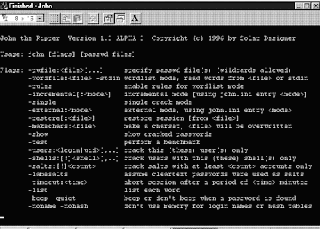
John the Ripperis a free password cracking software tool initially developed for theUNIX operating system. It is one of the most popular passwordtesting/breaking programs as it combines a number of password crackersinto one package, autodetects password hash types, and includes acustomizable cracker. It can be run against various encrypted passwordformats including several crypt password hash types most commonly foundon various Unix flavors (based on DES, MD5, or Blowfish), Kerberos AFS,and Windows NT/2000/XP/2003 LM hash. Additional modules have extendedits ability to include MD4-based password hashes and passwords storedin LDAP, MySQL and others.
2. Nmap
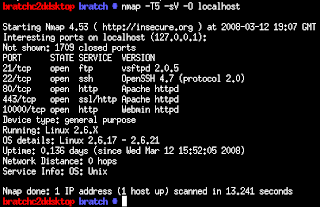
Nmapis my favorite network security scanner. It is used to discovercomputers and services on a computer network, thus creating a "map" ofthe network. Just like many simple port scanners, Nmap is capable ofdiscovering passive services on a network despite the fact that suchservices aren't advertising themselves with a service discoveryprotocol. In addition Nmap may be able to determine various detailsabout the remote computers. These include operating system, devicetype, uptime, software product used to run a service, exact versionnumber of that product, presence of some firewall techniques and, on alocal area network, even vendor of the remote network card.
Nmapruns on Linux, Microsoft Windows, Solaris, and BSD (including Mac OSX), and also on AmigaOS. Linux is the most popular nmap platform andWindows the second most popular.
3. Nessus
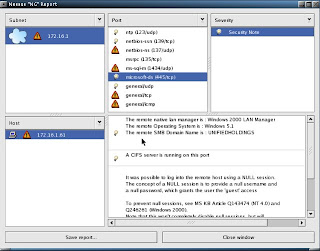
Nessusis a comprehensive vulnerability scanning software. Its goal is todetect potential vulnerabilities on the tested systems such as:
-Vulnerabilities that allow a remote cracker to control or access sensitive data on a system.
-Misconfiguration (e.g. open mail relay, missing patches, etc).
-Defaultpasswords, a few common passwords, and blank/absent passwords on somesystem accounts. Nessus can also call Hydra (an external tool) tolaunch a dictionary attack.
-Denials of service against the TCP/IP stack by using mangled packets
Nessusis the world's most popular vulnerability scanner, estimated to be usedby over 75,000 organizations worldwide. It took first place in the2000, 2003, and 2006 security tools survey from SecTools.Org.
4. chkrootkit
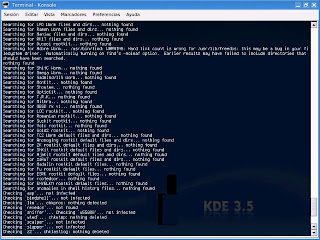
chkrootkit(Check Rootkit) is a common Unix-based program intended to help systemadministrators check their system for known rootkits. It is a shellscript using common UNIX/Linux tools like the strings and grep commandsto search core system programs for signatures and for comparing atraversal of the /proc filesystem with the output of the ps (processstatus) command to look for discrepancies.
It can be used from a"rescue disc" (typically a Live CD) or it can optionally use analternative directory from which to run all of its own commands. Thesetechniques allow chkrootkit to trust the commands upon which it dependa bit more.
There are inherent limitations to the reliability ofany program that attempts to detect compromises (such as rootkits andcomputer viruses). Newer rootkits may specifically attempt to detectand compromise copies of the chkrootkit programs or take other measuresto evade detection by them.
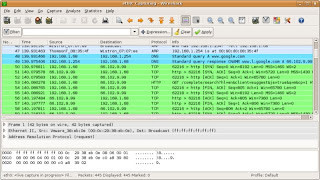
5. Wireshark
Wiresharkis a free packet sniffer computer application used for networktroubleshooting, analysis, software and communications protocoldevelopment, and education. In June 2006, the project was renamed fromEthereal due to trademark issues.
The functionality Wiresharkprovides is very similar to tcpdump, but it has a GUI front-end, andmany more information sorting and filtering options. It allows the userto see all traffic being passed over the network (usually an Ethernetnetwork but support is being added for others) by putting the networkinterface into promiscuous mode.
Wireshark uses thecross-platform GTK+ widget toolkit, and is cross-platform, running onvarious computer operating systems including Linux, Mac OS X, andMicrosoft Windows. Released under the terms of the GNU General PublicLicense, Wireshark is free software.
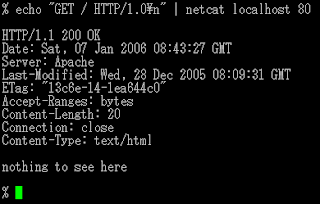
6. netcat
netcat is a computer networking utility for reading from and writing to network connections on either TCP or UDP.
Netcatwas voted the second most useful network security tool in a 2000 pollconducted by insecure.org on the nmap users mailing list. In 2003, itgained fourth place, a position it also held in the 2006 poll.
The original version of netcat is a UNIX program. Its author is known as *Hobbit*. He released version 1.1 in March of 1996.
Netcat is fully POSIX compatible and there exist several implementations, including a rewrite from scratch known as GNU netcat.
7. Kismet
Kismetis a network detector, packet sniffer, and intrusion detection systemfor 802.11 wireless LANs. Kismet will work with any wireless card whichsupports raw monitoring mode, and can sniff 802.11a, 802.11b and802.11g traffic.
Kismet is unlike most other wireless networkdetectors in that it works passively. This means that without sendingany loggable packets, it is able to detect the presence of bothwireless access points and wireless clients, and associate them witheach other.
Kismet also includes basic wireless IDS featuressuch as detecting active wireless sniffing programs includingNetStumbler, as well as a number of wireless network attacks.
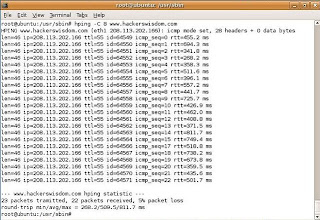
8. hping
hpingis a free packet generator and analyzer for the TCP/IP protocol. Hpingis one of the de facto tools for security auditing and testing offirewalls and networks, and was used to exploit the idle scan scanningtechnique (also invented by the hping author), and now implemented inthe Nmap Security Scanner. The new version of hping, hping3, isscriptable using the Tcl language and implements an engine for stringbased, human readable description of TCP/IP packets, so that theprogrammer can write scripts related to low level TCP/IP packetmanipulation and analysis in very short time.
Like most tools used in computer security, hping is useful to both system administrators and crackers (or script kiddies).
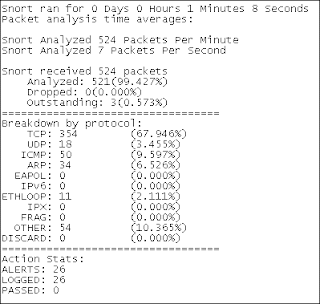
9. Snort
Snortis a free and open source Network Intrusion prevention system (NIPS)and network intrusion detection (NIDS) capable of performing packetlogging and real-time traffic analysis on IP networks.
Snortperforms protocol analysis, content searching/matching, and is commonlyused to actively block or passively detect a variety of attacks andprobes, such as buffer overflows, stealth port scans, web applicationattacks, SMB probes, and OS fingerprinting attempts, amongst otherfeatures. The software is mostly used for intrusion preventionpurposes, by dropping attacks as they are taking place. Snort can becombined with other software such as SnortSnarf, sguil, OSSIM, and theBasic Analysis and Security Engine (BASE) to provide a visualrepresentation of intrusion data. With patches for the Snort sourcefrom Bleeding Edge Threats, support for packet stream antivirusscanning with ClamAV and network abnormality with SPADE in networklayers 3 and 4 is possible with historical observation.
10. tcpdump
tcpdumpis a common computer network debugging tool that runs under the commandline. It allows the user to intercept and display TCP/IP and otherpackets being transmitted or received over a network to which thecomputer is attached.
In some Unix-like operating systems, auser must have superuser privileges to use tcpdump because the packetcapturing mechanisms on those systems require elevated privileges.However, the -Z option may be used to drop privileges to a specificunprivileged user after capturing has been set up. In other Unix-likeoperating systems, the packet capturing mechanism can be configured toallow non-privileged users to use it; if that is done, superuserprivileges are not required.
The user may optionally apply aBPF-based filter to limit the number of packets seen by tcpdump; thisrenders the output more usable on networks with a high volume oftraffic.
Do you have a favorite security software tool for Linux? Feel free to comment and tell us about it.
Of course your content is your copyright and others should not copyit without your permission. But a feed can be repurposed in many ways,and we need to look at what parts of the feed are being copied and whoprofits.
Copyright lawyers will have to fill me in on the latest case law onall of this, but I think in practice we have despatched the question whether links are legal (is the web legal?) with a resounding yes.
Shouldn’t You Have To Ask Permission If You Want To Take A Blog’s Feed For Your Profit? which has attracted considerable comment.
As Sir Tim father-of-the-web-but-not-a-lawyer Berners-Lee has said:
There are some fundamental principles about links onwhich the Web is based. These principles allow the world of distributedhypertext to work. Lawyers, users and technology and content providersmust all agree to respect these principles.
What of link+title? In principle there is copyright in a title, butit’s hard to see anyone any longer seeking to enforce copyright here.
But an RSS feed is an aggregation, so what of a bunch oflinks+titles? Here there is a stronger case for saying that thisaggregation is protected by copyright, and if we’re talking about anaggregation of links+titles+descriptions or even +excerpts, that isclearly protected. So let’s talk about permission, express or implied.
I don’t believe there’s any implied permission for others to republish feeds.But in practice, why publish a feed if you don’t want it to berepublished? It will be, and there’s little you can do to stop it. Youcan frame some stern T & Cs or apply a more friendly CC licence,but most, whether intentionally or by default, will take little notice.
Susan makes much of others taking your (blog) feed “for profit”. Weare all miffed if we see others profiting from our work at our expense.But, with feed repurposing, in most cases we profit too, sufficientlythat we do not see it as being at our expense.
Google indexes, caches and republishes parts of my website, myblog, my feeds without my permission. Google profits handsomely, but Iprofit too.
Other specialist search engines and directories - like Tehcnorati,Blawg Search - also index and repurpose my content. If I’ve submittedmy site to them, I’ve probably given them permission to do this, but inmost cases my signing up only legitimates what they have been doing /would do anyway. (Susan, Technorati indexes your blog whether you’veclaimed it or not.) They profit, but I profit too.
Smaller fish might also republish my feeds, but in all cases shortof their republishing my full text, I profit as much as or more thanthey do. All items link back to me. And I really am not going to losesleep if they choose to wrap Google ads around it or seek to profit inother ways. (I do view sploggers etc as the scum of the earth, but I blame Google Adsense.)
So in practice, what we are all most concerned about is othersclaiming our real work - our full posts or articles - as their own; andthere is a simple answer: if you want to protect your content, includeonly excerpts rather than full text in your feeds. Syndicate yourmetadata, not your data.
his past week, 38 Studios (the developer founded by Red Sox pitcherCurt Schilling) announced that Thom Ang was appointed Director of Art.He will oversee the direction and management of 38 Studios' artisticdevelopment, including the MMOG codenamed Copernicus, whileworking closely with Todd McFarlane and R. A. Salvatore. Ang willreport to Vice President of Creative Development, Scott Cuthbertson.
"38 Studios' creative teams have been meticulously crafting thesignature look and feel for our upcoming MMOG over the past 18 months,"said Brett Close, CEO and president. "Thom's extraordinary talent andexperience will be key in driving the vision and quality of our OnlineEntertainment Experience."
Ang has been working as a director for notable franchises and brandsfor over 15 years. He's worked as a senior artist at DisneyInteractive, working on titles like Toy Story II and Tarzan. Ang also created illustrations for TV shows, including The X-Files and was a storyboard artist for Sony/Columbia/Tri-Star TV Animation programs, which include Roughnecks: Starship Troopers Chronicles and Max Steel.He then moved on to be art director at EA LA, where he headed up artproduction, team management and visual concept development for the Medal of Honor franchise. In his last position, Ang was art director at THQ, managing more than 25 titles.
"38 Studios is absolutely committed to the next evolution of MMOGs, andevery team member has great pride in the value of what they do,"remarked Ang. "I am excited to contribute to this vision and become apart of an extraordinary team."
Lisa Jablonsky - Kongregate Kongregate announced this past Friday that Lisa Jablonsky will open thecompany's New York ad sales office. She will work with Kongregate'sChief Revenue Officer Lee Uniacke to secure high-profile advertisingpartnerships based on the site's reach and appeal to young men, ages 13- 34.
"With high user engagement and a growth rate of over 25 percent monthover month, Kongregate provides the ideal medium for advertisers tryingto reach this hard-to-pin-down demographic," stated Uniacke. "As webuild our sales force to address these opportunities, Lisa's proventrack record in developing successful partnerships across a range ofyouth-driven digital consumer brands will add tremendously to theexpertise of our team."
Jablonsky has worked in the New York advertising scene for 21 years andshe was as an early proponent of the digital advertising arena. Amongher projects, she has conceptualized and implemented ground-breakingfilm contests for Intel and Kohl's, and created one of the first mobilecontests for Alltel. Jablonsky helped create games for McAfee Softwareand the National Guard, as well as construct an editorial integrationprogram for Coke's NBA March Madness Flash game. She was most recentlyan account executive with MTV Networks, where she successfully droveadvertising and integrated sponsorships for Comedy Central,AddictingGames.com, Shockwave.com, and AtomFilms.
"Kongregate is an advertiser's dream as it attracts young men betterthan virtually any other site on the Web and puts them in a cool, edgyenvironment where our audience can really interact with their brand,"commented Jablonsky. "At over 3 million unique users today, a highgrowth rate, and just being named one of Time Magazine's Top 50 sitesfor 2008, we're on track to give advertisers the big reach that theyneed to effectively target the young male demographic this fall."
Trion World Network - Glen Van Datta Trion World Network announced recently that Glen Van Datta has beenhired as Vice President of Engineering and General Manager of TrionWorld Network Austin. He will oversee day to day operations at Trion'sAustin studio and supervise all customer service, quality assurance,operations and other support activities with relation to the Trionplatform.
"Glen is a tremendous hire for Trion and an excellent addition to ourworld class technical organization", said Nicholas Beliaeff, VicePresident of Product Development & Head of Trion World Network SanDiego. "Glen's vision, leadership, and deep history maturing andproductizing compelling online game technology will help Trion take ourserver based game technology to the highest levels while helping us andour partners get to market more quickly."
Notably, Van Datta has worked for over 22 years in softwaredevelopment, including the past dozen in game development. He wasco-founder and Vice President of Engineering at RTIME, where he oversawthe development, design and testing of the RTIME SDK online, in-gameand player matching platform. Van Datta most recently worked at SCEA asDirector of Online Technology, where he oversaw a team of more than 80employees that developed SCE-RT SDK to enable online games for PS2, PS3and PSP games, including Singstar, Warhawk, Resistance, Home and GT5 Prologue.
"For more than 12 years I've believed that online games, online socialnetworks and online media distribution were the future ofentertainment," said Van Datta. "Trion's innovative, dynamic platformand content are the next generation in the online entertainment space."
IGN Entertainment – Jamie Berger IGN Entertainment announced recently that senior vice president ofconsumer products and technology Jamie Berger will start overseeingbusiness development for the company. He will continue managing IGN'ssubscriptions, digital distribution, and e-commerce portfolio includingIGN's Direct2Drive and GameSpy Technologies.
Berger has over 16 years of professional brand management and marketingexperience from within the online gaming industry. He began hisprofessional career as an Account Manager with the NCR Corporation.Berger spent six years in the consumer products division of The WaltDisney Company before joining IGN Entertainment. He currently helpsextend the IGN brand by creating and leading partnerships thatdistribute content and drive revenue.
AMD - Emilio Ghilardi AMD, which runs the ATI graphics card business, announced this pastweek that Emilio Ghilardi has been appointed senior vice president andgeneral manager of Europe, Middle East and Africa (EMEA). He will beresponsible for all sales and marketing operations within EMEA,starting in mid-August 2008. Ghilardi will report to AMD chief salesofficer Gustavo Arenas.
"Emilio adds tremendous global sales and marketing leadership to AMD inEMEA which we expect to help strengthen and grow relationships with ourend-user customers, OEMs and distribution partners," said Arenas.
Ghilardi comes to AMD from HP, where he started as vice president ofConsumer PC Clients in EMEA. He then moved on to be vice president andgeneral manager of Commercial Hardware within the Imaging and PrintingGroup. Ghilardi was most recently vice president and general manager ofHP's EMEA Consumer Business Unit, managing the business for consumerPCs and Imaging and Printing products.
AMD added that Alberto Macchi, corporate vice president of Sales andMarketing for EMEA, is departing the company "to pursue newopportunities."
Warner Bros. Digital Distribution - Jacqueline Jourdain Hayes Warner Bros. Digital Distribution (WBDD) recently announced thatJacqueline Jourdain Hayes has been named Senior Vice President Businessand Legal Affairs. She will manage legal issues around new digitalbusiness models (such as distribution of Warner properties on Xbox Liveand elsewhere) globally, oversee the negotiation of Warner Bros.video-on-demand and electronic sell-through licenses across multipledigital platforms, and provide legal counsel to the Company's seniormanagement on the acquisition, distribution and protection of contentfor digital platforms and other digital initiatives.
"Jackie has been working on our digital business for quite some time,her expertise in this area is unparalleled," said Clarissa Weirick,General Counsel, WBDD. "The digital business is still one of thoseareas where you are often making the rules as you go along, whichrequires someone like Jackie who is confident and creative innegotiating this new terrain. We are extremely fortunate to have hercontinued expertise as our digital business moves ahead."
Hayes has worked as an Associate in the Corporate Departments of TroopMeisinger Steuber & Pasich in Los Angeles, of Goulston and Storrs,P.C. in Boston, and of Moses & Singer in New York City. She joinedWarner Home Video in 1998 as Counsel, and was promoted to VicePresident Business and Legal Affairs of WHV in 2000. Hayes joined theWarner Bros. Digital Distribution division in July 2006.
TC Digital Games – Andi Smithers Recently, TC Digital Games announced that it appointed Andi Smithers tothe new position of Director of Technical Development. He will overseedevelopment of the company's digital services, including mediatechnology and format strategy as well as interoperability of digitalservices and devices.
"Andi joins our team at a pivotal moment in the evolution of Chaoticand TC Digital," said Bryan C. Gannon, President and CEO of TC DigitalGames. "He will become an integral part of our efforts to enhance theChaotic online experience and further develop our digital services.Andi's expertise in developing technology, his extensive background increating computer game software and his vision for emerging technologymake him a perfect fit to lead this innovative game play convergence."
Smithers has held several executive roles and technical positionsthroughout his 20-year career, having worked for Microsoft, Activision,Psygnosis, LucasArts, and Midway. He was most recently with Sony OnlineEntertainment where he served as Senior Engineer in the Research andDevelopment group. Smithers pushed advanced physics and graphicstechnologies forward to ensure their quality and was responsible foroverseeing the strategy and development for a cloth simulator.
Microsoft – Michael Delman As we previously reported, Microsoft this past week appointed MichaelDelman to the position of corporate vice president of global marketingfor the Interactive Entertainment Business (IEB) in the Entertainmentand Devices Division. He takes over the role for Jeff Bell who left thecompany earlier this month. Read more about the move here.
Linux Thedaddy of people power, this open source operating system owes prettymuch everything to the massive community of users and developers who'vebuilt it, broken it, put it back together again and added all sorts ofgoodies.
The penguin logo unites a truly incredible group oftalented people, from driver developers to desktop designers, advocatesto application builders.
Firefox Even people who think that Linux is a character in the Peanutscartoon know about Firefox. What makes it special isn't the open sourcecommunity that created and maintain it, however; It's the efforts ofthe developer community whose extensions make Firefox the Swiss ArmyKnife of the internet.
Whether you want to block annoying ads,keep track of interesting sites or just stay up to date with footieresults from around the world, if you can imagine it, there's almostcertainly an extension that does it.
Half-Life 2 This month we've mostly been playing Minerva, Adam Foster's excellent mod for Half-Life 2 (http://developer.valvesoftware.com/wiki/MINERVA). Modders have been creating new stories since the days of Doom, and a quick look around Moddb (www.moddb.com) uncovers stacks of mods for your favourite PC games.
Smartdevelopers - such as Half-Life's Valve - know that mods make theirgames even more attractive, so the firms make modding as easy andaccessible as possible.
Xbox Is your original Xbox gathering dust in the loft? Why not dust it down and turn it into a fully-fledged media centre?
While Microsoft blabs about the 360's multimedia features, the talented team at the Xbox Media Center project (www.xboxmediacenter.com)can turn an ageing original Xbox into a multimedia marvel (although ifyou don't fancy modding your console, steer clear - XBMC only works onhacked machines).
Job done, they're turning their attention to other platforms: a Linux version of the software is in development.
TiVo Thecommunity that's sprung up around the TiVo digital video recorder(www.tivocommunity.com) is a thing of wonder, with users offering eachother advice, commenting on the company and fiddling with its products- often in ways that would give film and TV studios heart attacks.
While TiVo claims not to encourageor discourage the hacking community, it's pretty obvious that thehacking community makes the product even more attractive to tech-heads- and hackers' ideas often turn up in the official product, such aswhen the community found and fixed a date problem in older TiVo boxes.
iPhone iPhonehackers aren't just trying to free the phone for use on any network.They've found ways to turn your existing tunes into ringtones withoutpaying for them all over again, created all kinds of add-onapplications and best of all, found a way to change the truly horriblefont on the Notes screen.
PlayStation Portable Sonydoesn't like it - recent firmware updates mean that unless you've gotan older PSP, your options are limited - but thanks to Homebrew (www.psp-homebrew.eu)you can add all kinds of goodies to the device. There are loads,including customisers, emulators, chat programs and GPS software.
Overclocking Changingchips' clock speeds and hoping they wouldn't set your house on fireused to be a shadowy pursuit that tech firms frowned upon. Thenhardware firms realised that overclockers had money as well as PCs toburn.
Now, motherboard makers often provide everything a speeddemon needs, either in the motherboard BIOS or on the driver CD, andgraphics card firms are keen too. For example, ATI actively encouragesoverclockers to ramp up their Radeons.
Windows Media Center Microsoft'smedia system is pretty nifty, but it's niftier still when you tweak ituntil it squeaks. Microsoft knows this, which is why it happily linksto two independent community sites: the Media Center-specific GreenButton (thegreenbutton.com), and the general audio-visual AVS Forum(www.avsforum.com/avs-vb).
The software giant also has its own community site (www.microsoft.com/windowsxp/expertzone/communities/mediacenter.mspx), where media center experts share their top tips.
Web apps Firms who make it easy to interact with their online apps have createda massive community of developers. Google Maps has been adapted toprovide maps of speed cameras (http://spod.cx/speedcameras.shtml) and to create flight simulators (http://www.isoma.net/games/goggles.html), while keen developers have created software for apps such as Google Mail and Flickr.
You'll also find useful and useless apps alike on social networks such as Facebook.
UK pricing of Apple's pay as you go3G iPhone was posted on to O2's UK website today and then promptlytaken down again, but not before some eagle-eyed bloggers got a sneakyglimpse of the pricing.
It seems that if you want to purchase acontract-free 3G iPhone, you are going to cough up a pretty penny forone. An 8GB Apple iPhone 3G will cost customers £299.99, while themeatier 16GB version will be available in 02 stores for £359.99.
The package Notonly do you get an iPhone for this price, but O2 and Apple are alsothrowing in 6 months of unlimited WiFi hotspot access and web browsing.This is, of course, subject to 'excessive use policy'. At the end ofthe six months, the unlimited web browsing and WiFi access will costusers £10 a month.
As with all O2 PAYG accounts, the tariffchosen will decide the price of your calls, so buying more top-up amonth means cheaper calls and vice versa.
This PAYG offer will be available until 31 December 2008.
So, £299.99 plus for a phone: is it worth spending all this money to not be tied to a contract?
When Valve summoned a handful of US and UK journalists to itsSeattle headquarters at the end of last month, it promised to talkabout the future of Steam, its digital distribution system. That itdid, revealing the ambitious Steam Cloud service for remote storage of game data, and boasting that it would soon be making more money selling games digitally, all the while remaining untroubled by piracy.
Valvemastermind Gabe Newell and his cohorts had an ulterior motive forbringing reporters together, however, and unusually for an ulteriormotive, it wasn't a wholly self-interested one. It was this: toevangelise the PC as the games platform of the future.
"Thisreally should be done by a company like Intel or Microsoft, somebodywho's a lot more central to the PC," says Newell, pointing out thatcompanies like Blizzard, PopCap and GameTap would have just as much tosay as Valve about how PC gaming is leading innovation in technology,business models, and community-building. But, notwithstandingMicrosoft's occasional promotionof Games For Windows - an initiative Newell refrains from attackingdirectly, but exudes disdain for - that support has not beenforthcoming.
Where console platforms have merciless andwell-funded PR armies poised to combat any criticism, negative storiesabout the PC - mostly publishers, or developers like Crtyek,complaining of rampant piracy and flat sales - run unimpeded. Salesdata that focuses solely on boxed copies sold at retail appear to backthem up. Valve has had enough. "There's a perception problem," saysNewell. "The stories that are getting written are not reflecting whatis really going on."
You want figures? There are 260 million online PC gamers, a marketthat dwarfs the install base of any console platform, online oroffline. Each year, 255 million new PCs are made; not all of them forgaming, it's true, but Newell argues that the enormous capitalinvestment and economies of scale involved in this huge market ensurethat PCs remain at the cutting edge of hardware development, andconsoles their "stepchildren", in connectivity and graphics technologyespecially. Meanwhile, Valve's business development guru, JasonHoltman, notes that without the pressure of cyclical hardware cycles,PC gaming projects - he points to Steam as an example - can groworganically, over long periods of time, and with no ceiling whatsoeverto their potential audiences.
More pertinent, perhaps, are thefigures directly relating to games revenue that the retail charts -admittedly a stale procession of Sims expansions and under-performingconsole ports - don't pick up. "If you look into the future, there's animportant transition that's about to happen, and it's going to happenon the PC first," says Newell.
At its heart, he explains, is a shift from viewing games as aphysical product, to viewing them as a service - something that is alsohappening in other entertainment media. Digital distribution is part ofthat; more fluid and varied forms of game development, with games thatchange and engage their communities of players over time, are another;as is, naturally, the persistence and subscription (or otherwise)revenues of MMO games. None of this is reflected in the sales chartsanalysts, executives - and gamers - obsess over.
Valve sees 200per cent growth in these alternative channels - not just Steam, butincluding the likes of cyber-cafes as well - versus less than 10 percent in bricks-and-mortar shop sales. Steam has a 15 million-strongplayer-base with 1.25 million peak concurrent users, and 191 per centannual growth; none too far off a console platform in itself. The PCcasual games market, driven by the likes of PopCap, has gone from nextto nothing to USD 1.5 billion dollar industry in under ten years, andhas doubled in size in just three. Perhaps most surprisingly, Valve hasfound that digital distribution doesn't cannibalise retail sales - infact, a free Day of Defeat weekend on Steam created more new retailsales than online ones.
And then there is the game that many claim has been the death of PCgaming, but that Valve sees as its greatest success story, and itsfuture. "Until recently, the fact that World of Warcraft was generating120 million dollars in gross revenue on a monthly basis was completelyoff the books," Newell says. "Essentially, [Blizzard is] creating a newIron Man every month, in terms of the gross revenue they're generatingas a studio. Any movie studio would be shouting about that from therooftops. But it was essentially invisible."
Newell thinks thatWOW is "arguably the most valuable entertainment franchise in any mediaright now", and also believes, rightly, that it could only ever havehappened on the PC. He also tips his hat to South Korea's Nexxon forits enormous success with free-to-play, microtransaction-driven gameslike Kart Rider and Maple Story, soon to be aped by EA's BattlefieldHeroes.
There is another reason for the gulf between theperception and the reality of the games market, Valve thinks, and it'sa geographical and linguistic one. The dominance of the Englishlanguage gives the US and UK games markets, where the PC is weakest,undue prominence. In several major Western markets - notably Germanyand the Nordic countries - the PC performs much better. What's more, inthe emerging markets of China, Korea and Russia, where gaming is seeingunprecedented, explosive growth, console install bases are negligible,and the PC is king. Valve thinks that there's a silent majority ofglobal gamers who are skipping the console era entirely, the way thesedeveloping nations already skipped dial-up internet.
Steam isavailable in 21 languages for this reason, and Valve reckons that itsspeedy localisation and lack of physical distribution is an effectivecounter to the piracy common in these markets. It's also allowing Valveto get games to players in regions traditional channels don't support."PC's are everywhere in the world," says Holtman simply. "PC's are thesame all over the world. All of sudden, if you can open up emergingmarkets and go somewhere like Russia or South East Asia, you've goneway further than you can go with a closed console. There are 17 millionPC gaming customers in Russia alone."
A key shift in this brave new world of games as services rather thanproducts - and one that runs contrary to the traditional image of PCgaming - is a move away from graphical fidelity being the yardstick ofprogress. "As a company that's really proud of the job we do withgraphics it's funny to say this," Newell says, "but we get a betterreturn right now by focusing on those features and technologies thatare about community, about connecting people together."
He citeseasy uploading of gameplay videos to YouTube as a bigger source ofentertainment value than marginal improvements in graphics. "I thinkthat people thinking about how to generate web hits on their serversare a lot closer to the right mentality for what's going to besuccessful in entertainment going forward, than somebody that's used tohaving conversations about how to get end caps at Best Buy."
Therevolution in distribution and business models also offers a major newopportunity for smaller games - and smaller games developers - tothrive. The demands of retail - the logistical problems of gettingboxes to shops, and the budgetary drain of huge marketing campaigns -mean that bigger is necessarily better in the traditional games market.
Notso on Steam and its equivalents, says Valve, pointing to the hugesuccess of indie darling Audiosurf, as well as its own Portal. "As youmove away from that huge first weekend, big blockbuster mentality,"says Newell, "you're getting back to an area where smaller and smallergroups can connect with customers. I think you're going to find thatthe enjoyment of being in the game industry as a developer on the PC isa lot greater than outside of it."
He's backed up by an actual indie, Audiosurf creator Dylan Fitterer.This one-man development, created without financial backing -impossible on consoles, due to the cost of development kits - was thebest-selling game on Steam full-stop at its release, outclassing manybig-budget titles. "I didn't have to ask anybody if I could release it,except for my wife," Fitterer says. "It took a few years, and I waspretty darn tired by the time it was ready. Something likecertifications? No thanks." He also points out the tight limitations ofconsole servers versus PC servers for online gaming; Audiosurf'sscoreboard for every song ever recorded would be out of the question ona closed platform.
Holtman argues that Steam and Steamworks - thesuite of free tools it offers - revolutionise the environment fordevelopers and publishers. The auto-updating system means that a gamecan be developed right up to release and beyond. It eases painfulcrunch times, and allows game makers to respond to their audiences,publishers to develop their titles as continuously evolving franchisesrather than finite products.
"All of a sudden, PC games becomethis thing that's reliable and up-to-date," says Holtman. Team Fortress2 designer Robin Walker weighs in, noting that the PC version of theshooter has had no less than 53 updates since its release last year -something that certification cost and time have prohibited for onconsole - and that this "ship continuously" ethos is a key component tothe success of the best multiplayer titles. Steam, he says, makes thatprocess fast and transparent.
"I don't want anyone between me andmy customers," says Walker. "I want to write code today and I want allmy customers running it tomorrow." Possible on the PC - Steam inparticular, naturally. Not possible on consoles. For his part, Fittereradded achievements to Audiosurf in a total of two days. This constantiteration creates a feedback loop between developer and customer that,reckons Walker, can only improve the quality of the game. "The more Italk to my customers, the better my decisions will be. Without a systemof talking to my customers, I will make bad decisions."
The implication is a striking one: sporadic, excessively controlledupdating means that console multiplayer games will never reach theheights of their PC counterparts. There is a counter-argument - that PCgames descend into a poorly-defined, indistinct mess of constantpatching - but it is effectively squashed by the fact that, if you lookfor a multiplayer game with the longevity and massive popularity of aWOW or a Counter-Strike on console, you won't find one (with the veryarguable exception of Halo).
Auto-updating is the reason Valvecreated Steam in the first place. It's the reason it now finds itselfin an odd position for a developer: semi-publisher, leadingdistributor, market analyst, agony uncle and technocrat - not tomention defender of a platform that's still being proclaimed dead, whenall signs point to the very opposite.
At the end of the day, PCgaming's health - and its trickiest challenge - comes down to a bottomline that even the format's detractors can't refute: there are just somany of the damn things. "We think the number of connected PC gamers weare selling our products to dwarf the current generation of consolesput together," states Newell. "There are tremendous opportunities infiguring out how to reach out to those customers.
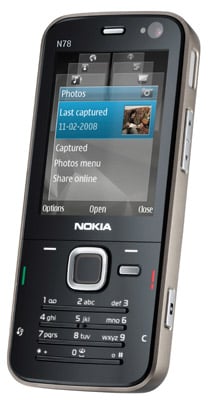
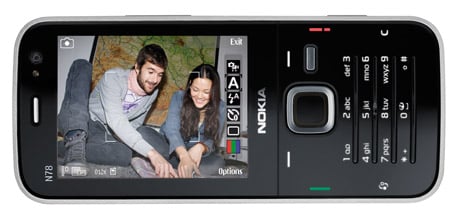
Nokia’s latest N-series "multmedia computer" bundles a 3.2-megapixelcamera, music player, satnav and maps into a sleek go-anywhere,do-it-all device. Wherever you happen to find yourself, you’ll be gladyou brought it.
The N78 is certainly a classy looking handset, and the smart touchgoes much deeper than its looks. Its sleek, gloss-black front may atfirst glance resemble the touch-sensitive minimalism of LG’s oft-copiedChocolate series, but in use, all is not as it seems.
Nokia's N78: packs in feature after feature
To press the illuminated buttons you actually press the plasticcasing inwards. The cover bends to accommodate your thumb rather thanreacting purely to your touch. It might seem like a low-techalternative, but in practice it seemed more reliable than thetouch-sensitive option, which in our experience can be a bittemperamental.
Nokia’s solution is a good combination of style and practicality.The numeric keypad is actually four raised plastic strips, with thenumbers backlit just above them. It looks lovely, but takes a bit ofgetting used to, and it has to be said that this keypad is far from thebest for rapid or prolonged texting.
The face of the phone oozes minimalist class, but strangely, theback feels like its made from low-grade material and creaks in yourhand, which detracts from the cool image. There’s another surprisehidden in the square navpad. Rubbing your thumb around the edgeactivates what Nokia calls the "navi-wheel", which moves the cursoraround the screen without the need to press the pad.
You can also do the iTrip thing with the built-in FM transmitter andbeam your music to your car radio. Incidentally, the Navi-wheel reallycomes into its own as you scroll through your music playlists, behavinglike a tiny version of Apple’s scroll wheel. Hmmm, are we sensing apattern here?
Of the few problems we encountered with this phone, there were theusual Symbian issues of running slowly when you’ve got severalapplications open at once, but it was nippy enough when we stuck todoing one or two things at a time and it was easy to switch offbackground applications using the aforementioned Applications button.
70MB of memory on board - plus a Micro SD slot for more
If the 3.6Mb/s HSDPA connection isn’t fast enough, you can alsoconnect over Wi-Fi. The usual N-series web browser is here in fulleffect, with options for viewing in landscape or portrait mode, pluszoom and the ability to flick through previously viewed pages. There’salso a PDF viewer and QuickOffice for viewing Microsoft Officedocuments, though if you want to create them you’ll have to pay for thefull Office suite.
And as a Symbian phone there are of course plenty more third-party apps available.
Battery life was pretty good, and we got a good three days ofmoderate use out of it, though heavy browsing will of course reducethis quite dramatically.
VerdictFrom its sleek, minimalist good looks to its raft of impressivelywell-integrated features, the N78 is a gorgeous little number. The3.2-megapixel camera, feature-packed music player, A-GPS and maps,quality web browser plus documents readers and email make it an idealtravelling companion for business or pleasure.
If you happen to have a friend or a family member who’s an expert oncomputer graphics cards, you’re in luck. Bring that person along withyou while you shop, and you’ll benefit from their experience.
If,on the other hand, you don’t have a game techno-wizard to call on—or,if you’d like to understand what you’re buying before you spend yourhard-earned cash—you’ve come to the right place. In this section, Ihelp you determine which graphics card features you need, includingimportant considerations such as video memory, the bus type, andexternal connectors.
Built-in versus add-on Today’s PCs use two different types of graphics cards, and each has advantages and disadvantages:
Built-in cards.A graphics card in this category isn’t really a graphics adapter cardat all, because it’s actually integrated into the motherboard. Abuilt-in card doesn’t require an AGP slot or a PCI slot, so amotherboard with a built-in card can fit into a smaller case anddoesn’t take up a valuable slot. (This explains why graphics cards areoften built-in on computers that use thin workstation cases, which arecommonly called pizza box cases.) If you’re building a new PC, rememberthat a built-in graphics card is usually easier to configure than aseparate adapter—and integrated graphics cards tend to be lessexpensive than their removable counterparts. On the down side, anintegrated video card may not let you install additional video memory.
Separate adapter cards.A graphics adapter occupies either an AGP or a PCI slot in yourcomputer. Naturally, a separate card is the choice of gamers who willbe upgrading their graphics hardware to keep up with the cutting-edge3D chipsets and visual effects in the latest video games. If yourgraphics adapter suddenly stops working and you need to replace it, aseparate graphics adapter card will ensure that you don’t have to sendback your entire motherboard for service or replacement, too.
Ifyou’re considering a graphics upgrade for your current motherboard andit has a built-in graphics card, you’re facing a brick wall (unless youcan add a daughter card, or disable the integrated card so that you canadd a PCI graphics card).
Understanding resolution and refresh rate Askany computer power user—especially a gamer—what specifications are mostimportant in selecting a graphics card, and two figures are almostcertain to be included in the group: maximum resolution and maximumrefresh rate. In this section, I discuss both of these importantcriteria.
Resolution makes the graphics card Resolutionbegins with the smallest unit displayed by your graphics card—a singledot, called a pixel. Pixels are the building blocks of every imagedisplayed on your monitor; they’re arranged in lines across yourscreen, and your graphics card controls each pixel individually forbrightness and color. For this reason, everyone expresses resolution asthe number of pixels displayed horizontally by the number of linesdisplayed vertically. For example, a resolution of 800 x 600 means thatthe monitor displays 800 pixels horizontally across the screen and 600pixels vertically.
Windows 98 still supports a minimumresolution of 640 x 480, and some games still use thisresolution—typically for big, bright graphics that don’t need a lot ofdetail, as in a casino game. However, almost all games that need finedetail—from role-playing games and strategy games to 3D first-persongames and simulations—now use resolutions of 800 x 600 or 1,024 x 768.Your desktop also benefits from a higher resolution, as you can displaymore of a larger document, Web page, image, or spreadsheet (or justmore program icons) on the screen at one time.
As you’veprobably already guessed, I would recommend that you keep your desktopset to a resolution of at least 800 x 600 (or, if your eyes don’t mind,1,024 x 768 is even better). If you can switch resolutions inside agame, you’ll probably find the resolution control in the Options orSetup screen; many games automatically set the resolution based on thespeed of your processor and the amount of video memory on your card.
The importance of the refresh rate Whatis the refresh rate of a monitor, and why is it such a big deal forgamers? That’s a good question. But before I answer it, I need todescribe how your computer actually draws a video image on yourmonitor. (Don’t worry: I’ll try to keep this from getting boring.)
Agraphics card creates an image on your computer monitor by “painting”it with electrons—in fact, the image is emitted from a phosphorescentcoating that glows on the inside of the monitor tube. The coating glowswhen it’s hit with a stream of electrons from the electron emitter(commonly called an electron gun) at the back of the monitor; theseelectrons move across the inside surface of your monitor, one line at atime, from top to bottom.
However, while the electrons arefocused on another portion of the screen, the phosphorescent coating onthe area that’s already been painted starts to dim, and then thecoating stops glowing entirely. So the monitor must redraw the imageconstantly to keep it bright, as shown in
Asyou probably expected, the refresh rate (also called the vertical scanrate) of a graphics card-and-monitor combination refers to the numberof times per second that your computer redraws the image on themonitor. As a general rule, the higher the refresh rate, the better;although you can’t see it with your eyes, the majority of computersredraw each pixel on the monitor at least 65 times per second (giving arefresh rate of 65Hz). Resolution is also tied to refresh rate: Asresolution goes up (which uses more video memory), refresh rates willdrop accordingly.
Here’s the bad news: 65Hz isn’t enough for anyPC owner, especially gamers. A dedicated computer gamer needs a higherrefresh rate for several reasons:
A gamer can spendhours in front of a monitor, and a higher refresh rate reduceseyestrain for most people. Even though you may not be able to noticethe screen being redrawn, your eye can discern the difference between arefresh rate of 60Hz and 75Hz. The more times the screen is redrawnevery second, the more stable the image appears, and the less itbothers your eye.
Many games require higher resolutions in therange of 800 x 600 to 1,024 x 768, and higher resolutions generallylook better with a higher refresh rate.
Because an image is morestable at a higher frame rate, small details onscreen are easier todistinguish with a higher refresh rate.
A higher refresh rate reduces flicker in all of your games.
Therefore, keep these recommendations in mind when you’re shopping for a graphics card or monitor to use for gaming:
Ifyou’re shopping for a monitor, always try to find one in a local storeso that you can evaluate it with your own eyes: Specifications don’ttell the whole story. As a demonstration, run your favorite game on themonitor before you decide.
Always look for a graphics card andmonitor with a refresh rate of at least 75Hz. For most people, thehigher the refresh rate, the better the image; in fact, some expensivehigh-end graphics card-and-monitor combinations (commonly used forcomputer-aided drafting) can handle refresh rates of over 100Hz.However, I’ve met gamers and other computer owners who swear that theyprefer a lower refresh rate. Only your eye can make the decision, sotry out a monitor at 75Hz or 80Hz before you buy it.
Both yourmonitor and your graphics card must support the same refresh rate inorder for you to use it. Setting your monitor for a higher refresh ratethan recommended by the manufacturer can permanently damage it!(Windows 95 and 98 may alert you of this problem as well if you try toset your refresh rate too high.)
If your monitor and graphicscard have Windows 95 or 98 drivers, your computer can automatically setthe optimal refresh rate for your particular hardware combination. (Ofcourse, that’s “optimal” according to the manufacturer, so it may notsuit you perfectly. But at least it’s a good start.)
Unfortunately,there’s one problem with shopping for a card with a high refresh rate:This particular figure often isn’t mentioned! Most manufacturers don’tinclude a card’s refresh rate in their advertising, so it’s up to youto visit the company’s Web site and dig a little deeper. You’ll alsofind these benchmark figures mentioned in articles covering graphicshardware in gaming and computer magazines. Sometimes a little sleuthingcan make the difference between a good graphics-card choice and a greatchoice, so avoid the temptation to buy quickly. And turn a critical eyetoward those flashy graphics-card magazine advertisements.
Apple hasunveiled MobileMe, which is a push method of controlling calendars,emails and contacts by sending the information from a remotely storedbase. The service replaces the .Mac service which hasn’t really set the world alight so far. The programme works with Mac, PC and iPhone, and works with Mail, iCal and Address book on the Mac, or Outlook on Windows. Applehas also built a suite of web 2.0 applications for the MobileMe serviceusing Ajax, which provides a desktop-like experience on the web tointeract with the data, and can be accessed at me.com. Send photos from the beach Photoscan even be synched over the air, either from the iPhone or a Mac orPC, which means Apple is working to drop hard into the Web 2.0 spaceGoogle and Yahoo have been beavering away at over the last two years. MobileMealso has over the air interaction; i.e. email is sent to the device, itinteracts with Google Maps, finds a restaurant mentioned in the email,and stores it as a contact for use on your computer. Unveiled atWWDC, it was termed as a perfect application for the iPhone or iPodtouch for $99 per year with 20GB storage, but it comes with a free 60day trial.
MobileMe Difference between .Mac and MobileMe While mostly replacing .Mac (which was primarily centered aroundInternet services for Apple's desktop and notebook computers), MobileMeprovides Internet services for both Mac OS X and the iPhone OS as well as the iPod touch device and Microsoft Windowsusers. This means that now you are not restricted to a Mac runningsoftware like Mail and iCal, but can access your personal data from anycomputer connected to the internet. Features Storage 20GB of online storage featuring 200GB of monthly transfer. Thefamily pack includes this for the main user as well as 5GB of storageand 50GB of transfer for each sub user (up to four additional users)
Mail Free Push Mail. Includes a @me.com email address. When a message is received it is sent directly to all the user's devices.
Address Book Address Book (Push). When a contacted is added or amended it is updated immediately on all the user's devices.
Calendar Calendar (Push). When a calendar appointment is added or amended it is updated immediately on all the user's devices. Gallery Public photo gallery. Photos can be uploaded in the web browser or synced by iPhoto on a mac
iDisk iDisk, which is accessible via a web browser, the Finder on a Mac, or as a remote disk in Microsoft Windows.The iDisk can also share files by emailing a link to the intendedrecipient. Another feature is to set an expiration on the link. Thismeans access to file will stop after a set number of downloads or aftercertain time period.
Web 2.0 MobileMe uses web 2.0 technologies to provide the look and feel of desktop-class applications in the user's web browser.
Pricing An Individual purchase of a MobileMe account for one-year is $99 USD (£59), while a Family Packsubscription (which includes one individual account and four familyaccounts with a specific email address for each one) is $149 USD (£89)for one year. The Individual account will have 20GB of combined emailand file storage and 200GB of monthly data transfer, while the FamilyPack will have, for each account in the Pack, 5GB of combined email andfile storage, and 50GB of monthly data transfer.
Competitors MobileMe is supposed to comprise Microsoft Exchange-like features for consumers.
Browser Support MobileMe's online services can be accessed in Desktop Applications.MobileMe also allows access to the user's data in desktop-likeenvironment in a web browser. Featured browsers are:
"Now I'd like to talk about something near and dear to my heart. That'sthe iPhone. In a few weeks it's going to be the iPhone's firstbirthday. An amazing intro -- certainly the most amazing we've everhad."
Steve! "Isn't that great? We've been working on that for a while. I think we finally got it right."
".Mac users can continue to use service, but they'll be automatically upgraded to MobileMe. So that's MobileMe."
"We'regoing to create a free 60 day trial, available along with iPhone 2.0.You might be asking what about .Mac? MobileMe replaces .Mac."
"It's available for $99 per year -- 20GB of storage."
Send to MobileMe option from photo. Send to the library of yourchoosing in the cloud. More applause. "So that's MobileMe, anincredible new experience for all your information. It's like havingExchange for the rest of us. Push email, contacts, calendars -- workswith native apps on the Mac and PC. And most exciting are theseincredible new web apps. The perfect companion."
Showing calendar push -- demoing the amount of time it takes tomake changes to calendar events over the air from PC to iPhone. 12seconds, by our count.
Log-off is power-on/off icon. Demo of OTA interaction... email getspushed to the device. Email to Gmaps, saves restaurant as a newcontact. Back to the computer -- what should happen to be there but theemail that was pushed to the phone, including the state (read orunread), and there's the restaurant contact.
11:22AM PT -Photos: photo skimming works, resizing thumbs -- it looks exactly likedesktop iPhoto. Wonder how much of this is Flash. iDisk is supported aswell -- looks like .Mac might be going bye-bye.
Quick reply mailfeature -- really fast way to send an inline reply. Contacts searchwith real-time text entry filter. Calendar, you know... it's a calendar.
"Ican run this on a Mac or PC -- you might guess which my favorite is.I'm going to launch my favorite browser -- which happens to be Safari.Just log right in." Looks pretty solid, almost identical to the desktopapps.
"It's a breakthrough web 2.0 app interface." Demo time!
Mail, contacts, calendar -- all this stuff looks exactly like Apple's native apps. This is pretty nice.
"Go to any browser, type me.com. Simple, easy to remember. Login... you get an incredibly rich email client. It feels like a desktop."
"What's really going to surprise people, we've built an incredible suite of web 2.0 apps using Ajax."
11:16AM PT - "Itworks with the native apps on my Mac or PC -- it works with Mail.app,iCal, Address Book... as well as Outlook. You'd expect that it wouldwork with those native apps."
Example of email -- gets pusheddown to all devices. Change a contact? Gets pushed up to MobileMe, downto all other device. "The best part of this, it works over the air.Everything is up to date."
"MobileMe stores your info up in the cloud so you can get to itanywhere using any of your devices -- Mac, PC, iPhone -- it will pushinformation up and down to keep everything up to date all the time."
Push email, contacts, and calendars... everything is up to date wherever you are.
Schiller just called ActiveSync ActiveStink -- the mockery! Guffawing.
Design Though the iPhone 3G is thinner at the edges than its predecessor, the phone measures a hair thicker (0.48 inches versus 0.46 inches) in the gut. The other measurementsare the same except that it weighs just the slightest bit less (4.7ounces versus 4.8 ounces). Otherwise, the iPhone 3G shows few cosmeticchanges from the front--same display size and resolution, and thesingle Home button sits just below the screen. We're very pleased tosee that Apple has done away with the irritating recessed headphonejack, which now is flush so that you'll be able to use any 3.5mmheadphones you like.
But turn over the iPhone 3G, and you'll see more significantchanges. A black, plastic skin replaces the current silver-aluminumback. The swap may cut the cost, but we worry about its long-termdurability. The 8GB model will come in black only, while Apple promisesthe 16GB version in back and white. The white model is a bit random--wewere expecting something in red--butcolor is a personal choice. The camera lens, volume rocker, chargerport, speaker, microphone, power button, and display locking switchshow no changes. Our News.com colleaguegot a hands-on with the new device and reports that it feels similar inthe hand to the current model, with the exception of the tapered edges.
3G With support for three 3G bands (850, 1900, 2100) and bothUMTS and HSDPA networks, the iPhone 3G is well positioned for usinghigh-speed networks all around the world. Considering that Apple ispromising to bring the device to 70 countries, it had better be. Duringhis WWDC keynote, Jobs compared Web download speeds between the twoiPhones. On the original model, which runs on a 2.5G EDGE network, aphoto-heavy Web site loaded in 59 seconds, while the same site loadedin 21 seconds on the new device--impressive, but we take it with agrain of salt for now. After all, the demo iPhone in today's keynotewas the only iPhone in the room using AT&T's 3G network. Once amultitude of devices flood the same network, load times may change.
GPS This is one feature that was on our original iPhone wish list.While the current iPhone location services find your position vianearby cell phone towers and satellites, the iPhone 3G uses Assisted GPS supplemented by satellites. It also offers live tacking so you canmonitor your progress as you drive (or walk) along. We're excited tosee this feature as well, as it fills in another gaping hole on theoriginal handset. You'll also find photo geotagging, but we're not sureyet whether the iPhone 3G or any third-party applications will supportturn-by-turn directions.
Third-party apps Speaking of which, the iPhone 3G will indeed support the collection of appsavailable through the iPhone SDK--no surprise here. Apple promises toopen apps store in early July (Apple didn't release an exact date);we're guessing by July 11. Gaming apps should feature prominently; many will integrate with the phone's accelerometer.
Enterprise support Worker bees will be pleased to know that the iPhone 3G will offer support for Microsoft Exchange Server.That will bring push e-mail, contacts and calendar, remote wipe, globalcontacts access, and auto-discovery. That's another welcome change asit puts the iPhone in the hands of a whole new class of corporate userswho now will be able to get their work e-mail on the iPhone.
Battery life Last year Jobs said that Apple had not included3G in the first iPhone because it would have made too many compromiseswith the handset's battery life. But now it appears that Apple hassolved that problem. The iPhone 3G promises a solid 5 hours of 3G talktime, 10 hours of 2G talk time, 5 hours of 3G Internet time, 6 hours ofWi-Fi Internet time, 7 hours of video playback, 24 hours of audioplayback, and 12.5 days standby time. The audio and video times areunchanged from the original iPhone.
What else? Since the latest iPhone will support the 2.0 software,additional new features will show up at launch and beyond, includingcontacts search, iWork document support, the capability to viewPowerPoint attachments, bulk move and delete, a scientific calculatorin landscape mode, parental controls, and support for 16 languages.You'll also be able to use a graffiti-style application for enteringcharacters in Asian languages.
What's missing? Unfortunately, we hoped for an even largerbundle of features in this round. Apple still leaves multimediamessaging out of the mix along with voice dialing and video recording.We still don't understand why Apple can't include these basic features,many found in even the cheapest and simplest cell phones. We were alsohoping for a landscape keyboard, the capability to cut and paste, Flashsupport for the Safari Web browser, expanded memory, and additionalBluetooth profiles. Apple, you left us hanging in a big way. It's alsodisappointing to hear that the dock is now sold separately for $49, butwe suppose that helped cut the price. No, you don't needthe dock, but it's nice to have. Even the power adapter and the SIMcard removal tool that now come in the box won't make up for its loss.
Should you buy it? If you're an iPhone fence-sitter, now'sthe time. The addition of 3G and GPS, the affordable price tag, andextra features from the iPhone 2.0 software update make the iPhone 3G aworthy prospect. Unlike the previous iPhone, which we liked andrecommended with reservations, we're much happier with what this newhandset has to offer. iPhone 3G isn't perfect, but there's a lot tolike here and we approach the device with much anticipation. We'llupdate this page with a full, rated review once we get our hands on thehardware.
11:48 a.m.: Jobs moves into the new ad for the 3G iPhone,which pokes fun at Apple's secretive nature. The demo gods finally maketheir presence felt as the audio skips on the replay of the video.
11:46 a.m.: Twenty-two countries will get the 3G iPhonefirst, and they'll all get it at the same time, and it's not cominguntil July 11. The late rumors win.
11:45 a.m.: The 16GB model will be $299, and that model will also be available in white.
11:44 a.m.: On to the price. The first iPhone was $599, and now sells for $399. It will now sell for $199 for 8GBs of storage.
11:43 a.m.: Jobs then moves into enterprise support, whichhas been covered in detail earlier today, as well as third-partyapplications. When it comes to more countries, the 3G iPhone will beavailable in dozens of countries, as a video with "A Small World AfterAll" plays with the iPhone working its way through South America andEurope. No love for Venezuela or China, but India and Australia areadded for a total of 70 countries. It will roll out to those placesover the next several months.
11:39 a.m.: "Location services is going to be a really bigdeal on the iPhone." GPS data allows you to do tracking, Apple recordeda iPhone traveling in a car going down San Francisco's famously crookedLombard Street, showing how precisely the iPhone can be tracked as itnavigates the curves.
Jobs announced the new iPhone will offer GPS.
(Credit: James Martin/CNET News.com)
11:38 a.m.: He compares the 3G iPhone to the Nokia N95 andTreo 750, two other 3G phones, and says the 3G iPhone is 36 faster todownload the same Web page. in an iPhone 1.0 to iPhone 2.0 comparison,an e-mail attachment downloads in five seconds on the 3G model, and 18seconds on EDGE. Jobs says the 3G iPhone will 300 hours of standbytime, improved from 8 hours to 10 hours on 2G talk time, and he'squoting 5 hours of 3G talk time. Browsing should give you 5-6 hours,video 7 hours, and audio 24 hours of continuous operation.
Jobs confirms the new iPhone will have GPS.
3G iPhone speed test.
(Credit: James Martin/CNET News.com)
11:35 a.m.: Jobs goes over the 3G support first. Fasterdownloads are a no-brainer, he says. He does a side-by-side comparisonof a Web page loading on EDGE vs. one on 3G. The National Geographic'shome page downloads in 21 seconds on the 3G network, and the EDGE oneis taking forever. Twenty-one seconds is a lot, but this is a prettyphoto-heavy Web page. It took 59 seconds on EDGE. The 3G speeds areclose to Wi-Fi, Jobs said.
11:33 a.m.: "We've learned so much with the first iPhone."Jobs shows off the pictures; it's thinner at the edges, a black plasticback, and metal buttons on the side. It's the same screen, with acamera, a flush-headphone jack (which gets wild applause), and improvedaudio.
11:32 a.m.: "Today we're introducing the iPhone 3G."
11:31 a.m.: "We did figure out what our next challenges are."3G networking, as you might have heard, is that first challenge.Enterprise support is the second, third is third-party applicationsupport, fourth is international support--as Jobs jokes about theunlocked iPhones all over the world--and fifth, everybody wants aniPhone, but we need to make it more affordable.
"I can run this on a Mac or PC -- you might guess which my favorite is.I'm going to launch my favorite browser -- which happens to be Safari.Just log right in." Looks pretty solid, almost identical to the desktopapps.
Works with the native applications you know.
Doeverything you need to do on every device you own. MobileMe works withMail, Address Book, and iCal on a Mac; Microsoft Outlook on a PC withWindows XP or Vista; and the built-in applications on your iPhone oriPod touch.
Push email. Push contacts. Push calendar.
MobileMestores all your email, contacts, and calendars on a secure onlineserver — or “cloud” — and pushes them down to your iPhone, iPod touch,Mac, and PC. When you make a change on one device, the cloud updatesthe others. Push happens automatically, instantly, and continuously.You don’t have to wait for it or remember to do anything — such asdocking your iPhone and syncing manually — to stay up to date.
Read about MobileMe on your
PC | Mac | iPhone or iPod touch
"It's a breakthrough web 2.0 app interface." Demo time!
Mail, contacts, calendar -- all this stuff looks exactly like Apple's native apps. This is pretty nice.
"Go to any browser, type me.com. Simple, easy to remember. Login... you get an incredibly rich email client. It feels like a desktop."
"What's really going to surprise people, we've built an incredible suite of web 2.0 apps using Ajax."
11:16AM PT - "Itworks with the native apps on my Mac or PC -- it works with Mail.app,iCal, Address Book... as well as Outlook. You'd expect that it wouldwork with those native apps."
Example of email -- gets pusheddown to all devices. Change a contact? Gets pushed up to MobileMe, downto all other device. "The best part of this, it works over the air.Everything is up to date."
"MobileMe stores your info up in the cloud so you can get to itanywhere using any of your devices -- Mac, PC, iPhone -- it will pushinformation up and down to keep everything up to date all the time."
Push email, contacts, and calendars... everything is up to date wherever you are.
Schiller just called ActiveSync ActiveStink -- the mockery! Guffawing.
"Good morning, I'm really excited to tell you about this brand newservice... so what's the idea? It's like having Exchange for the restof us."
Phil Schiller's up! Demo time.
"We're very very excited about this. It's called MobileMe."
"Now, we've got something entirely new."
"Imagineyou're a professor teaching a class on how to write iPhone apps! Youwant people to mail apps around... you can get certified and registerup to 100 iPhones, apps can be circulated and posted for up to 100iPhones. We think we've got a great story now." Applause.
11:02 a.m.: Forstall's back. He thanks all the developers whodemonstrated their applications. He mentions one feature request fromdevelopers: instant-messaging developers want to deliver notificationseven when the application isn't running. This is the background-runningissue that arrived after the March event. Forstall says backgroundprocesses are bad for a number of reasons, such as battery life andperformance. He uses the opportunity to ding Windows Mobile's taskmanager for handling background processes the way desktop Windows does,to widespread laughter and applause.
11:00 a.m.: Forstall promises that Digital LegendsEntertainment is the last demo for this morning. These guys built agame in two weeks, and Xavier Carrillo Costa shows off his game. Theirgame is called Krull, and it's another caveman adventure gamewhere you battle enemies, swing across rope bridges, and solveproblems. They expect to have the game ready by September.
10:57 a.m.: Mimvista has another medical application thatbuilds on their niche, medical imaging software. Mark Cain isrepresenting Mimvista, and he says developing one of their types ofapplications before the iPhone wasn't going to work. The idea is toconnect doctors with their workstations, so they can evaluate medicalimaging from the golf course. The application, like Modality's, canshow extremely detailed pictures of the human system, as well as movingimages. "The iPhone has created a new direction for our company."
MLB on the iPhone
(Credit: James Martin/CNET News.com)
10:53 a.m.: Modality is the next company that Apple isshowing off. These folks, represented by Dr. S Mark Williams, havedeveloped an application that helps medical students ditch their flashcards and use an iPhone to view anatomical images of the body that arevery detailed, down to the arteries and veins, and can quiz students onthe various parts of the heart, for example. Within weeks of the AppStore launching, they will have about a dozen applications availablefor various health-care needs.
10:50 a.m.: MLB.com is getting in on the action, so we canwatch the tortured season of the New York Mets on our iPhones. JeremySchoenherr shows off At-Bat, as we check out the Royals-Yankees game.You can see who's at bat, who's pitching, the count, and the score: Mussina'soff to a decent start this morning. You can get real-time videohighlights of the Yankees turning a double play. They aren't really"real-time" since the highlights arrive after the fact, but still.
10:48 a.m.: It's a parade of developers. An app called Bandwas made by a solo developer named Mark Terry, whereas all the otherapps so far have been corporate-developed. Band lets you create musicon the iPhone, with a touch-screen piano, and the demo guy cranks out apassable version of John Lennon's "Imagine." There are also drums and a12-bar blues creation app, which lays down a bass line while you playguitar over the track, and a bass guitar, which is used to play theslinky bass line from Pink Floyd's "Money." There's other stuff, buttime is limited. Terry says Band will appear on the App Store in a fewweeks' time.
Developer shows off music application on the iPhone.
(Credit: James Martin/CNET News.com)
10:45 a.m.: More applications! Brian Greenstone of Pangea Software comes up to show off two games they ported from Mac OS X to the iPhone, Enigmo, a 3D puzzle game, is very CPU intensive, says Greenstone, and it doesn't miss a beat in the demo. Cromag Rally,which is apparently a caveman racing game, is the other game shown off.Driving looks hard, but he is racing on snow, and people fromCalifornia don't know how to drive in the snow. Both games will cost$9.99.
10:41 a.m.: Our good friends at the Associated Press alsohave an application to show off. Benjamin Mosse of the AP is showingoff their application, which is essentially a reader-style applicationthat focuses on local news. This is another location-aware applicationthat sends you local news based on where you are. You can customize thefeeds for your favorite sports teams, and browse AP photos and video.Those stores can be shared via text or e-mail, and civilians can uploadtheir own stories and pictures to the AP from the iPhone, andcontinuing with the trend, it will be free.
10:39 a.m.: TypePad is next up, for the mobile bloggers inthe audience. Michael Sippey of TypePad shows off what they've puttogether, with a simple interface that lets you create a post, take aphoto, or add a photo. You can take photos with the iPhone's camera andadd them to a post, as well as add photos from your library on youriPhone. This will be yet another free application.
eBay application on iPhone.
(Credit: James Martin/CNET News.com)
10:36 a.m.:Looptis the third company to demo, and they're talking about alocation-based application. Again, no distinction is made whether thisis an application using GPS or the current location-based service onthe iPhone. Loopt blends your social networks with the Mapsapplication, so you can see where your friends are. You can also go totheir journal to see what they've been doing today, what picturesthey've added, and so on. This app will also be free.
10:33 a.m.: eBay is the next developer to show off anapplication, and Ken Sun of eBay comes onstage to show off Auctions onthe iPhone. The iPhone is already the primary mobile device used oneBay's Web site, he says. The app has a basic front door with optionsto track auctions you've bid on, see whether you've been outbid, and toplace new bids. You can also pick up the photos from the auctionlistings, and blow them up to full screen. eBay is making this appavailable for free.
10:30 a.m.: This demo is showing off the capabilities of theaccelerometer, where the iPhone can be tilted back and forth toaccelerate or brake. The tester gets a nice hand from the audience forhurling Baby Monkey through the goal. Super Monkey Ball will be available at the launch of the App Store for $9.99.
10:29 a.m.: Forstall is bringing third-party developersonstage to talk about their application, and Sega revisits the stage.They demoed a game called Super Monkey Ball in March, andthey've refined it. Ethan Einhorn of Sega comes up onstage to talkabout the app. The initial game had four stages developed in two weeks,now they've got 110 stages, with all four classic monkeys.
Showing tilt control on Sega games.
(Credit: James Martin/CNET News.com)
10:26 a.m.: The application finds your friends within acertain radius, but Forstall says nothing about whether the applicationwas designed for the current iPhone, which uses a Wi-Fi/cell tower typeof location-aware application, or the new iPhone, which is expected tohave GPS. Forstall reads off a few quotes from corporate developerpartners like Disney--once again--and Fox Interactive.
10:23 a.m.: His mock application is going to merge thecontacts databases and location-aware services. He's taking us throughthe actual development experience, dragging and dropping icons thatrepresent things like the iPhone's search bar around the developmentenvironment. Once the application is done, the developer can test itright on a Mac for bugs or to make different aesthetic choices, such aswhether to put things in the toolbar or within the regular fields.