An exclusive gaming industry community targeted
to, and designed for Professionals, Businesses
and Students in the sectors and industries
of Gaming, New Media and the Web, all closely
related with it's Business and Industry.
A Rich content driven service including articles,
contributed discussion, news, reviews, networking, downloads,
and debate.
We strive to cater for cultural influencers,
technology decision makers, early adopters and business leaders in the gaming industry.
A medium to share your or contribute your ideas,
experiences, questions and point of view or network
with other colleagues here at iVirtua Community.
Steve Jobs, Apple's CEO, has revealed that over 160 games will beavailable to download for the iPhone upon launch of the devices AppStore, in a phone call with the New York Times.
Intotal 500 applications will be available when the store launches in theUS today, 25 per cent of which will be free, 90 per cent will be soldfor less than USD 9.99 and one third of the applications will be games.
Jobs also revealed that that Apple doesn't plan to make much money offof the applications, including games, by giving developers a 70 percent cut of the sales.
"We are not trying to be business partners," said Jobs.
Adobe seems to be hard at work at Adobe Creative Suite 4*. In May, they releasedpublic betas of CS4 versions of Dreamweaver, Fireworks, and Soundbooth.Existing CS3 owners are able to continue to use these applicationsbeyond the initial 48 hour window.
One of the most obvious changes in the new CS4 applications is the userinterface, and this change will also be carried over into the nextversion of Adobe's Photoshop. This decision is describedin detail by Adobe's John Nack. Nack describes how Adobe has beentrying to make the interfaces on their apps more consistent and showsoff a screenshotof the new Mac Photoshop "application frame". This application framecontains both user interface elements as well as documents themselves.Despite expressing his own initial resistance, Nack explains theadvantages to the consolidated window:
- It facilitatesN-up (2-up, 3-up, etc.) document layouts that adapt as you adjust theinterface. Think "live window tiling"--great for comparing,compositing, etc.
- It makes it easier to move the entire application and its contents, including from one monitor to another.
- It prevents documents from getting obscured by panels (palettes).
- It blocks out the contents of the desktop, minimizing visual clutter.(A number of Mac users have requested this option for many years. I'veknown quite a few people who open a small blank document, hit F to putit into full-screen mode, and then put it into the background to hidethe desktop. Willingness to live with that kind of hack demonstratessome genuine desire for a real fix.)
ForMac users resistant to the change, Nack assures readers that the newinterface is optional, and users can easily disable the consolidatedview, or you can use choose to use elements of both methods.
There's been no public timeframe for the release of this next version of Adobe's Photoshop, but there were some contested claims of an October release target. The next Mac version of Photoshop has been announced to remain a 32-bit application. 64-bit support is expected on the subsequent version for the Mac.
* Note that Adobe has objected to labeling this next version of Creative Suite as "Creative Suite 4" or "CS4", but for consistency's sake with the rest of the world, we are using that designation until Adobe officially announces otherwise.
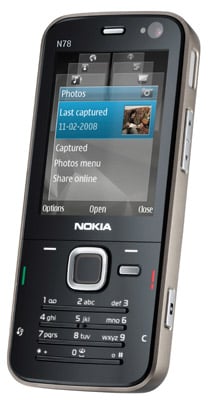
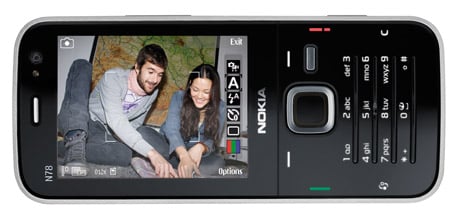
Nokia’s latest N-series "multmedia computer" bundles a 3.2-megapixelcamera, music player, satnav and maps into a sleek go-anywhere,do-it-all device. Wherever you happen to find yourself, you’ll be gladyou brought it.
The N78 is certainly a classy looking handset, and the smart touchgoes much deeper than its looks. Its sleek, gloss-black front may atfirst glance resemble the touch-sensitive minimalism of LG’s oft-copiedChocolate series, but in use, all is not as it seems.
Nokia's N78: packs in feature after feature
To press the illuminated buttons you actually press the plasticcasing inwards. The cover bends to accommodate your thumb rather thanreacting purely to your touch. It might seem like a low-techalternative, but in practice it seemed more reliable than thetouch-sensitive option, which in our experience can be a bittemperamental.
Nokia’s solution is a good combination of style and practicality.The numeric keypad is actually four raised plastic strips, with thenumbers backlit just above them. It looks lovely, but takes a bit ofgetting used to, and it has to be said that this keypad is far from thebest for rapid or prolonged texting.
The face of the phone oozes minimalist class, but strangely, theback feels like its made from low-grade material and creaks in yourhand, which detracts from the cool image. There’s another surprisehidden in the square navpad. Rubbing your thumb around the edgeactivates what Nokia calls the "navi-wheel", which moves the cursoraround the screen without the need to press the pad.
You can also do the iTrip thing with the built-in FM transmitter andbeam your music to your car radio. Incidentally, the Navi-wheel reallycomes into its own as you scroll through your music playlists, behavinglike a tiny version of Apple’s scroll wheel. Hmmm, are we sensing apattern here?
Of the few problems we encountered with this phone, there were theusual Symbian issues of running slowly when you’ve got severalapplications open at once, but it was nippy enough when we stuck todoing one or two things at a time and it was easy to switch offbackground applications using the aforementioned Applications button.
70MB of memory on board - plus a Micro SD slot for more
If the 3.6Mb/s HSDPA connection isn’t fast enough, you can alsoconnect over Wi-Fi. The usual N-series web browser is here in fulleffect, with options for viewing in landscape or portrait mode, pluszoom and the ability to flick through previously viewed pages. There’salso a PDF viewer and QuickOffice for viewing Microsoft Officedocuments, though if you want to create them you’ll have to pay for thefull Office suite.
And as a Symbian phone there are of course plenty more third-party apps available.
Battery life was pretty good, and we got a good three days ofmoderate use out of it, though heavy browsing will of course reducethis quite dramatically.
VerdictFrom its sleek, minimalist good looks to its raft of impressivelywell-integrated features, the N78 is a gorgeous little number. The3.2-megapixel camera, feature-packed music player, A-GPS and maps,quality web browser plus documents readers and email make it an idealtravelling companion for business or pleasure.
iPhone features showed off during the keynote include push email(Blackberry’s home turf) and support for Microsoft Exchange 2007 -making it a great alternative to businesses who’re bored of the currentincumbents.
RIM's Bold move RIM, of course, is moving in the opposite direction. With the launch of the Blackberry Bold 9000 in May, it’s finally moving out of the cloistered corridors of enterprise towards a more consumer-oriented future.
Youonly have to examine the Blackberry Bold’s high-class design, 480 x 320pixel colour display and support for iTunes using Blackberry Media Syncto see how true that is.
And then there's the Blackberry Thunder- an iPhone rival with a rumoured full-face display instead of thescreen-and-physical-keyboard combo we've been used to with Blackberrydevices to date.
Of the two platforms, the Blackberry still verymuch has the edge for business users. It offers wider push email accessthan the iPhone, with support for IBM Lotus Domino and Novell Groupwareas well as Microsoft Exchange.
IM and third party apps TheBlackberry also includes Instant Messaging - something the iPhone can’tyet do, despite iChat’s inclusion in OS X on the Mac.
AllBlackberries, of course, are also compatible with thousands ofthird-party applications aimed at business users, the Apple iPhone hashardly got started.
iPhone 3G vs Blackberry Bold Specfor spec, the iPhone and Blackberry Bold 9000 are more or less par -both offer Wi-Fi , GPS and 3G (the Bold is the first Blackberry modelto do so).
The iPhone 3G beats the Bold hands-down when it comesto on-board storage though: you get a choice of either 8GB or 16GB onthe iPhone; the Blackberry Bold holds 1GB, plus a side-mounted SD cardslot.
The decider for many corporate types of course will be whattheir company chooses to give them. Businesses are still more likely topick a Blackberry for their employees, but it’s the iPhone that manyof us would buy given a choice.
The real threat? Intruth, the iPhone 3G and the Blackberry very distinct platforms thatcan easily find room to manoeuvre in the rapidly growing smartphonespace.
If anything the iPhone and Blackberry pose more of athreat to Windows Mobile, Palm and Symbian platforms than they do toeach other. We expect both to clean up in the coming months.
In a statement, Intel said, "Supporting the new Intel 4 Series chipset familyintroduced at Computex, Intel has launched theIntelVisual Computing Developer Community, a technical resource to enabledevelopers... to create innovative graphics and video applications."
Intel's 4 Series chipset line includes the G45 Express chipset and the GMAX4500HD graphics accelerator that support Microsoft DirectX 10 gaming graphicssoftware technology and Blu-ray 1080p high-definition video viewing.
Chipzilla's new graphics developers' resources website will push its newLarrabee graphics technology effort and offers videos, white papers, discussionforums, weblogs and wikis. µ
Apple hasunveiled MobileMe, which is a push method of controlling calendars,emails and contacts by sending the information from a remotely storedbase. The service replaces the .Mac service which hasn’t really set the world alight so far. The programme works with Mac, PC and iPhone, and works with Mail, iCal and Address book on the Mac, or Outlook on Windows. Applehas also built a suite of web 2.0 applications for the MobileMe serviceusing Ajax, which provides a desktop-like experience on the web tointeract with the data, and can be accessed at me.com. Send photos from the beach Photoscan even be synched over the air, either from the iPhone or a Mac orPC, which means Apple is working to drop hard into the Web 2.0 spaceGoogle and Yahoo have been beavering away at over the last two years. MobileMealso has over the air interaction; i.e. email is sent to the device, itinteracts with Google Maps, finds a restaurant mentioned in the email,and stores it as a contact for use on your computer. Unveiled atWWDC, it was termed as a perfect application for the iPhone or iPodtouch for $99 per year with 20GB storage, but it comes with a free 60day trial.
MobileMe Difference between .Mac and MobileMe While mostly replacing .Mac (which was primarily centered aroundInternet services for Apple's desktop and notebook computers), MobileMeprovides Internet services for both Mac OS X and the iPhone OS as well as the iPod touch device and Microsoft Windowsusers. This means that now you are not restricted to a Mac runningsoftware like Mail and iCal, but can access your personal data from anycomputer connected to the internet. Features Storage 20GB of online storage featuring 200GB of monthly transfer. Thefamily pack includes this for the main user as well as 5GB of storageand 50GB of transfer for each sub user (up to four additional users)
Mail Free Push Mail. Includes a @me.com email address. When a message is received it is sent directly to all the user's devices.
Address Book Address Book (Push). When a contacted is added or amended it is updated immediately on all the user's devices.
Calendar Calendar (Push). When a calendar appointment is added or amended it is updated immediately on all the user's devices. Gallery Public photo gallery. Photos can be uploaded in the web browser or synced by iPhoto on a mac
iDisk iDisk, which is accessible via a web browser, the Finder on a Mac, or as a remote disk in Microsoft Windows.The iDisk can also share files by emailing a link to the intendedrecipient. Another feature is to set an expiration on the link. Thismeans access to file will stop after a set number of downloads or aftercertain time period.
Web 2.0 MobileMe uses web 2.0 technologies to provide the look and feel of desktop-class applications in the user's web browser.
Pricing An Individual purchase of a MobileMe account for one-year is $99 USD (£59), while a Family Packsubscription (which includes one individual account and four familyaccounts with a specific email address for each one) is $149 USD (£89)for one year. The Individual account will have 20GB of combined emailand file storage and 200GB of monthly data transfer, while the FamilyPack will have, for each account in the Pack, 5GB of combined email andfile storage, and 50GB of monthly data transfer.
Competitors MobileMe is supposed to comprise Microsoft Exchange-like features for consumers.
Browser Support MobileMe's online services can be accessed in Desktop Applications.MobileMe also allows access to the user's data in desktop-likeenvironment in a web browser. Featured browsers are:
Appletook the wraps off version 2.0 of its iPhone firmware at WWDCtoday.But it didn't send thousands of iPhone owners scurrying away toclickon 'Check for Update' in iTunes.
The 2.0 firmware, and by associationthe new iPhone3G, are due to be rolled out worldwide on July 11.
Thenew iPhone 3G is undoubtedly theheadline act – it updates Apple'spioneering smartphone withtri-band HSDPA connectivity, GPS and improvedbattery life. If theiPhone was hard to beat before, it's even toughernow. But the new2.0 firmware that's being rolled out with it is equallyimportant.
Enterprise, SDK and 'new features' Availableon both the 3G and original2G iPhones, version 2.0 adds a several newfeatures to the iPhoneplatform. There are those that we've alreadyseen: push email andcalendaring (via MS Exchange), Cisco VPN supportand downloadablethird-party applications via the forthcoming App Store.
And there are those features we didn'tsee coming: a pushnotification service, a scientific version of Calcand a nifty ContactSearch. These hardly make compelling front pagenews. Apple has improvedthe iPhone in very subtle ways.
When it hits on July 11, version2.0 ofthe iPhone firmware won't offer a major overhaul of theiconictouchscreen interface. Why should it? If it 'aint broke... AsSteveJobs explained in his keynote, there are three elements to theiPhone2.0 software – enterprise, the SDK and 'new features'.
SinceApple firstrevealed the iPhone 2.0 software back in early March, we'veknownabout its enterprise plans. Apple's support for MS Exchangewillenable the sort of push calendaring, push email, push contactsandremote wipe capabilities that businesses have been crying outfor.Ditto the built-in Cisco VPN client.
What we're reallyinterested in is thepersonal apps and games. With 250,000 softwaredeveloper kitsdownloaded since March, Jobs revealed that Apple hadadmitted 4,000applicants to its iPhone developer programme (from25,000applications).
With access to the iPhone's coreAPIs(shared with Mac OS X), plus its accelerometer, cameraandlocalisation features, we now have a better idea of what theiPhoneis capable of.
Super Monkey Ball for $9.99 Just as it did back in March, Segashowed off an updated cut of its GameCube favourite Super MonkeyBall.This game will be available on the App Store for $9.99 when itlaunchesin July. That's about £5 or £6 in UK money,although expect thereal-world exchange rate to be avoided in favourof $1=£1. At least it'sa lot less than the rumoured $25 pergame that was swirling around techwebsites pre-keynote.
In comparison, the rest of the earlyAppStore line-up at WWDC seems a little simplistic – anuninspiringselection of games, medical applications and prettied-upnews feeds. Butthere are some bright sparks.
The mobile version of TypePad,forexample, has been designed to tie in with the iPhone's camera,enablingyou to take shots and upload them to a website. Looptoffers a mix ofsocial networking with location-aware intelligence,while the AssociatedPress plans anapp that will map your whereabouts to deliver relevantnews.
Apple itself has developed a pushnotification service,designed to keep a persistent IP connectionopen that can notify you ofnew emails or instant messages. And itdoes this without the relevantapplications running in thebackground. It's a big deal, but pencilSeptember in your diary forthis one.
Like the iPhone 3G, the AppStoreshould launch on July 11th. 2G and 3G iPhone owners will be abletodownload apps less than 10MB over 2G/3G, Wi-Fi or via iTunes.Anythinggreater than 10MB will be limited to Wi-Fi connections anddownloads viaiTunes.
The 2.0 upgrade will be free for iPhoneusers, but it will cost iPod touch owners $9.95.
So far the price has not been confirmed forpay-as-you-go customers, but the phone will be available for free tocustomers signing up for certain tariffs.
The 8GB device will cost £99 for users who subscribe to the £30 and £35per month contracts, or will be given away free to customers who agreeto the £45 and £75 monthly price plans.
The 16GB iPhone will be available for free to those signedup to the £75 per month tariff, or will cost £159 for those customerson the £30 and £35 contracts, and cost £59 on the £45 per month tariff.
The iPhone will also be available as a pay-as-you-go handset,although O2 is yet to announce pricing details for the device on thistariff.
Users of the new iPhone 3G will continue to have unlimiteddata browsing over the 3G network, as well as free access to theinternet in BT Openzone and The Cloud wireless hotspots.
The next-generation iPhone 3G was unveiled yesterday at Apple's annual Worldwide Developers Conference in San Francisco.
Steve Jobs, Apple's CEO, called the device "the phone that has changed phones forever". The new-look handset is thinner than its predecessor and features built-in GPS.
Jobs also unveiled details of the iPhone 2.0 software that will power the iPhone range.
advertisement
Itincludes access to special applications, created by third-partydevelopers, that allow users to tailor their iPhone experience.
Design Though the iPhone 3G is thinner at the edges than its predecessor, the phone measures a hair thicker (0.48 inches versus 0.46 inches) in the gut. The other measurementsare the same except that it weighs just the slightest bit less (4.7ounces versus 4.8 ounces). Otherwise, the iPhone 3G shows few cosmeticchanges from the front--same display size and resolution, and thesingle Home button sits just below the screen. We're very pleased tosee that Apple has done away with the irritating recessed headphonejack, which now is flush so that you'll be able to use any 3.5mmheadphones you like.
But turn over the iPhone 3G, and you'll see more significantchanges. A black, plastic skin replaces the current silver-aluminumback. The swap may cut the cost, but we worry about its long-termdurability. The 8GB model will come in black only, while Apple promisesthe 16GB version in back and white. The white model is a bit random--wewere expecting something in red--butcolor is a personal choice. The camera lens, volume rocker, chargerport, speaker, microphone, power button, and display locking switchshow no changes. Our News.com colleaguegot a hands-on with the new device and reports that it feels similar inthe hand to the current model, with the exception of the tapered edges.
3G With support for three 3G bands (850, 1900, 2100) and bothUMTS and HSDPA networks, the iPhone 3G is well positioned for usinghigh-speed networks all around the world. Considering that Apple ispromising to bring the device to 70 countries, it had better be. Duringhis WWDC keynote, Jobs compared Web download speeds between the twoiPhones. On the original model, which runs on a 2.5G EDGE network, aphoto-heavy Web site loaded in 59 seconds, while the same site loadedin 21 seconds on the new device--impressive, but we take it with agrain of salt for now. After all, the demo iPhone in today's keynotewas the only iPhone in the room using AT&T's 3G network. Once amultitude of devices flood the same network, load times may change.
GPS This is one feature that was on our original iPhone wish list.While the current iPhone location services find your position vianearby cell phone towers and satellites, the iPhone 3G uses Assisted GPS supplemented by satellites. It also offers live tacking so you canmonitor your progress as you drive (or walk) along. We're excited tosee this feature as well, as it fills in another gaping hole on theoriginal handset. You'll also find photo geotagging, but we're not sureyet whether the iPhone 3G or any third-party applications will supportturn-by-turn directions.
Third-party apps Speaking of which, the iPhone 3G will indeed support the collection of appsavailable through the iPhone SDK--no surprise here. Apple promises toopen apps store in early July (Apple didn't release an exact date);we're guessing by July 11. Gaming apps should feature prominently; many will integrate with the phone's accelerometer.
Enterprise support Worker bees will be pleased to know that the iPhone 3G will offer support for Microsoft Exchange Server.That will bring push e-mail, contacts and calendar, remote wipe, globalcontacts access, and auto-discovery. That's another welcome change asit puts the iPhone in the hands of a whole new class of corporate userswho now will be able to get their work e-mail on the iPhone.
Battery life Last year Jobs said that Apple had not included3G in the first iPhone because it would have made too many compromiseswith the handset's battery life. But now it appears that Apple hassolved that problem. The iPhone 3G promises a solid 5 hours of 3G talktime, 10 hours of 2G talk time, 5 hours of 3G Internet time, 6 hours ofWi-Fi Internet time, 7 hours of video playback, 24 hours of audioplayback, and 12.5 days standby time. The audio and video times areunchanged from the original iPhone.
What else? Since the latest iPhone will support the 2.0 software,additional new features will show up at launch and beyond, includingcontacts search, iWork document support, the capability to viewPowerPoint attachments, bulk move and delete, a scientific calculatorin landscape mode, parental controls, and support for 16 languages.You'll also be able to use a graffiti-style application for enteringcharacters in Asian languages.
What's missing? Unfortunately, we hoped for an even largerbundle of features in this round. Apple still leaves multimediamessaging out of the mix along with voice dialing and video recording.We still don't understand why Apple can't include these basic features,many found in even the cheapest and simplest cell phones. We were alsohoping for a landscape keyboard, the capability to cut and paste, Flashsupport for the Safari Web browser, expanded memory, and additionalBluetooth profiles. Apple, you left us hanging in a big way. It's alsodisappointing to hear that the dock is now sold separately for $49, butwe suppose that helped cut the price. No, you don't needthe dock, but it's nice to have. Even the power adapter and the SIMcard removal tool that now come in the box won't make up for its loss.
Should you buy it? If you're an iPhone fence-sitter, now'sthe time. The addition of 3G and GPS, the affordable price tag, andextra features from the iPhone 2.0 software update make the iPhone 3G aworthy prospect. Unlike the previous iPhone, which we liked andrecommended with reservations, we're much happier with what this newhandset has to offer. iPhone 3G isn't perfect, but there's a lot tolike here and we approach the device with much anticipation. We'llupdate this page with a full, rated review once we get our hands on thehardware.
"I can run this on a Mac or PC -- you might guess which my favorite is.I'm going to launch my favorite browser -- which happens to be Safari.Just log right in." Looks pretty solid, almost identical to the desktopapps.
Works with the native applications you know.
Doeverything you need to do on every device you own. MobileMe works withMail, Address Book, and iCal on a Mac; Microsoft Outlook on a PC withWindows XP or Vista; and the built-in applications on your iPhone oriPod touch.
Push email. Push contacts. Push calendar.
MobileMestores all your email, contacts, and calendars on a secure onlineserver — or “cloud” — and pushes them down to your iPhone, iPod touch,Mac, and PC. When you make a change on one device, the cloud updatesthe others. Push happens automatically, instantly, and continuously.You don’t have to wait for it or remember to do anything — such asdocking your iPhone and syncing manually — to stay up to date.
Read about MobileMe on your
PC | Mac | iPhone or iPod touch
"It's a breakthrough web 2.0 app interface." Demo time!
Mail, contacts, calendar -- all this stuff looks exactly like Apple's native apps. This is pretty nice.
"Go to any browser, type me.com. Simple, easy to remember. Login... you get an incredibly rich email client. It feels like a desktop."
"What's really going to surprise people, we've built an incredible suite of web 2.0 apps using Ajax."
11:16AM PT - "Itworks with the native apps on my Mac or PC -- it works with Mail.app,iCal, Address Book... as well as Outlook. You'd expect that it wouldwork with those native apps."
Example of email -- gets pusheddown to all devices. Change a contact? Gets pushed up to MobileMe, downto all other device. "The best part of this, it works over the air.Everything is up to date."
"MobileMe stores your info up in the cloud so you can get to itanywhere using any of your devices -- Mac, PC, iPhone -- it will pushinformation up and down to keep everything up to date all the time."
Push email, contacts, and calendars... everything is up to date wherever you are.
Schiller just called ActiveSync ActiveStink -- the mockery! Guffawing.
"Good morning, I'm really excited to tell you about this brand newservice... so what's the idea? It's like having Exchange for the restof us."
Phil Schiller's up! Demo time.
"We're very very excited about this. It's called MobileMe."
"Now, we've got something entirely new."
"Imagineyou're a professor teaching a class on how to write iPhone apps! Youwant people to mail apps around... you can get certified and registerup to 100 iPhones, apps can be circulated and posted for up to 100iPhones. We think we've got a great story now." Applause.
11:02 a.m.: Forstall's back. He thanks all the developers whodemonstrated their applications. He mentions one feature request fromdevelopers: instant-messaging developers want to deliver notificationseven when the application isn't running. This is the background-runningissue that arrived after the March event. Forstall says backgroundprocesses are bad for a number of reasons, such as battery life andperformance. He uses the opportunity to ding Windows Mobile's taskmanager for handling background processes the way desktop Windows does,to widespread laughter and applause.
11:00 a.m.: Forstall promises that Digital LegendsEntertainment is the last demo for this morning. These guys built agame in two weeks, and Xavier Carrillo Costa shows off his game. Theirgame is called Krull, and it's another caveman adventure gamewhere you battle enemies, swing across rope bridges, and solveproblems. They expect to have the game ready by September.
10:57 a.m.: Mimvista has another medical application thatbuilds on their niche, medical imaging software. Mark Cain isrepresenting Mimvista, and he says developing one of their types ofapplications before the iPhone wasn't going to work. The idea is toconnect doctors with their workstations, so they can evaluate medicalimaging from the golf course. The application, like Modality's, canshow extremely detailed pictures of the human system, as well as movingimages. "The iPhone has created a new direction for our company."
MLB on the iPhone
(Credit: James Martin/CNET News.com)
10:53 a.m.: Modality is the next company that Apple isshowing off. These folks, represented by Dr. S Mark Williams, havedeveloped an application that helps medical students ditch their flashcards and use an iPhone to view anatomical images of the body that arevery detailed, down to the arteries and veins, and can quiz students onthe various parts of the heart, for example. Within weeks of the AppStore launching, they will have about a dozen applications availablefor various health-care needs.
10:50 a.m.: MLB.com is getting in on the action, so we canwatch the tortured season of the New York Mets on our iPhones. JeremySchoenherr shows off At-Bat, as we check out the Royals-Yankees game.You can see who's at bat, who's pitching, the count, and the score: Mussina'soff to a decent start this morning. You can get real-time videohighlights of the Yankees turning a double play. They aren't really"real-time" since the highlights arrive after the fact, but still.
10:48 a.m.: It's a parade of developers. An app called Bandwas made by a solo developer named Mark Terry, whereas all the otherapps so far have been corporate-developed. Band lets you create musicon the iPhone, with a touch-screen piano, and the demo guy cranks out apassable version of John Lennon's "Imagine." There are also drums and a12-bar blues creation app, which lays down a bass line while you playguitar over the track, and a bass guitar, which is used to play theslinky bass line from Pink Floyd's "Money." There's other stuff, buttime is limited. Terry says Band will appear on the App Store in a fewweeks' time.
Developer shows off music application on the iPhone.
(Credit: James Martin/CNET News.com)
10:45 a.m.: More applications! Brian Greenstone of Pangea Software comes up to show off two games they ported from Mac OS X to the iPhone, Enigmo, a 3D puzzle game, is very CPU intensive, says Greenstone, and it doesn't miss a beat in the demo. Cromag Rally,which is apparently a caveman racing game, is the other game shown off.Driving looks hard, but he is racing on snow, and people fromCalifornia don't know how to drive in the snow. Both games will cost$9.99.
10:41 a.m.: Our good friends at the Associated Press alsohave an application to show off. Benjamin Mosse of the AP is showingoff their application, which is essentially a reader-style applicationthat focuses on local news. This is another location-aware applicationthat sends you local news based on where you are. You can customize thefeeds for your favorite sports teams, and browse AP photos and video.Those stores can be shared via text or e-mail, and civilians can uploadtheir own stories and pictures to the AP from the iPhone, andcontinuing with the trend, it will be free.
10:39 a.m.: TypePad is next up, for the mobile bloggers inthe audience. Michael Sippey of TypePad shows off what they've puttogether, with a simple interface that lets you create a post, take aphoto, or add a photo. You can take photos with the iPhone's camera andadd them to a post, as well as add photos from your library on youriPhone. This will be yet another free application.
eBay application on iPhone.
(Credit: James Martin/CNET News.com)
10:36 a.m.:Looptis the third company to demo, and they're talking about alocation-based application. Again, no distinction is made whether thisis an application using GPS or the current location-based service onthe iPhone. Loopt blends your social networks with the Mapsapplication, so you can see where your friends are. You can also go totheir journal to see what they've been doing today, what picturesthey've added, and so on. This app will also be free.
10:33 a.m.: eBay is the next developer to show off anapplication, and Ken Sun of eBay comes onstage to show off Auctions onthe iPhone. The iPhone is already the primary mobile device used oneBay's Web site, he says. The app has a basic front door with optionsto track auctions you've bid on, see whether you've been outbid, and toplace new bids. You can also pick up the photos from the auctionlistings, and blow them up to full screen. eBay is making this appavailable for free.
10:30 a.m.: This demo is showing off the capabilities of theaccelerometer, where the iPhone can be tilted back and forth toaccelerate or brake. The tester gets a nice hand from the audience forhurling Baby Monkey through the goal. Super Monkey Ball will be available at the launch of the App Store for $9.99.
10:29 a.m.: Forstall is bringing third-party developersonstage to talk about their application, and Sega revisits the stage.They demoed a game called Super Monkey Ball in March, andthey've refined it. Ethan Einhorn of Sega comes up onstage to talkabout the app. The initial game had four stages developed in two weeks,now they've got 110 stages, with all four classic monkeys.
Showing tilt control on Sega games.
(Credit: James Martin/CNET News.com)
10:26 a.m.: The application finds your friends within acertain radius, but Forstall says nothing about whether the applicationwas designed for the current iPhone, which uses a Wi-Fi/cell tower typeof location-aware application, or the new iPhone, which is expected tohave GPS. Forstall reads off a few quotes from corporate developerpartners like Disney--once again--and Fox Interactive.
10:23 a.m.: His mock application is going to merge thecontacts databases and location-aware services. He's taking us throughthe actual development experience, dragging and dropping icons thatrepresent things like the iPhone's search bar around the developmentenvironment. Once the application is done, the developer can test itright on a Mac for bugs or to make different aesthetic choices, such aswhether to put things in the toolbar or within the regular fields.
WWDC 2008 is currently taking place from June 9 to June 13 at Moscone West, San Francisco.
Applereported that, for the first time, this conference is sold out. Thereare three tracks for developers, iPhone, Mac, and IT.
Announcementsat the keynote included the App Store for iPhone and iPod Touch, thestable version of the iPhone SDK, a subsidized 3G version of the iPhonefor Worldwide markets, version 2.0 of the iPhone OS, Mac OS X v10.6,and the replacement/rebranding of .Mac as MobileMe. Mac OS X version 10.6 "Snow Leopard" is the presumptive designation of Apple's next major version of Mac OS X. It was announced by Apple CEO Steve Jobs at WWDC on June 9, 2008. It is scheduled to ship "about a year" from the announcement. Mac OS X v10.6 will not introduce any major new features, ratherfocusing on improving performance, stability and reducing the footprintof Mac OS X. However, full support for Microsoft Exchange will be included. Snow Leopard
MobileMe Difference between .Mac and MobileMe While mostly replacing .Mac (which was primarily centered aroundInternet services for Apple's desktop and notebook computers), MobileMeprovides Internet services for both Mac OS X and the iPhone OS as well as the iPod touch device and Microsoft Windowsusers. This means that now you are not restricted to a Mac runningsoftware like Mail and iCal, but can access your personal data from anycomputer connected to the internet. Features Storage 20GB of online storage featuring 200GB of monthly transfer. Thefamily pack includes this for the main user as well as 5GB of storageand 50GB of transfer for each sub user (up to four additional users)
Mail Free Push Mail. Includes a @me.com email address. When a message is received it is sent directly to all the user's devices.
Address Book Address Book (Push). When a contacted is added or amended it is updated immediately on all the user's devices.
Calendar Calendar (Push). When a calendar appointment is added or amended it is updated immediately on all the user's devices. Gallery Public photo gallery. Photos can be uploaded in the web browser or synced by iPhoto on a mac
iDisk iDisk, which is accessible via a web browser, the Finder on a Mac, or as a remote disk in Microsoft Windows.The iDisk can also share files by emailing a link to the intendedrecipient. Another feature is to set an expiration on the link. Thismeans access to file will stop after a set number of downloads or aftercertain time period.
Web 2.0 MobileMe uses web 2.0 technologies to provide the look and feel of desktop-class applications in the user's web browser.
Pricing An Individual purchase of a MobileMe account for one-year is $99 USD (£59), while a Family Packsubscription (which includes one individual account and four familyaccounts with a specific email address for each one) is $149 USD (£89)for one year. The Individual account will have 20GB of combined emailand file storage and 200GB of monthly data transfer, while the FamilyPack will have, for each account in the Pack, 5GB of combined email andfile storage, and 50GB of monthly data transfer.
Competitors MobileMe is supposed to comprise Microsoft Exchange-like features for consumers.
Browser Support MobileMe's online services can be accessed in Desktop Applications.MobileMe also allows access to the user's data in desktop-likeenvironment in a web browser. Featured browsers are:
Safari 3 or later (Mac + PC)
Firefox 2 or later (Mac + PC)
Internet Explorer 7 (PC)
iPhone 2.0
Microsoft Exchange ActiveSync support
Push email
Push contacts
Push calendar
Global Address List
Certificates and Identities
WPA2/802.1x
Enforced security policies
Extra keyboard languages including Chinese and Korean
Cisco IPsec VPN support
Device configuration
Remote wipe
Ability to view PowerPoint attachments
Mass email delete
Mass email move
Bonjour service discovery protocol
Support for SVG
Parental controls
Ability to search contacts
App Store (To manage third-party applications)
New "Calendar" menu in "Settings"
Updated calculator with extra features in portrait mode, a scientific calculator in landscape mode and an updated icon.
Updated iTunes with a new icon and reordered category icons within iTunes application.
Ability to save or open images from websites in Safari
Support for Traditional and Simplified Chinese handwriting recognition
Geotagging
Norwegian, Swedish, Danish, Finnish, Polish, Korean and Brazilian Portuguese language interface in iPhone, previously these languages were only in the iPod Touch since 1.1.1
Workers hang Apple's logo outside Moscone Center, where the Worldwide Developers Conference kicks off Monday. (Credit: James Martin/CNET News.com) Expect to hear new details about the future of Apple's Mac OS X andWeb business next week at the Worldwide Developers Conference--and wethink there might be a new iPhone, too. On Monday, Apple CEO Steve Jobs will take the stage at the Moscone WestConvention Center in San Francisco to address a gathering of Apple'sdevelopers and the media. This year's WWDCis sold out to the development community, who will be hearing formalpresentations by Apple on both Mac and iPhone development during theweek's sessions and meetings. Anyone with even a passing interest in consumer electronics is probably aware that Apple is expected to unveil the next generation of the iPhone in the near future. The older version has been sold out for weeks as we approach the anniversary of the first model's debut, and anticipation of a model that can connect to 3G cellular networks has been building almost since that date last year. One of the primary drawbacks of the first iteration of the iPhone hasbeen its reliance on the slower EDGE network outside of Wi-Fi hotspots, which can make downloading a Web page an exercise in patience.Upgrading to a faster connection should encourage people to do more Webbrowsing outside of Wi-Fi connections and could open up a whole newclass of applications that need a faster pipe to work effectively. Apple is also expected to include GPS technologyinside the latest version, another development that could pique thesoftware development community's interest in the iPhone. Location-awareservices are available on several phones that use GPS technology, andthe iPhone developers could soon be ready to join the party. Will the new iPhone be available immediately following Jobs' keynote?It's not clear. There have been conflicting reports, but Brian Tong ofCNET TV is hearing from his sources that Apple Retail employees havenot yet been told whether they'll need to report early on Monday for aspecial training session, which the company has done in the past beforemajor announcements. Next Monday, Apple CEO Steve Jobs could announce a new iPhone and a new operating system. (Credit: Apple) While the iPhone gets all the attention as the new kid on the block,WWDC is always, in large part, about the Mac. Apple chose a picture oftwo Golden Gate bridges branching off in different directions toillustrate its WWDC invitation, and while the iPhone branch mightaccount for the sold-out conference, the Mac branch is the bread andbutter of this conference. The Unofficial Apple Weblogreported on Wednesday that Apple would be providing developers with anearly version of Mac OS X 10.6 during the conference. It's unclearwhether that means Apple is ready to start demonstrating features fromthat release, but the report said the new version is expected to focuson "stability and security." Apple released Leopard, Mac OS X 10.5, last October after a delay needed to make sure the iPhone arrived on time. At the time, Jobs told The New York Times that he wants Apple to stick to an operating-system deployment cycle of 12 to 18 months. TUAW's report says Apple could be eyeing a Macworld 2009 release forMac OS X 10.6, which would certainly nestle within that time frame.Microsoft recently said it wants to get the next version of Windows out by the end of 2009. Another interesting part of that report is the notion that 10.6 will bean Intel-only release. Users of older Macs running PowerPC chips wereable to upgrade to Leopard, but the report suggests that Apple willdrop PowerPC support with the next release. Apple will likely spend a healthy portion of Jobs' keynote discussingMac OS X, but it remains to be seen how much of a peek we'll get at thenext version. One question on the minds of many Apple users: afterwhich big cat will Apple choose to name the next release? Ars Technica's Infinite Loopreported Wednesday that "Snow Leopard" was the name slated for the nextversion, which sounds like it could be somewhat confusing, given thefact that the current version is called Leopard. In a poll on TUAW'ssite, "Cougar" was in the lead, trailed by "Lynx" and "LOLcat," the last of which we can probably eliminate. The third leg of the WWDC presentation could involve Apple's .Macservice. There have been a number of recent signs that Apple isrethinking its presence on the Internet, with new domain names beingsnapped up by the company and code strings in the iPhone SDK suggesting that a new name is on tap. One interesting thing to watch for concerning any new version of .Macis how much of the service Apple keeps in-house, as opposed to bringinga Web-savvy partner like Google into the mix. The .Mac service is a good idea, but it isn't widely used among Mac users due to issues with its stability, feature list, and price tag. Any or all of those objections could change, if Apple transfers theback end of the service to a huge Internet services provider likeGoogle, and uses the service to bring Macs and iPhones together ininteresting ways. As usual, Apple is very tight-lipped about what may or may not bearriving during this year's WWDC. The latest iPhone may or may not beready for an actual release on the first day of the show, but expectthe topic to be the highlight of the day's announcements.
Bill Gates has announced the next betas of Internet Explorer 8 andSilverlight 2 while outlining plans from Microsoft on development,services. He also took the opportunity in his valedictory keynote atTechEd in Orlando, Florida today to unveil a Steve Ballmer 'bot.
The second beta of Microsoft Silverlight cross-browser media playerand development platform will be released by the end of this week undera Go Live license. A Go Live license lets developers use pre-releasecode in real-world applications, but without the safety net ofMicrosoft support. The second beta had been promised for the secondhalf of 2008, so it's... early!
document.write('\x3Cscript src="http://ad.uk.doubleclick.net/adj/reg.software.4159/developer;cta='+cta+';ctb='+ctb+';ctc='+ctc+';sc='+sc+';cid='+cid+';'+RegExCats+GetVCs()+'pid='+RegId+RegDT+';'+RegKW+'maid='+maid+';test='+test+';pf='+RegPF+';dcove=d;sz=336x280;tile=3;ord=' + rand + '?" type="text/javascript">\x3C\/script>'); <ahref="http://ad.uk.doubleclick.net/jump/reg.software.4159/developer;dcove=d;sz=336x280;tile=3;ord=00kKItRk6jgAAHQdt@sAAAE7?"target="_blank"><imgsrc="http://ad.uk.doubleclick.net/ad/reg.software.4159/developer;dcove=d;sz=336x280;tile=3;ord=00kKItRk6jgAAHQdt@sAAAE7?"width="336" height="280" border="0" alt="" />
The second beta for IE8 is released in August in 20 languages, sohitting the summer launch, that Microsoft had previously promised.
To promote Microsoft's work on robotics Gates demoed aWindows-powered robot with a monitor showing the Steve Ballmer's face.On cue, the Robot Steve waved his arms up and down and began shouting "Developers! Developers! Developers!", after throwing an egg across the stage.
Billg ponders Microsoft under Robot Steve
Gates today hosted his last TechEd before stepping down from day-to-day activities next month after 38 years with Microsoft.
It was a stoic affair, during which Gate's sole concession toemotion came when he credited Microsoft's success to its relationshipwith developers. Gates said next-month's transition to the newtechnology leadership at Microsoft was going very well.
Microsoft has tried the patience of developers many times. There wasthe transition from Visual Basic 6.0 to Visual Basic.NET. Then theill-advised decision to stop serious work on IE, and fold it back intoWindows. That was reversed once Firefox began nibbling away at IE'smarket share.
Gates noted his company had "a renewed effort to invest in Internet Explorer".
"We are hard at work on a new version of that: IE 8 - a very creative name we came up with," he said.
He also talked up Microsoft's plans for Oslo,which will feature a new modeling language, repository, storagemechanism and way to manipulate models. A Community Technology Preview(CTP) is due this fall. The next edition of Visual Studio, meanwhile,will support the Object Management Group's Unified Modeling Language (UML).
After years of industry talk on models and re-use, neither has quitefulfilled their potential. According to Gates, Oslo will get thingsright, and take the "richness" of distributed, online services andbring them together into "one rich framework".
According to Gates, Oslo will enable ambitious forms of development.This will coincide with the rollout of more services from Microsoft,similar to SQL Server Data Services and BizTalk Server Services. Gates promised Microsoft would run these on millions of servers in its data centers, up from just hundreds of thousands today.
He said Microsoft's SharePoint Server would become the firstMicrosoft product to use enterprise search from its Fast Search andTransfer acquisition. The delayed SQL Server will be next. "Think of it as SQL Server, but it's really Fast," he said.
For all the talk of data services, there was still no date on thenext edition of SQL Server. Demonstrating SQL Server 2008, DaveCampbell, from Microsoft's data storage platform division said SQLServer 2008 would be available in the "next month or two"
It says a lot about the state ofconsumer tech in the last few yearsthat even the most insignificantannouncements from Apple take on awhole new life of their own - fromiMac updates to employees’ holiday.
That’spartly because Applehas arguably done so much to change people’sperceptions of what goodtech can be with the Mac, the iPod and, ofcourse the iPhone.
Butit’s also a symptom of how characterless muchof the technologyindustry actually is, that it needs a figurehead likeSteve Jobs orSteve Ballmer to show it the direction that it should beheading in.
The biggest hoopla, of course, will surround Steve Jobs' keynote speech on Monday 9 June.
iPhone fever He’sexpectedto reveal who’s been lucky enough to be awarded a third-partylicence todevelop apps for the iPhone; then to top that by unveiling the iPhone 3G.
Apple’s move to allow third-party apps for the iPhone has, of course, been mired in controversy.
Appleseemedentirely dismissive of the idea at first, leading to a waveofthird-party hacks that showed how far some early buyers anddeveloperswere prepared to go to get what they wanted from the iPhone.
Thatwas followed by a compromise deal that saw Apple offer developers thechance to deliver non-resident web-apps for the iPhone.
Finalcapitulationcame at Macworld in January, when Apple announced itsiPhone DeveloperProgram, so setting next week’s announcements in train.
Third party apps There has, of course, been a great deal of speculation over what kinds of iPhone apps we’ll see and from whom.
Rumourssuggestthat games developers like Electronics Arts and even Nintendoare keento get on board, as are makers of more ‘serious’ software.We’ll knowfor sure who the headliners are when Jobs invites them onstage at WWDCon Monday 9.
As for other Mac hardware the jury'sstill out. Applerarely uses WWDC to launch hardware, even if it makeits shock move toabandon the PowerPC platform for Intel-derived CPUsin 2005.
Mac OS X and the iPhone Instead,Applewill use this software-orientedf forum to focus on its Mac OSXoperating system, especially since it underpins much of what theiPhoneand iPod touch can do.
Apple has lined up 150 differentsessionsover the five days of WWDC, of which 19 have yet to beconfirmed. Thatleaves plenty of room to speculate over what thosesessions might be,especially since we don't know what Steve Jobs plansto unveil onMonday 9.
iPhone sessions Of the sessionswe doknow about, 24 are focused on developing apps for the iPhone -fromcreating games the make use of the iPhone’s range of sensorstoemploying 3D graphics using Open GL.
The sessions will besupportedadditional labs (workshops) where developers can get help,advice andhands-on training from Apple engineers.
Other WWDCsessions highlightthe obvious synergies between the iPhone and Machardware, thanks to thecommon OS that underpins them.
Developers! Developers! Developers! Thiswillenable many Mac-dedicated developers to get a head-start when itcomesto developing for iPhone. But it has other pay-offs too:
Newdeveloperswho've been attracted to Apple by the lure of the iPhonewill find itsbreeze to develop applications for the Macintosh too.
Thatcouldspark a new golden age of Mac development that should finally laytorest the old ‘there aren’t any apps for the Mac’ myth that in truthhasbeen meaningless for years.
By way of proof, Apple hasdedicated 27WWDC sessions to the technologies that both the Mac andiPhone share -things like Open GL, Core Animation and the Cocoaapplicationdevelopment environment.
Sink your teeth into Leopard Theoverwhelmingmajority of WWDC sessions have been dedicated to Mac OS X10.5 Leoparditself. Given that it went on sale only six months ago,there are stillplenty of core features developers can take advantageof for their ownthird-party apps.
They’ll have plenty of opportunity to find out how too, with 50 training sessions and over 50 different labs to enjoy.
With all this on on offer, WWDC 2008 is fast shaping up to be the best Apple developer meet yet.
BBC The iPlayer(formerly know as the iMP, or Interactive Media Player) was announcedin 2003 and intended to be an extension to the successful Radio Player,built around RealPlayer. The final iPlayer is, thankfully, shaping upto be a much slicker affair, looking like a cross between Joost and acable/satellite Electronic Program Guide (EPG). As long as you live inthe UK, on launch you will be able to download a selection of programsup to 7 days after broadcast, and you then have 30 days in which towatch it before the DRM kicks in. I’m guessing that the range ofprograms will be similar to the offerings on Virgin Media’s “Replay”feature, i.e. most popular “home-grown” programs such as Eastenders,Doctor Who and Life on Mars.
The iPlayer has come under fire from open source advocatesbecause, at launch, it will only be available for Windows XP users.This goes against the BBC’s charter, restricting the application, andtherefore the programs, to certain systems. The BBC Trust has confirmedthat versions for Apple Mac, Windows Vista and mobile platforms willfollow [Ed. once the BBC can find a platform agnostic DRM solution, which could take some time],and more recently, the BBC’s announced that they are meeting with theOpen Source Consortium (OSC). The OSC are to work with the BBC on the possibility of developing an open source iPlayer.
The BBC also plans to expand the functionality of the iPlayer, suchas adding on-demand streaming, which would allow you to watch a programwithout downloading it first. They are also looking to add seriesstacking (allowing you to download previous episodes of a series) andintegrating the Radio Player with the iPlayer. The BBC will bepromoting the iPlayer heavily: via the BBC TV channels, links on theBBC website and also on partner websites such as YouTube, AOL andMySpace. There are indications that live streaming of BBC channels mayalso possible.
ITV ITV are following the BBC’s lead, with the imaginatively titled “ITV Broadband“.They are offering programs that are viewable within the browser, usingWindows Media Player integrated into their web pages. At the momentthey are only offering 10 minutes catch-ups of the last 30 days’episodes of Emmerdale and Coronation Street, which are book-ended byadverts (being popular programs these are probably the two that couldattract the most advertising and therefore generate the most onlinerevenue), but that is set to expand. ITV are promising catch up optionson Drama, Lifestyle, Entertainment, Sport and News programs, plus a“Best of ITV” section too.
The biggest drawback I found was that ITV Broadband (which isPC-only) favors Internet Explorer. The only way I could view content inFirefox was to use the IETab add-on,which allows the current tab to be rendered using the Internet Explorerengine instead of the Firefox one, but fortunately ITV have had thesense to display a link to download IETab where the video normallyappears.
ITV also offers live streaming of their four channels from the website which is of reasonable quality.
It’s also worth mentioning ITV Local, the site for regional ITVbroadcasters such as Granada, Meridian and Tyne Tees. The site streamsnews updates, weather reports and other videos from the region, ondemand.
Channel 4/More4/E4 Channel 4’s “4oD”application has been available since December 2006 and is similar tothe forthcoming iPlayer. You can download a selection of programs fromChannel 4, More4 and E4 for free from the last seven days, or choosefrom the available archives. Again, DRM only lets you watch thedownloaded programs for up to 30 days. They also offer paid content,both television programs (including US imports such as Lost and UglyBetty) and films, from 99p.
Be prepared for long download times although the actual videoquality is very good. The application is sluggish on lower specmachines which may result in slow adoption; another problem may be theway in which the network actually serves the programs. It uses Kontiki,a peer-to-peer platform, to distribute video, which means that evenwhen you are not using the 4oD application, your computer may still beserving files to others, which some security- and bandwidth-conscioususers may dislike. It is also limited to running only on Windows XPsystems with Internet Explorer and Windows Media player, so once againApple Mac and open source fans will be left out in the cold.
Channel 4 too offers streaming through a browser-embedded MediaPlayer, for which you have to register (to make sure you’re a UKresident presumably) but the quality is quite good, even at full screen.
Five Fivehas always been the black sheep of the UK TV industry. Their contenthas never really been on the same par as that of the other networks andtheir “fivedownload” service isn’t much better. It seems the onlyprograms they offer are Grey’s Anatomy and CSI (three flavours: CSI,CSI:Miami and CSI:NY) and it’s a pay service. With iTunes possiblyoffering a similar feature soon (these shows are available in the USstore so they may come to the UK too) I don’t really see that Five’sapplication will have much of a future unless they improve and increasethe available content.
Sky Sky offers their “Sky Anytime”feature, which uses Kontiki, similar to Channel 4’s 4oD. To use SkyAnytime you need to register on Sky’s website, and then download theSky Anytime application (one again, PC-only). After installation, youlog in as expected and the first thing that hits you is how slick theapplication is. It’s responsive, looks good and has a large amount ofcontent. I’m not a Sky customer so I was limited to what programs Icould download, but TV subscriptions to entertainment, movies andsports packages unlocks similar content on Sky Anytime.
Its worth noting that Sky also let users program their Sky+ box over the net.
Conclusion The major UK TV networks are making good ground with TV on the net.Of the dedicated applications on offer, Sky’s seem to be the bestoverall (at the moment) with its clean look, and responsive andintuitive interface. The range of content across the board is growing,with Channel 4 and the BBC ahead — and as advertising and other revenuestreams for internet TV are realized, the content from commercialnetworks will likely increase in quantity, as market forces demand it.
All of the UK networks employ techniques to prevent non-UK viewersfrom accessing their Internet TV offerings, such as geo-blocking, wherethe user’s IP address is used to establish their location. This is,in-part, a world-wide licensing issue (which in the BBC’s case is mademore complicated by its state-funding), but also protects potentialrevenue from overseas sales. However, with many popular UK programsappearing illegally online, and the fact that geo-blocking can becircumvented — moving forward, I think we’re likely to see the networkstake a more global approach to Internet TV programming, especially withregards to older content.
As a side note, it’s also worth mentioning that users can programtheir Sky+ box (the company’s own DVR offering) over the internet andvia a mobile phone. The next logical step would be to allow users tostream programs recorded on their Sky+ box (or any other DVR) over thenet, similar to a Slingbox.This would add another dimension to Internet TV; you could be workingaway in another part of the country, or on holiday abroad, and with adecent broadband connection you can access content that you’vepreviously recorded.
This is an exciting time for Internet TV, and in particular I hopethat the iPlayer lives up to my expectations. I’m fairly convinced thatthe BBC is moving in the right direction and will push the boundariesof Internet TV, not only in the UK but also worldwide.